Community
    • Login

    Notepad++ v8.4.8 Release Candidate 3

    Scheduled Pinned Locked Moved Announcements
    12 Posts 7 Posters 3.8k Views 2 Watching
    Loading More Posts
    • Oldest to Newest
    • Newest to Oldest
    • Most Votes
    Reply
    • Reply as topic
    Log in to reply
    This topic has been deleted. Only users with topic management privileges can see it.
    • Artur HarisonA Offline
      Artur Harison @Андрей Плотников
      last edited by Artur Harison

      @Андрей-Плотников
      Что вы имеете ввиду? Какие файлы? Настроек или свои текстовые?

      Пишите по Английски, чтобы все участники понимали ваше сообщение!

      Андрей ПлотниковА 1 Reply Last reply Reply Quote 0
      • James RichtersJ Offline
        James Richters @donho
        last edited by James Richters

        @donho said in Notepad++ v8.4.8 Release Candidate 3:

        Function List: Add Pascal/Delphi & NppExec plugin’s scripting, enhance SQL. (Fix #3664, #12517, implemnt #12625)

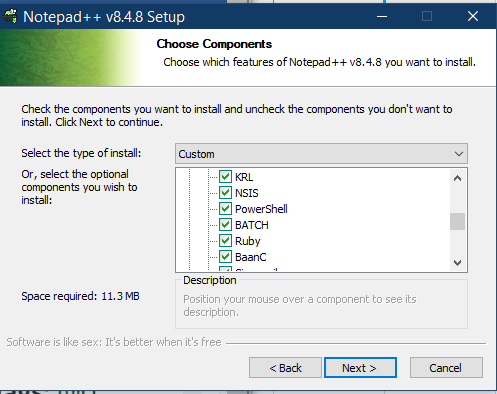
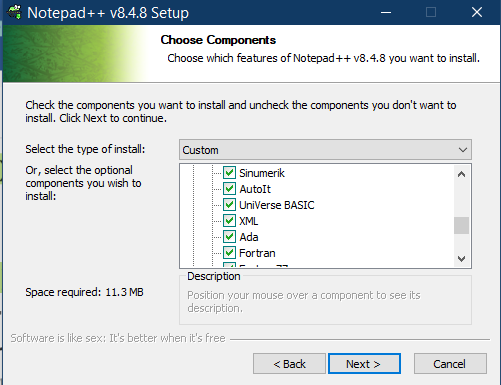
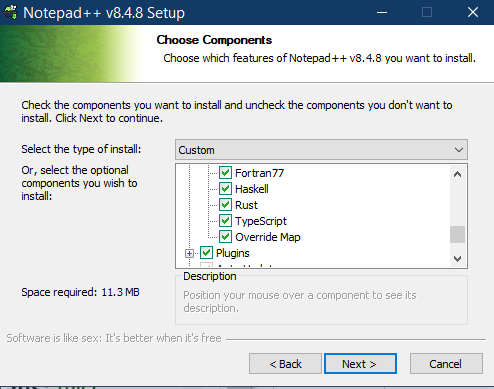
        This is not working. I even uninstalled and reinstalled Notepad ++ and Pascal does not show anything in the Function List.
        It is also not shown it the list during the installation:
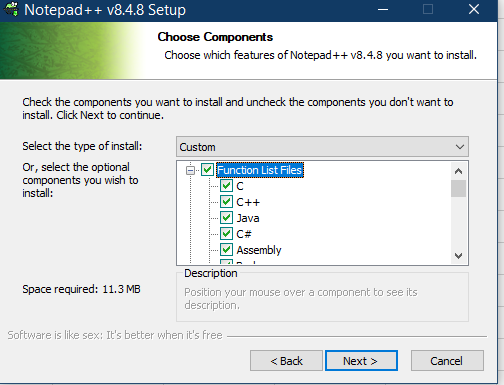
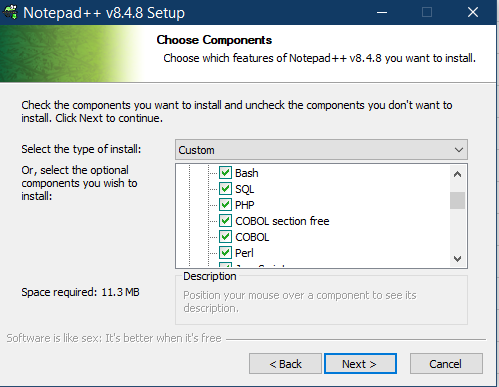
        Screenshot 2022-12-21 063426.png

        Screenshot 2022-12-21 063450.png

        Screenshot 2022-12-21 063512.png

        Screenshot 2022-12-21 063546.png

        Screenshot 2022-12-21 063611.png

        Screenshot 2022-12-21 063637.png

        Screenshot 2022-12-21 064526.png

        Michael VincentM 1 Reply Last reply Reply Quote 0
        • Michael VincentM Offline
          Michael Vincent @James Richters
          last edited by

          @James-Richters said in Notepad++ v8.4.8 Release Candidate 3:

          It is also not shown it the list during the installation:
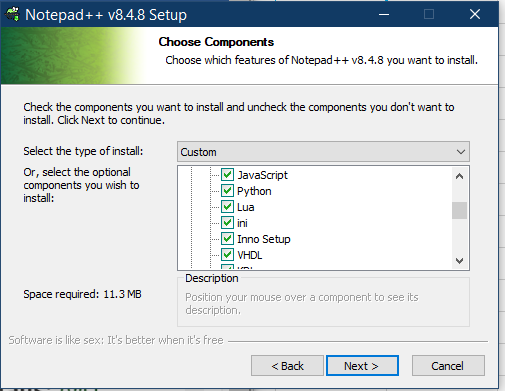
          Interesting. It is in the portable edition:

          PS VinsWorldcom ~\Downloads > unzip -l .\npp.8.4.8.portable.x64.zip | grep pascal
              10267  2022-11-14 16:33   functionList/pascal.xml
          

          Cheers.

          rdipardoR James RichtersJ 2 Replies Last reply Reply Quote 0
          • rdipardoR Offline
            rdipardo @Michael Vincent
            last edited by

            Interesting. It is in the portable edition:

            That’s the one I tried before replying to James’s other post. Someone just forgot to put it into the installer.

            1 Reply Last reply Reply Quote 2
            • James RichtersJ Offline
              James Richters @Michael Vincent
              last edited by

              @Michael-Vincent said in Notepad++ v8.4.8 Release Candidate 3:

              Interesting. It is in the portable edition:

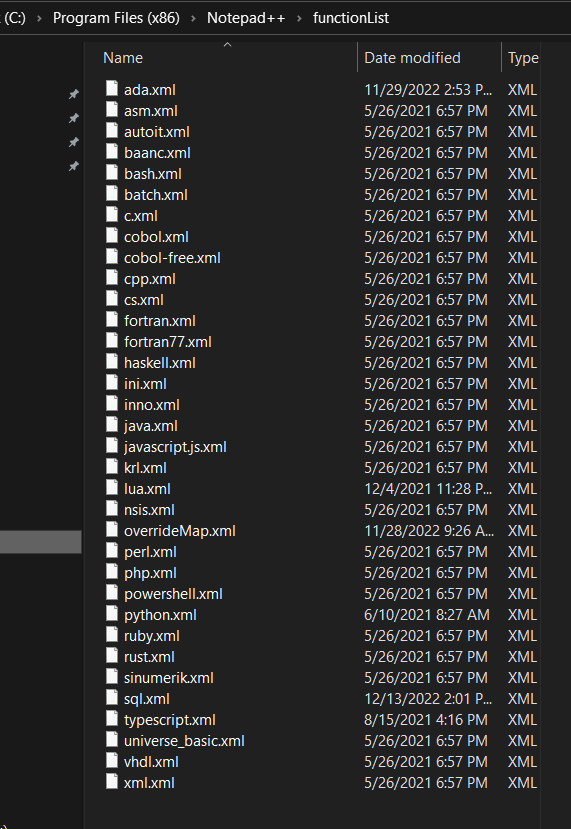
              Yes it is… I didn’t want to change my setup, so I downloaded the portable version and just copied the Function List files to my normal installation. There was one other file missing:
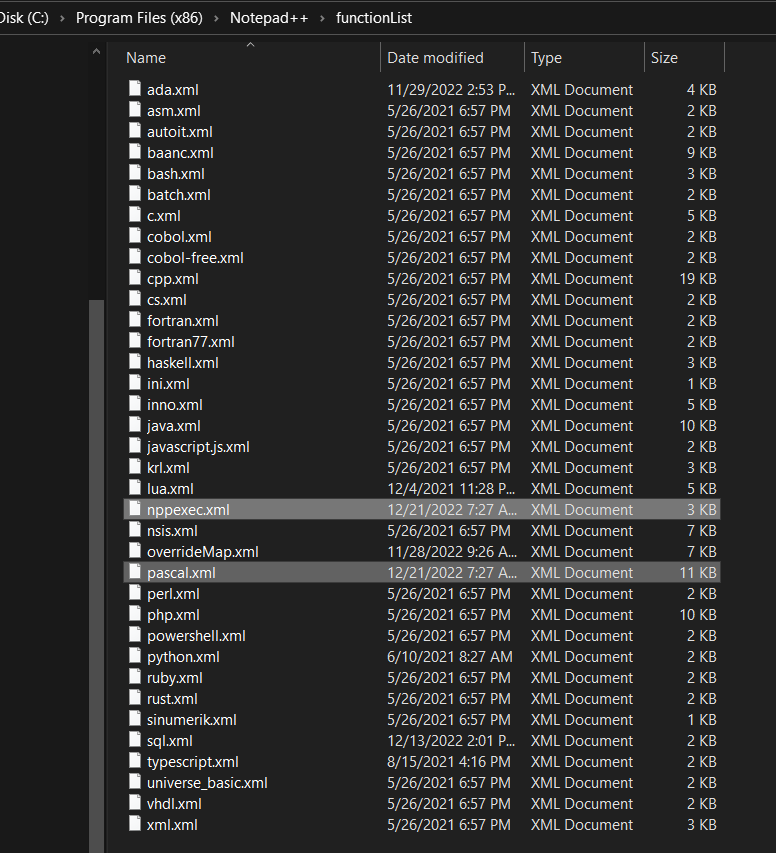
              Screenshot 2022-12-21 073232.png

              Pascal is working now. Thank You

              1 Reply Last reply Reply Quote 1
              • Андрей ПлотниковА Offline
                Андрей Плотников @Artur Harison
                last edited by

                @Artur-Harison

                all text files, 35 pieces, just disappeared

                donhoD 1 Reply Last reply Reply Quote 0
                • donhoD Offline
                  donho @Андрей Плотников
                  last edited by donho

                  @Андрей-Плотников
                  I need more detail:
                  How did you do your update?
                  And your Notepad++ version?
                  Could you provide your Debug Info (Menu ?->Debug Info...).

                  1 Reply Last reply Reply Quote 0
                  • donhoD Offline
                    donho
                    last edited by donho

                    FYI: I’ve just updated the binary packages, all the executable files are remained the same, only the missing XML files are added: pascal.xml & nppexec.xml for function list and powershell.xml for autocompletion.
                    Please redownload packages if you want to check if all files are there.

                    1 Reply Last reply Reply Quote 5
                    • YaronY Offline
                      Yaron
                      last edited by

                      INI File styles can not be changed.

                      https://github.com/notepad-plus-plus/notepad-plus-plus/issues/12696

                      donhoD 1 Reply Last reply Reply Quote 0
                      • donhoD Offline
                        donho @Yaron
                        last edited by

                        @Yaron said in Notepad++ v8.4.8 Release Candidate 3:

                        INI File styles can not be changed.

                        https://github.com/notepad-plus-plus/notepad-plus-plus/issues/12696

                        Fixed in:
                        https://github.com/notepad-plus-plus/notepad-plus-plus/commit/13ddc1a339a50bbab9fd5dbbf9300d52ab59fc47

                        Thank you for the bug report!

                        1 Reply Last reply Reply Quote 3
                        • donhoD donho unpinned this topic on
                        • donhoD donho locked this topic on

                        Hello! It looks like you're interested in this conversation, but you don't have an account yet.

                        Getting fed up of having to scroll through the same posts each visit? When you register for an account, you'll always come back to exactly where you were before, and choose to be notified of new replies (either via email, or push notification). You'll also be able to save bookmarks and upvote posts to show your appreciation to other community members.

                        With your input, this post could be even better 💗

                        Register Login
                        • First post
                          Last post
                        The Community of users of the Notepad++ text editor.
                        Powered by NodeBB | Contributors