Notes repeated, repeated...
-
Hello everyone.
I’ve been using Notepad++ for years, but this is my first post. Please excuse any imperfections in my translation.I’d like to discuss a specific aspect of the Notepad++ design that I find rather annoying.
I am aware that Notepad++ can be configured to either restore or not restore your previous session (i.e., reopen the files you were working on) when the program starts.
It’s a useful feature—one that I actually use—but either I don’t fully understand how it’s supposed to work, or there is an issue:
When I open Notepad++, it displays the tabs for the files I had open or saved previously.
After checking them, if I decide I don’t need them, I remove them (all of them) from the tab bar. I then continue using Notepad++, eventually close the program, and shut down my PC.
When I open Notepad++ again, it doesn’t just show the last notes I created or modified; it also shows notes I created or modified days earlier, which I’m sure I closed in my last session.
Apologies for the length, but I want to be clear: I am not talking about the program reopening the files I most recently created or edited; I am referring to the fact that it reopens files from days ago—files that I definitely closed within Notepad++ during my last session.
Is there a specific setting I’m unaware of, or is this a bug?
TksNotepad++ v8.9.8.1 (64-bit)
Build time: Sep 24 2026 - 15:34:11
Scintilla/Lexilla included: 5.6.6/5.5.3
Boost Regex included: 1_90
pugixml included: 1.16
nlohmann JSON included: 3.12.0
Path: C:\Program Files\Notepad++\notepad++.exe
Command Line: “D:\HARDWARE\Computer\UPS\ElsistMission2000\BatterieAlternative\2026-11-20_Domanda_a_YepponSulleBatterieElsist.txt”
Admin mode: OFF
Local Conf mode: OFF
Cloud Config: OFF
WinGUp: present
disableNppAutoUpdate.xml: absent
Periodic Backup: ON
Placeholders: OFF
Scintilla Rendering Mode: SC_TECHNOLOGY_DIRECTWRITE (1)
Multi-instance Mode: monoInst
asNotepad: OFF
File Status Auto-Detection: cdEnabledNew (for current file/tab only)
Dark Mode: OFF
Display Info:
primary monitor: 3840x2160, scaling 175%
visible monitors count: 1
installed Display Class adapters:
0000: Description - Intel® UHD Graphics 770
0000: DriverVersion - 32.0.101.7088
0001: Description - NVIDIA GeForce RTX 4080
0001: DriverVersion - 32.0.16.1088
OS Name: Windows 11 Pro (64-bit)
OS Version: 26H2
OS Build: 26300.9974
Current ANSI codepage: 1252
Plugins:
AutoSave (2)
ComparePlugin (2.0.2)
Explorer (1.9.9)
mimeTools (3.1)
NppConverter (4.7)
NppExport (0.4) -
Notepad++ should update the session when you close the file inside Notepad++, so that when Notepad++ exits, it should remember to not have the file in the session the next time. I’ve never personally seen that fail, in 15+ years of using Notepad++.
If Notepad++ is in multi-instance mode, the instance that saves the session might not be the one you think. I see you have it default to mono-instance mode, based on your Debug Info. But do you ever use the “move to new instance” or “clone to new instance” commands, to have multiple Notepad++ windows open at once? If you do, then only one of them gets to save the session, so files you close in a second instance would not be removed from the session. If you only ever have one Notepad++ window open, then that’s not the culprit.
My other guess is somehow you have a permissions issue on session.xml. As an experiment:
- Exit all open Notepad++ windows.
- Look at
%AppData%\Notepad++\session.xmlproperties (Right Click in Explorer, then Properties), and look at the last-modified time, as well as the Security tab’s permissions section for your user (or for USERS in general, if your user isn’t listed in the choice box):- make note of the last-modified time , and make sure “read only” is not checkmarked.
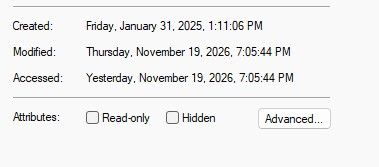
- Make sure your user has write-permission to the file
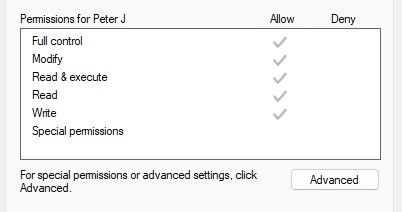
- make note of the last-modified time , and make sure “read only” is not checkmarked.
- Run Notepad++
- Close one of the tabs in Notepad++, so it should remove it from the session.
- Exit Notepad++
- Look at
%AppData%\Notepad++\session.xmlproperties again, and see if the last-modified time has updated. If it’s not been updated, then Notepad++ is, for some reason, not writing to the session file. - Run Notepad++ again, and see whether the closed file is still closed, or whether Notepad++ re-opened it.
If that works, then the system as a whole should be working, so maybe it will work from now on. If it doesn’t work, then tell us where in the process it diverged from expected behavior (screenshots of the properties, similar to mine, would be nice)

Hello! It looks like you're interested in this conversation, but you don't have an account yet.
Getting fed up of having to scroll through the same posts each visit? When you register for an account, you'll always come back to exactly where you were before, and choose to be notified of new replies (either via email, or push notification). You'll also be able to save bookmarks and upvote posts to show your appreciation to other community members.
With your input, this post could be even better 💗
Register Login