(\W)'(\w) Regex replace failure
-
I’m aware that there are other ways to achieve this, and that’s indeed what I ended up doing, but I’m still hoping to understand why my initial method did not work…
In ANSI text, I sought to replace selected instances of the straight single quote (
') that were preceded by any non-word character and followed by any word character, with the right/closing curly single quote (’), using FIND WHAT string(\W)'(\w)and REPLACE WITH string\1’\2. Some example text I tried it on:this 'Cos I am that this 'Round and 'round thatMy FIND WHAT string successfully matched everything it was intended to, shown as marked here:
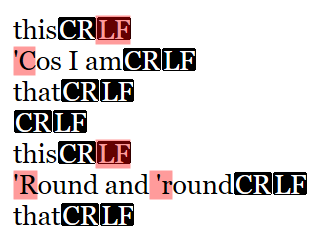
However, my REPLACE WITH string only replaced the third instance (
'r) and reported no error messages for the first two before jumping to the next instance when I clicked on REPLACE. Anybody? @guy038?[Note to @Coises: I also tried this with Search++ , which also failed to work as expected — though in a different way than NPP’s native find/replace feature — which I will report separately.]
Debug:
Notepad++ v8.9.7 (32-bit) Build time: Jul 14 2026 - 01:11:31 Scintilla/Lexilla included: 5.6.4/5.5.1 Boost Regex included: 1_90 pugixml included: 1.16 nlohmann JSON included: 3.12.0 Path: C:\Program Files (x86)\Notepad++\notepad++.exe Command Line: Admin mode: OFF Local Conf mode: OFF Cloud Config: OFF WinGUp: present disableNppAutoUpdate.xml: absent Periodic Backup: ON Placeholders: OFF Scintilla Rendering Mode: SC_TECHNOLOGY_DIRECTWRITE (1) Multi-instance Mode: monoInst asNotepad: OFF File Status Auto-Detection: cdEnabledNew (for current file/tab only) Dark Mode: OFF Display Info: primary monitor: 1920x1080, scaling 100% visible monitors count: 1 installed Display Class adapters: 0000: Description - Intel(R) HD Graphics 620 0000: DriverVersion - 31.0.101.2140 0001: Description - NVIDIA GeForce 940MX 0001: DriverVersion - 30.0.15.1169 OS Name: Windows 10 Enterprise (64-bit) OS Version: 22H2 OS Build: 19045.7548 Current ANSI codepage: 1252 Plugins: BetterMultiSelection (1.5) ColumnsPlusPlus (1.3.1) ColumnTools (1.4.5.1) ComparePlus (3) DSpellCheck (1.5) ExtSettings (1.3.1) HTMLTag_unicode (1.6) mimeTools (3.1) MultiClipboard (2.1) MultiReplace (6.0.0.36) NppCalc (1.5) NppConverter (4.7) NppExport (0.4) NPPJSONViewer (2.2) NppTextFX (2.0.3) NppXmlTreeviewPlugin (2) PreviewHTML (1.4.5) PythonScript (2.1) RegexTrainer (1.2) Search++ (0.6.3.1) SessionMgr (1.4.4) -
I’m still hoping to understand why my initial method did not work…
Notice what happens if you change your line endings to Unix (Edit | EOL conversion | Unix). With View | Show Symbol | Show End of Line enabled, watch carefully what gets highlighted as you click Replace repeatedly. Now undo to restore your straight quotes and return to Windows line endings, move the caret back to the beginning, and compare what happens when you click Replace repeatedly.
Notepad++ won’t let the selection that results from a search split a CRLF line ending. As you can see, it moves the start of the selection from the actual location of the match to after the line ending.
When you click Replace, Notepad++ decides whether to replace or find the next occurrence by first checking whether Find what matches the current selection. If it does, Notepad++ does a replace; otherwise, it does a find.
The selection doesn’t match, because there is no character before the curly single quote.
That’s the why. Whether it’s a bug is… I suppose a matter of opinion.
-
-
 M M Andre Z Eckenrode referenced this topic on
-
@Coises said:
Notepad++ won’t let the selection that results from a search split a CRLF line ending. As you can see, it moves the start of the selection from the actual location of the match to after the line ending.I noticed that in a Lua script recently that the Scintilla positionAfter function treats CRLF as a single UTF-8 character. So the CRLF has become what some may call an unbreakable sequence in some situations.
-
C Coises referenced this topic on
-
-
M M Andre Z Eckenrode referenced this topic on

Hello! It looks like you're interested in this conversation, but you don't have an account yet.
Getting fed up of having to scroll through the same posts each visit? When you register for an account, you'll always come back to exactly where you were before, and choose to be notified of new replies (either via email, or push notification). You'll also be able to save bookmarks and upvote posts to show your appreciation to other community members.
With your input, this post could be even better 💗
Register Login