HELP on Macros - security issue?
-
Hi everyone!
I have a few macros on my npp installation, which always have worked fine - all of them are typing macros.
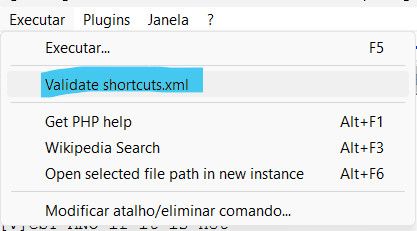
Today I tried executing one of them and I got a warning on theshortcuts.xmlfile saying it “should be validated, using the menu”.In fact if I go to the “Run” menu, I find a new option I had never seen before saying “Validate shortcuts.xml”.
I have done quite a few web search in different engines and also AI, and I could not find any references to this menu entry. I checked the release .log file, no mentions on it either. I am worried this could be some sort of malware.
I checked
shortcuts.xmlmyself and I don’t see any custom comand with this description, which tells me it should be a native command.I made a new installation over the new one, same warning. I uninstalled, installed again, same warning. Then I remembered I had forced the pc to shut down, which might have corrupted the file, and then I did a manual restore of one of my backups. I had a new security warning,this time because the file was manually updated - but again telling me to run “Validate
shortcuts.xml”.I made a test macro, so that npp would itself read and write the shortcuts file and now all seems to be working. But the menu entry is still there.
But the question remains: Is this “Validate shortcuts.xml” a native option?
One can never be to cautious…
Thanks in advance!
-
I have done quite a few web search in different engines and also AI, and I could not find any references to this menu entry.
Apparently, your search engines don’t stay abreast of updates to the official online user manual for Notepad++, because https://npp-user-manual.org/docs/config-files/#run-menu-security most definitely describes that menu entry, though it focuses on the run-commands aspect, and should be clarified to also refer to macos.
-
User Manual has been updated:
- Renamed header to “shortcuts.xml Security” and includes mention of Macros as well: https://npp-user-manual.org/docs/config-files/#shortcutsxml-security
- added Macros Security on the macros page: https://npp-user-manual.org/docs/macros/#macro-security
- added a paragraph linking to the “shortcuts.xml Security” page in the Running External Commands page: https://npp-user-manual.org/docs/run-menu/#security-is-your-responsibility

Hello! It looks like you're interested in this conversation, but you don't have an account yet.
Getting fed up of having to scroll through the same posts each visit? When you register for an account, you'll always come back to exactly where you were before, and choose to be notified of new replies (either via email, or push notification). You'll also be able to save bookmarks and upvote posts to show your appreciation to other community members.
With your input, this post could be even better 💗
Register Login