Bug: Empty file with UTF-8 encoding saved as ANSI
-
Assume I open NP++ and create a new file via menu
file—>new
In the lower right corner the Encoding is “UTF-8” which is equal to my default encoding.
GoodNow I save this empty, unchanged file as “new 1.txt” and close NP++.
Afterwards I reopen this file “new 1.txt” by double click…and the Encoding now switched to ANSI.
Very badI guess this is a bug in NP++
I oftentimes create empty files in Filemanager and fill them later with stuff.
And I always want have UTF-8 Encoding (until I switch this manually).
How can I enforce this in NP++? -
The problem is that neither ANSI nor UTF-8 includes a “marker” within the file itself to indicate the encoding type. This means Notepad++ or any other editor has to determine the encoding based on the file’s content. Consequently, with an empty file, it is impossible to distinguish which encoding is intended.
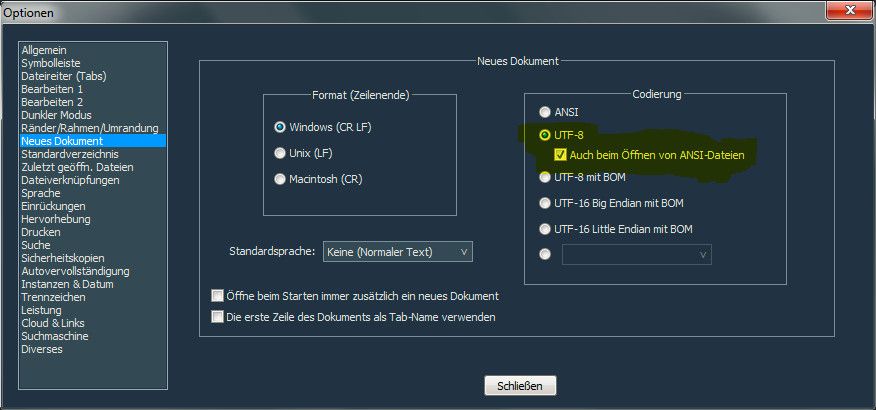
That is precisely why this setting exists (see screenshot). Checking that box should do the trick.
-
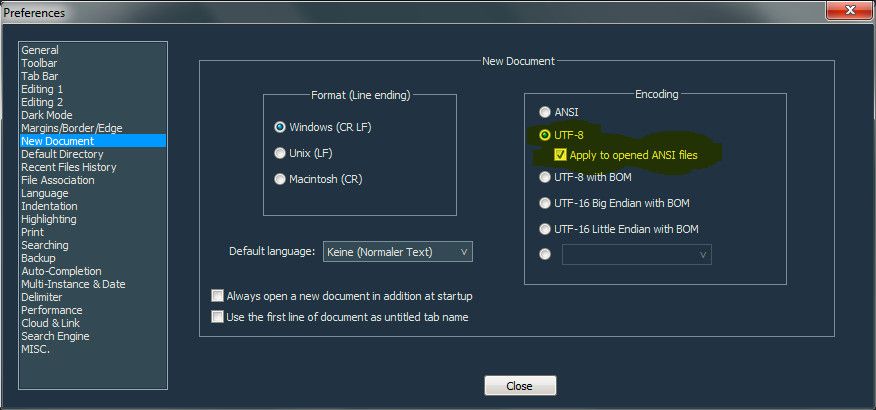
Screenshot with englisch lang:
-
ok, thank you. This works.
I must have been blind to not see that sub option.
Possibly it was introduced only recently -
Possibly it was introduced only recently
Nope.
But it isn’t exactly obvious what its function is, based only upon the UI text. -
@Alan-Kilborn said:
But it isn’t exactly obvious what its function is, based only upon the UI text.Yes, exactly what I thought while taking the screenshots
-
@Alan-Kilborn said:
But it isn’t exactly obvious what its function is, based only upon the UI text.@MarkusBodensee said:
Yes, exactly what I thought while taking the screenshotsThe option is on the “New Document” panel, no doubt, because it is only available when the default encoding for new documents is set to UTF-8.
Yet it doesn’t apply to new documents, it applies to existing files.
What is really means is, when Notepad++ opens an existing file that contains only ASCII characters, it should treat it as UTF-8 rather than as ANSI.
Which, for me, raises the question: Why is this only available when UTF-8 is the default encoding for new files?
Background in case anyone reading this doesn’t know:
- ASCII comprises 128 codes, from 0-127. All the characters on a standard US keyboard are ASCII, but most languages other than English use characters that ASCII lacks.
- UTF-8 is a standard method for encoding Unicode, a set of over one hundred thousand characters that includes very nearly every character needed for every known language.
- ANSI refers to any of several dozen legacy “code pages” that were used in Windows to support different languages before Unicode was developed. These encodings are still in common use. In Notepad++, ANSI always refers to the “system default code page,” the one the Windows system on which Notepad++ is running recognizes as the “normal” encoding for files on that system. The specific code page that is default varies by country.
- The first 128 codes in all ANSI code pages and in UTF-8 are the same as the 128 ASCII characters.
Because of all this, when opening a file that contains only ASCII characters, there is no way to distinguish whether it is ANSI or UTF-8 (or some code page other than the system default code page). The results are identical.
When Notepad++ loads a file into an editing area, it has to determine which encoding to use. For a pure ASCII file, it will only matter if and when you edit the file by adding characters that are not in the ASCII range. Once you do that, the results will differ depending on which encoding was chosen.
This setting lets you tell Notepad++ whether it should load pure ASCII files so that, if you add non-ASCII characters to them, they will wind up as ANSI, or so that they will wind up as UTF-8.
-
@Coises said:
What is really means is, when Notepad++ opens an existing file that contains only ASCII characters, it should treat it as UTF-8 rather than as ANSI.Yeah, so for example: “Treat ASCII-only files as UTF-8 (instead of ANSI)” or something similar could be a more clear wording for the option.
Which, for me, raises the question: Why is this only available when UTF-8 is the default encoding for new files?
It would add a bit more flexibility to the user, but on the other side it seems very unlikely to set this option if you don’t want UTF-8 as default. So I guess it could be a preventative measure that the user doesn’t set any confusing options.




Hello! It looks like you're interested in this conversation, but you don't have an account yet.
Getting fed up of having to scroll through the same posts each visit? When you register for an account, you'll always come back to exactly where you were before, and choose to be notified of new replies (either via email, or push notification). You'll also be able to save bookmarks and upvote posts to show your appreciation to other community members.
With your input, this post could be even better 💗
Register Login