How do I reset back to the default Dark Mode style settings?
-
How do I reset back to the default Dark Mode style settings?
Hello,
I’m nearly blind, so I run windows and the programs I run with it, including NotePad++ at a very high magnification level of 900 using the built-in windows magnifier app. To make using Notepad even easier I run it in Dark Mode. Recently, to increase the contrast of the text color and the background I tried to tweak the style settings even more, but really messed it up and now can’t see the cursor position, read the text on the current line, or the anything in the selected text. And now NotePad++ is impossible for me to use any more. How do I reset Dark Mode’s settings to their ‘factory’ settings? If there is a link or button to do this on the style dialogs areas or the built-in Help screen, I haven’t found it? Would reinstalling NotePad++ fix this? Oh, and if after this issue is solved, how do I set the general screen background to the the darkest black rather than the sort of gray that it was at when I chose Dark Mode, before I wrecked that? Finally, because, as I said before, due to my blindness, a video or instructions that rely heavily on screenshots are hard for me to see because these usually don’t zoom well.
Thank you
-
I tried to tweak the style settings even more, but really messed it up and now can’t see the cursor position, read the text on the current line, or the anything in the selected text. And now NotePad++ is impossible for me to use any more. How do I reset Dark Mode’s settings to their ‘factory’ settings?
If there is a link or button to do this on the style dialogs areas or the built-in Help screen, I haven’t found it?There is no button. People wanting a “Factory reset” is a rare thing (you’re the first that I’ve ever noticed asking for it… though I can see why it would be nice)
Would reinstalling NotePad++ fix this?
No, because reinstalling Notepad++ doesn’t change the files that are in
%AppData%\Notepad++, where your customizations are stored. (assuming normal installation)But the good news is, that’s the solution, too. When you customize the Dark Mode stylings, they end up in
%AppData%\Notepad++\themes\as*.xml. So if you exit Notepad++, then use Windows Explorer and paste in that directory (don’t worry, Windows knows to do “the right thing” with the%AppData%portion, so you can literally copy the entire%AppData%\Notepad++\themes\and paste it in the Explorer location bar), then you can deleteDarkModeDefault.xmlfrom that directory (and any others in there that you want to reset). When you run Notepad++ again, it will use the copy of DarkModeDefault that ships with Notepad++, and if you make any customizations, it will save a new copy in your AppData location.(If you have a non-normal installation, things will have to be different, and you’ll have to share your ?-menu’s Debug Info with us for us to be able to tell you where the files will be.)
Oh, and if after this issue is solved, how do I set the general screen background to the the darkest black rather than the sort of gray that it was at when I chose Dark Mode, before I wrecked that?
Settings > Style Configurator > Language:
Global Styles> Style:Default Style, then click on the background color box, and select the true black: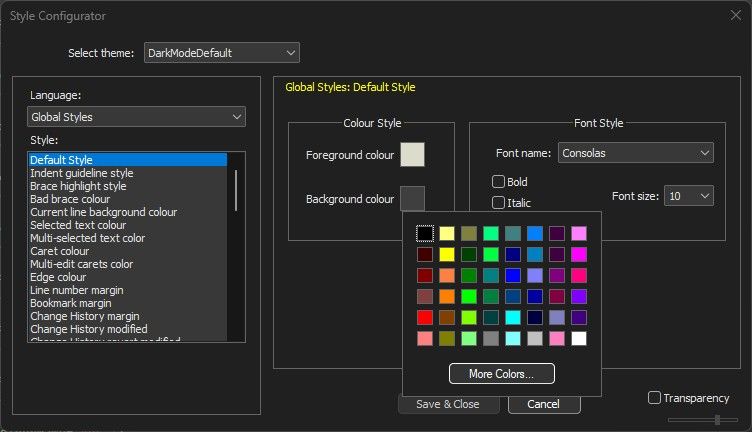
-
@Howard-Brown
@peterjones has given you the necessary information to get back the default DarkMode settings, so you should learn from this issue and do what I did, and make your own DarkMode settings by copying that file, and giving it a different name. I called mineMyDarkModeDefaultto avoid the confusion, and played with it to my hearts content. Doing this trick, even with your new default version, you can make another copy and continue to fine tune what you need to, without damaging the default, or your own new default versions. Call itMyExperimentalDarkMode, and have fun without worrying. As @peterjones and many of us around here always say, “back up what you don’t want to lose or recreate” - though that is paraphrasing. :-)


Hello! It looks like you're interested in this conversation, but you don't have an account yet.
Getting fed up of having to scroll through the same posts each visit? When you register for an account, you'll always come back to exactly where you were before, and choose to be notified of new replies (either via email, or push notification). You'll also be able to save bookmarks and upvote posts to show your appreciation to other community members.
With your input, this post could be even better 💗
Register Login