Confusing/Frustrating folding behavior
-
Hello,
Using version 8.9.6.4 s4-bit
Windows 11
Language: PythonI’ve noticed this for awhile, even in previous versions.
I normally like to keep my functions folded so I can navigate easily, unfolding them as needed, when editing, then folding them back up.My issue is that often, not always, but often, once I fold the function back up, the FUNCTION BELOW IT has somehow opened, so I close THAT one and…
The NEXT one is now unfolded, so I fold that…
This continues all the way down my file. I will have to manually fold every. single. function. And no, I am not forgetting to fold them up and only noticing it later. I at first thought that was what was happening, but no, they are unfolding on their own. Sure, I can fold them up again, but it is annoying. Also, it doesn’t always happen. Only sometimes.
-
That sounds similar to Issue #18093, where the seemingly-random unfolding was happening for a UDL instead of for Python. In that issue, it’s because of the presence of a comment in the second block (but my experiment below shows that’s not the case for the python folding… at least, not the sole cause)
I don’t know if it’s related or not. Can you share a small piece of code (maybe 3 blocks long) that shows the problem if that’s all you have in the file? For example, I cannot replicate your problem with
def first():
    more()
    return

def more():
    # commented
    pass

def most():
    first()
    more()
    return
I will have to manually fold every. single. function
Well, that’s the easy part.
Alt+0folds everything with one keystroke (the default keystroke for View > Fold All). -
@PeterJones Thanks for the keyboard shortcut. I’m embarrassed to say I never considered that approach. But here are some function blocks. I’m doing this quick and dirty right now, so forgive the inelegant code.
(This is for a character generator for an obscure RPG you probably haven’t heard of)
def get_bonus(self, score): if score > 18: return "+4" elif score > 16: return "+3" elif score > 14: return "+2" elif score > 12: return "+1" elif score > 8: return "+0" else: return "-1" def roll(self, n=1, d=6): total = 0 for i in range(n): total += randint(1, d) return total #CLASS FUNCTIONS def choose_class(self): print( """First, choose your character's class by entering the letter of your choice: WARRIORS MAGICIANS SPECIALISTS -------- --------- ----------- A) Amazon F) Elementalist K) Hunter B) Barbarian G) Lyrist L) Thief C) Centaur H) Nymph D) Noble I) Priest E) Spearman J) Sorceror """) while True: self.code = "" self.code = input("Your Choice [A-L]: ")[0].upper() if self.code in "ABCDEFGHIJKL": break match self.code: case "A": self.char_class = "Amazon" self.primary = Stat.SKILL self.secondary = Stat.GRACE case "B": self.char_class = "Barbarian" self.primary = Stat.MIGHT self.secondary = Stat.WILL case "C": self.char_class = "Centaur" self.primary = Stat.MIGHT self.secondary = Stat.SKILL case "D": self.char_class = "Noble" self.primary = Stat.LUCK self.secondary = Stat.OTHER case "E": self.char_class = "Spearman" self.primary = Stat.SKILL self.secondary = Stat.WILL case "F": self.char_class = "Elementalist" self.primary = Stat.WILL self.secondary = Stat.WITS case "G": self.char_class = "Lyrist" self.primary = Stat.GRACE self.secondary = Stat.LUCK case "H": self.char_class = "Nymph" self.primary = Stat.GRACE self.secondary = Stat.LUCK case "I": self.char_class = "Priest" self.primary = Stat.WILL self.secondary = Stat.LUCK case "J": self.char_class = "Sorceror" self.primary = Stat.WILL self.secondary = Stat.WITS case "K": self.char_class = "Hunter" self.primary = Stat.SKILL self.secondary = Stat.WITS case "L": self.char_class = "Thief" self.primary = Stat.WITS self.secondary = Stat.LUCK case _: # Default action if no other case matches print("ERROR") exit() -
But here are some function blocks
Sorry, I cannot get it to replicate your problem description. Maybe it has to do with the way you pasted it into your post – I had used moderator powers to move the ``` to the beginning of the line, so it would actually do the full code as a block in the forum… but the indentation didn’t seem consistent even after that. But whether (1) I try with get_bonus() fully on the left, with its contents double-indented, and the the roll() and choose_class() are both one level indented more than the start of get_bonus(); or whether (2) I indent choose_class() to match the other two; or whether (3) I do 2, but also prefix with a dummy class header – no matter which of those I do, I cannot replicate your problem.
Can you confirm whether the indentation matches what you’re using… and if not, post the code again, more carefully, so that we get an exact representation of your indentation (and maybe a screenshot of what it looks like in Notepad++, to make sure). And then, a blow-by-blow account of the actions you take, like, “I fold get_bonus(), fold roll(), fold choose_class(), then when I unfold roll(), work in it, and edit something inside it (be detailed), and fold it back up again, then choose_class magically unfolds” – or even more detailed, including line numbers, and exact things you type. Because unless someone can replicate your problem, it will be hard to help you.
-
@Thorin-Schmidt The style in the document that can disturb folding is the triple double quotes.
This image shows 3 frames. The 1st framed typed two
"". The 2nd frame typed the 3rd"to create the triple … which causes a disruption. The 3rd frame terminates the string with a closing triple …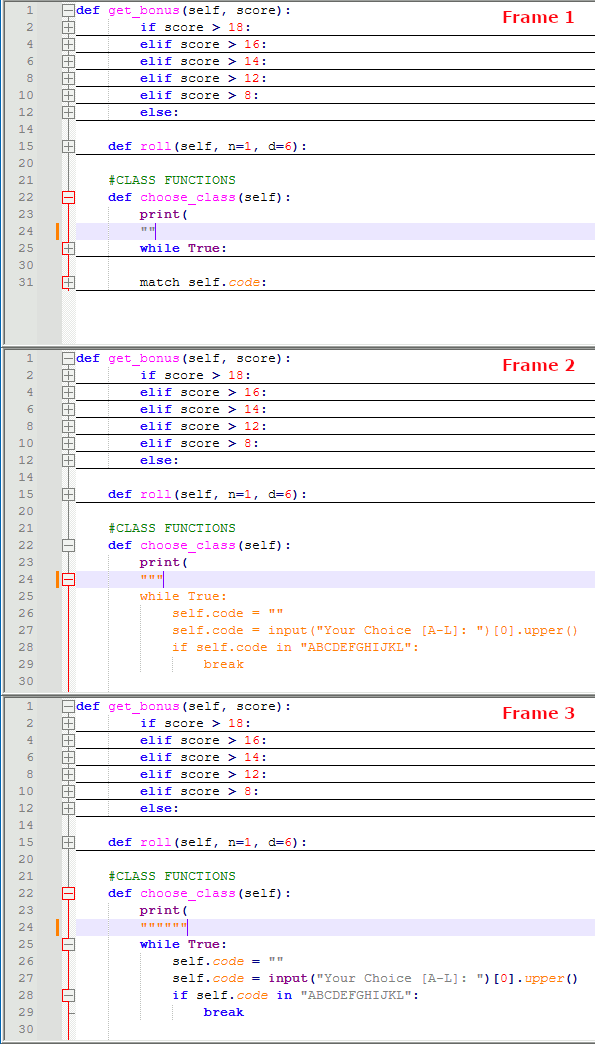
When
"""is inserted into the document, the styler will style as string until a matching"""is found to terminate the string. As Frame 2 shows, the code styling after"""changes to string styling and the folds become invalid. The invalid folds are removed and the hidden text becomes visible.Once a matching
"""is inserted to terminate the string style, the code styling is restored with the folds expanded.Auto-insert may help. Once the 3rd quote is typed, then change the insert of
"to""""to automatically terminate the string. This can be done with PythonScript to handle the Auto-insert. Since you know Python already, do you want to make the PythonScript code or do you need someone to provide example code?Here is a FAQ for PythonScript if you are new to the plugin.
Without a script, could prepare the triple quoted string in a temporary buffer then copy and paste the whole complete string into the main buffer to avoid the disruption.
-
@Thorin-Schmidt Yet another option is the builtin macro system.
<Macro name="PythonTripleDoubleQuote" Ctrl="yes" Alt="no" Shift="yes" Key="222"> <Action type="1" message="2170" wParam="0" lParam="0" sParam="""""""" /> </Macro> <Macro name="PythonTripleSingleQuote" Ctrl="yes" Alt="no" Shift="no" Key="222"> <Action type="1" message="2170" wParam="0" lParam="0" sParam="''''''" /> </Macro>You can record your own macro’s or insert these macro’s into
shortcuts.xmlthat I tested in v8.9.4.- Press
Ctrl+"to insert'''''' - Press
Ctrl+Shift+"to insert""""""
This requires awareness to use the combination keys instead of the manual typing of the triple quotes.
- Press
-
@mpheath THANK OU
Jeez, now I finally know why* this has been happening. I’ll try the script option first, and if I can’t seem to get it right, I’ll just use the macro option below. Tat would kinda be overkill since the triple-quote is just a Python thing, and I use this editor for lots of other languages.
Again, Thank You. Especially for the Peace of Mind. ;)
-
@mpheath Thanks for this suggestion. It seems to be the simplest solution. A bit of an overkill since it would only be needed for my Python stuff, yet I like keyboard shortcuts, growing up on DOS and all.
Thank You! I really appreciate the help. :)


Hello! It looks like you're interested in this conversation, but you don't have an account yet.
Getting fed up of having to scroll through the same posts each visit? When you register for an account, you'll always come back to exactly where you were before, and choose to be notified of new replies (either via email, or push notification). You'll also be able to save bookmarks and upvote posts to show your appreciation to other community members.
With your input, this post could be even better 💗
Register Login