Fix npp displays Chinese characters in traditional characters in DirectWrite render mode since version 8.6
-
Since Notepad++ 8.6 added DirectWrite as the default rendering method, the program displays Chinese characters in traditional characters, and modifying to GBK font cannot fix the issue; reverting to GDI rendering resolves the problem.
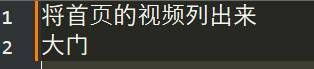
I tracked the issue:
According to Scintilla’s description, DirectWrite determines which set of glyph variants to use for CJK characters based on localeName (locale name).
The default values for Scintilla (see Platform.h) are:constexpr const char *localeNameDefault = "en-us";The repair method is as follows:
After enabling DirectWrite, the correct font locale will be automatically set according to the system locale in the init method:
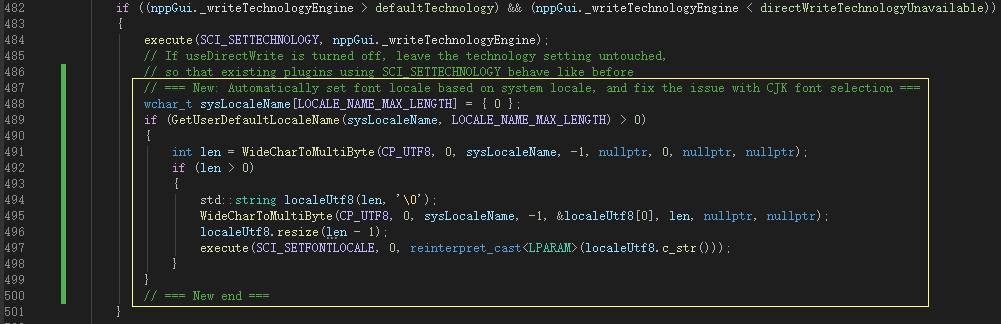
Taking the notepad-plus-plus-8.9.2 source code as an example, modify the if statement starting from ScintillaEditView.cpp:482 to the following:
		// === New: Automatically set font locale based on system locale, and fix the issue with CJK font selection ===
		wchar_t sysLocaleName[LOCALE_NAME_MAX_LENGTH] = { 0 };
		if (GetUserDefaultLocaleName(sysLocaleName, LOCALE_NAME_MAX_LENGTH) > 0)
		{
			int len = WideCharToMultiByte(CP_UTF8, 0, sysLocaleName, -1, nullptr, 0, nullptr, nullptr);
			if (len > 0)
			{
				std::string localeUtf8(len, '\0');
				WideCharToMultiByte(CP_UTF8, 0, sysLocaleName, -1, &localeUtf8[0], len, nullptr, nullptr);
				localeUtf8.resize(len - 1);
				execute(SCI_SETFONTLOCALE, 0, reinterpret_cast<LPARAM>(localeUtf8.c_str()));
			}
		}
		// === New end ===
After DirectWrite initialization, this code reads the user’s system language (such as zh-CN) and notifies Scintilla to use the corresponding font variant through SCI_SETFONTLOCALE. This ensures that the Simplified Chinese system (zh-CN) correctly selects the Simplified Chinese font, while the Traditional Chinese system (zh-TW) selects the Traditional Chinese font.
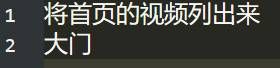
Finally result:
-
Bravo!
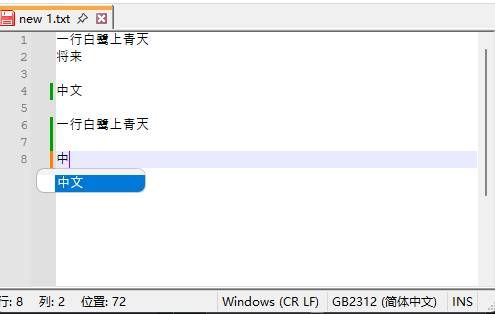
You may also be interested in this issue: “ANSI auto-completion shows garbled text when typing Chinese characters (since v8.8)”
-
@rdipardo In Version 8.9.3, The program behaves correctly.
-

Hello! It looks like you're interested in this conversation, but you don't have an account yet.
Getting fed up of having to scroll through the same posts each visit? When you register for an account, you'll always come back to exactly where you were before, and choose to be notified of new replies (either via email, or push notification). You'll also be able to save bookmarks and upvote posts to show your appreciation to other community members.
With your input, this post could be even better 💗
Register Login