I want to make columns and rows like Microsoft Excel and I want strikethrough
-
I want to type in columns and rows,
And I want the ability to add in colors on the text and strikethrough on the text.
Please show me how.
-
Just use Excel?
Don’t try to pervert Notepad++ into something it isn’t supposed to be. My 2c. -
@461 said in I want to make columns and rows like Microsoft Excel and I want strikethrough:
I want to type in columns and rows,
The Columns++ plugin has a feature called Elastic Tabstops, which might be what you want. But if you mean you want a full-featured spreadsheet (like LibreOffice Calc or MS Excel), that’s not what Notepad++ is for.
And I want the ability to add in colors on the text and strikethrough on the text.
That is not a feature of text editors. See our FAQ that explains the difference between a Text Editor (like Notepad++) and a Word Processor (like LibreOffice Writer or MS Word)
-
Let me show you what I want to do in notepad++ I drew a picture using Microsoft paint:
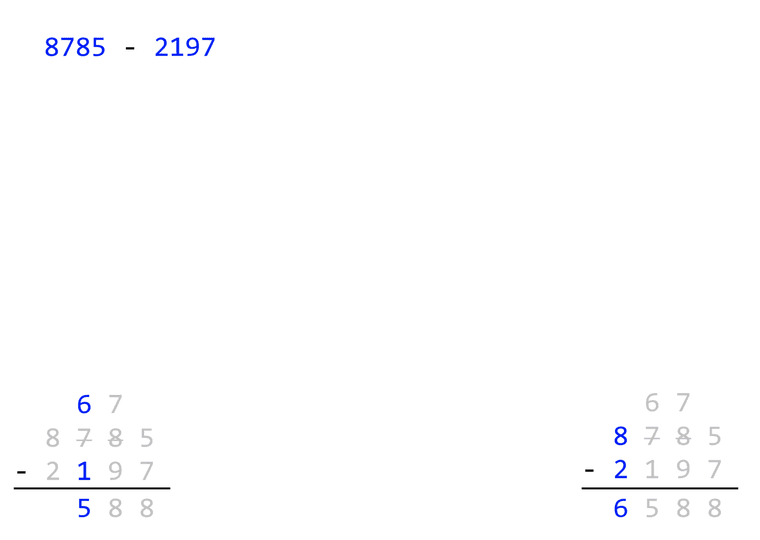
If this isn’t possible then maybe it’s a feature request. Otherwise I will have to use Microsoft paint to do stuff like this. Since Microsoft Excel colors the entire cell and strikethrough the entire cell.
-
@461 said in I want to make columns and rows like Microsoft Excel and I want strikethrough:
If this isn’t possible then maybe it’s a feature request.
It’s not possible in Notepad++, because that is not something reasonable to expect a text editor to do. In the FAQ that you obviously didn’t read, it explains that text editors are for editing the underlying text of a file, not for dealing with stuff like setting font sizes or colors or the like.
Since Microsoft Excel colors the entire cell and strikethrough the entire cell.
Despite your protestations to the contrary, what you want is really easy to do in Excel or another spreadsheet – use a different cell for each digit, instead of putting your whole number in the cell, so your example subtractions would use A1:E4 (for example, C1 would be 6 and formatted blue, D1 would be 7 formatted gray, C2 would be gray with strikethrough with value 7, etc).
Or you could use a word processor, either drawing a table and formatting the cells of the table, or just putting spaces or tabs between the characters and formatting the individual characters.
Otherwise I will have to use Microsoft paint to do stuff like this.
Don’t do it in mspaint, as that’s the least efficient way of doing it. It’s simple in either Excel or Word. If you don’t understand how, there are plenty of forums out there who would love to help you with Excel or Word questions.
-
@PeterJones Ok, Thank you. I see now Microsoft Excel is the way to go!



Hello! It looks like you're interested in this conversation, but you don't have an account yet.
Getting fed up of having to scroll through the same posts each visit? When you register for an account, you'll always come back to exactly where you were before, and choose to be notified of new replies (either via email, or push notification). You'll also be able to save bookmarks and upvote posts to show your appreciation to other community members.
With your input, this post could be even better 💗
Register Login