How to Remove "Edit with Notepad++" from the Right-Click Context Menu
-
I’ve got a bit of a minor annoyance I’m hoping to fix. When I right-click on certain files, the context menu always shows an “Edit with Notepad++” option. I’d really like to remove this, but I’m having trouble finding the setting for it within Notepad++ itself.
Any pointers on how to get rid of this specific entry from the right-click menu would be greatly appreciated! -
When you install Notepad++, it installs the right-click context-menu entry using a “Shell Extension”. The User Manual has an entire page on the Shell Extension, including a secion on how to unregister the Shell Extension so that the “Edit with Notepad++” entry goes away
-
@PeterJones Doesn’t work for me unfortunately. “regsvr32 /U NppShell.dll” does nothing and “regsvr32 /U /i NppShell.dll” produces an error prompt with “DLLnstall entry point not found”. I wish programs would just stop cluttering your context menu with useless entries without asking you.
-
“Does nothing” may have just silently unregistered it. After doing both of those, try deleting/renaming the DLL, then rebooting, and see if it’s still there. (Some portions of install/uninstall changes require reboots, at least on some machines; it may be that on your machine, you need to reboot before it leaves your context menu.)
Also, check the registry (use regedit), and see if there’s anything in
HKEY_CLASSES_ROOT\CLSIDthat containsNppShell.dll(when mine is registered, I find it under the right {…} in the InProcServer32 subkey, and then elsewhere under theHKEY_CLASSES_ROOT\PackagedCom\Package\NotepadPlusPlus_1.0.0.0_neutral__...\class\{...}. If you delete it from both of those, I believe it will be effectively unIf it doesn’t let you delete the DLL even using UAC permission (elevated/administrator) because it’s still “in use”, then boot into recovery mode (which I believe will not load that registered DLL), and delete the file
I wish programs would just stop cluttering your context menu with useless entries
A: not useless to everybody. And in fact, the vast majority of conversations in the Community Forum about the NppShell are when people aren’t getting the Edit with Notepad++ and desparately want it.
B: Portable versions (like the portable zip that Notepad++ distributes) are your friend, if you want to not use things like shell context menus: avoiding operating system entanglements is one of the primary reasons portable versions exist.
-
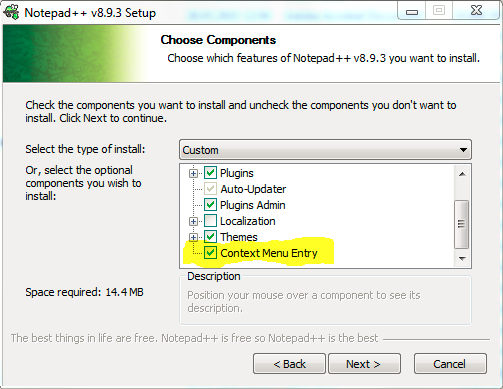
And please don’t forget the easiest solution, just uncheck the option to install the Context Menu Entry during Notepad++ installation.