Preview HTML 32-bit Plugin package hash mismatched
-
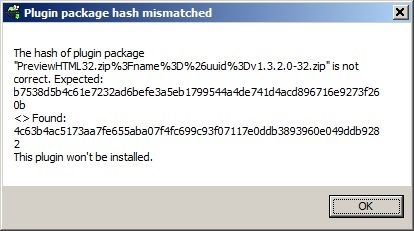
Why do I get “The hash of plugin package … is not correct…” each time I try to install it?
Notepad++ v8.6.9 (32-bit)
Build time : Jul 12 2024 - 05:08:26
Path : C:\Program Files\Notepad++\notepad++.exe
Command Line :
Admin mode : OFF
Local Conf mode : OFF
Cloud Config : OFF
Periodic Backup : OFF
OS Name : Windows 7 Professional (32-bit)
OS Build : 7601.24544
Current ANSI codepage : 1252
Plugins :
ComparePlus (1.1)
mimeTools (3.1)
NppConverter (4.6)
NppExport (0.4) -
@dddwwwbbb said in Preview HTML 32-bit Plugin package hash mismatched:
Why do I get: The hash of plugin package … is not correct…
Based on the filename in the error message, I am guessing that the file didn’t process/download correctly from the URL that the plugin author provided to the plugins list – my guess is their host actually served up some HTML in a “manual download webpage”, rather than sending the actual file.
-
I dug into it more: the website that hosts the plugin has changed the URL for the 32bit and 64bit zipfiles, so Plugins Admin gets an error message instead of an actual zipfile when it tries to download. The error message, of course, doesn’t have the same hash as the zip, because it’s not the same contents. Unfortunately, that means that you will not be able to use Plugins Admin on v8.6.9 to download that plugin.
However, you can manually install it.
0. Exit Notepad++ completely- Go to https://fossil.2of4.net/npp_preview/home
- Download the “32-bits plugin” (https://fossil.2of4.net/npp_preview/zip/PreviewHTML.zip?uuid=release-32bits)
- Extract the “PreviewHTML” folder from that zipfile and put it in your
C:\Program Files\Notepad++\plugins\directory, so it will beC:\Program FIles\Notepad++\plugins\PreviewHTML\directory, with contents ofPreviewHTML.dlland its notes and sample ini - Run Notepad++ – the plugin should be installed and available.
-
Try the updated plugin version (v1.3.3); it’s only available on GitHub at the moment: https://github.com/rdipardo/npp_preview/releases/tag/v1.3.3.0
-
@PeterJones Thank you. That worked. I see it is deprecated: fossil.2of4 dot net/npp_preview/wiki/Deprecation
-
Installation via Plugins Admin will be possible in the next release of Notepad++ https://github.com/notepad-plus-plus/nppPluginList/pull/795
Any other issues with the plugin should be sent here: https://github.com/rdipardo/npp_preview/issues


Hello! It looks like you're interested in this conversation, but you don't have an account yet.
Getting fed up of having to scroll through the same posts each visit? When you register for an account, you'll always come back to exactly where you were before, and choose to be notified of new replies (either via email, or push notification). You'll also be able to save bookmarks and upvote posts to show your appreciation to other community members.
With your input, this post could be even better 💗
Register Login