Set Default Language Syntax to COBOL
-
I have many files I need to edit all really using COBOL Syntax and all having many disparate extensions.
I want the COBOL Syntax to be my default highlighting syntax. Can I do that? -
@Robert-Gilland
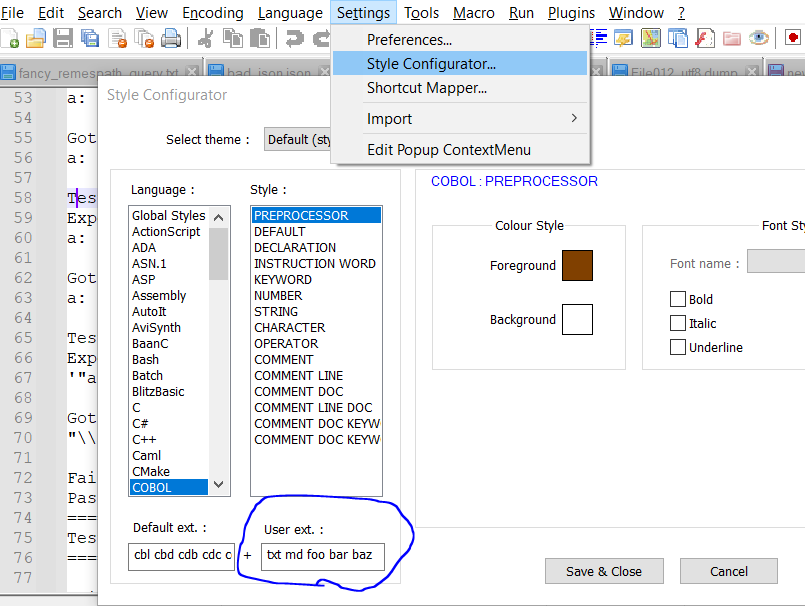
If your files have like 100 different extensions, this is obviously not a great option, and you’d probably want to use a scripting solution like NppExec or PythonScript. -
Sure you can. Try this
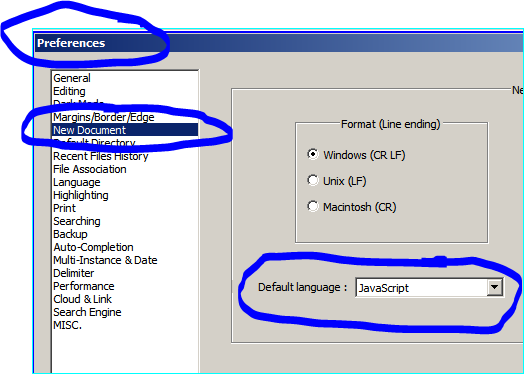
Settings > Preferences > New Document > Defaoult language and set COBOL there.
Screeshot follows:



Hello! It looks like you're interested in this conversation, but you don't have an account yet.
Getting fed up of having to scroll through the same posts each visit? When you register for an account, you'll always come back to exactly where you were before, and choose to be notified of new replies (either via email, or push notification). You'll also be able to save bookmarks and upvote posts to show your appreciation to other community members.
With your input, this post could be even better 💗
Register Login