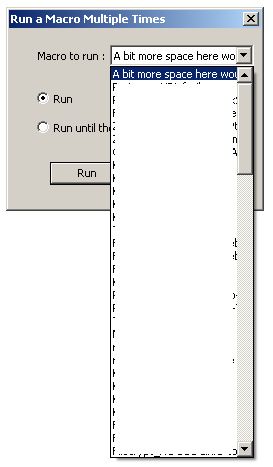
Increase width of the Run macro multiple times dropdown?
-
@loomes77 said in Increase width of the Run macro multiple times dropdown?:
I always hoped that would be improved with some update, but it never happened… ;)
My first problem here is that the macro dropdown menu has only scrollbuttons, no scrollbar and the mouse wheel doesn’t work either, so it’s very slow to get to the bottom and up again.
I know they just recently did something on that for some of the dropdown scrollbars. @Alan-Kilborn, did issue#12459 => PR#12501 only affect comboboxes for searching, or did they apply the WS_VSCROLL to other comboboxes throughout the GUI as well?
my problem here is that the width of this dropdown is so small
Yeah, the default macro “Trim Trailing Space and Save” is too wide for that dialog.
You’d think someone after all these years would have put in an official feature request (after reading this FAQ if they didn’t know where feature requests went).
-
@PeterJones said in Increase width of the Run macro multiple times dropdown?:
did issue 12459 -> PR 12501 only affect comboboxes for searching, or did they apply the WS_VSCROLL to other comboboxes throughout the GUI as well?
ONLY the searching ones.
(Maybe soon you will communicate solely through meme usage?)
-
@loomes77 said in Increase width of the Run macro multiple times dropdown?:
So instead of using the main macro menu I’m actually using mostly the “Run macro multiple times” dialog, even if I want to run it just a single time, because the dropdown there has a scrollbar.
That’s kind of a slick solution to the problem. I have a lot of macros as well and sometimes find the Macro menu itself to be cumbersome too. There was talk of adding submenus to the Macro menu, for some consolidation, but nothing has yet come from it.
-
You’d think someone after all these years would have put in an official feature request (after reading this FAQ if they didn’t know where feature requests went).
Oh, did you mean me here. ;)
OK, I tried: :)
-
@Alan-Kilborn said in Increase width of the Run macro multiple times dropdown?:
That’s kind of a slick solution to the problem. I have a lot of macros as well and sometimes find the Macro menu itself to be cumbersome too. There was talk of adding submenus to the Macro menu, for some consolidation, but nothing has yet come from it.
Yeah, submenus for better organization would indeed be a really nice thing. Or an improved macro manager to rearrange and modify macros. In the moment I’m doing it by editing the shortcuts.xml, which works but isn’t the most comfortable thing.
-
issue 12534
You should have opened a second issue with your first complaint:
I’m using a lot of macros for all kind of things. My first problem here is that the macro dropdown menu has only scrollbuttons, no scrollbar and the mouse wheel doesn’t work either, so it’s very slow to get to the bottom and up again.
For those that might not understand that (those that only have a few macros), when you have a lot of macros you get a menu that stretches across your screen vertically full-height. It looks similar to what is shown in this unrelated issue (just note the screenshot, don’t read the context): https://github.com/notepad-plus-plus/notepad-plus-plus/issues/12536#issue-1454621502
-
This post is deleted! -
@Alan-Kilborn said in Increase width of the Run macro multiple times dropdown?:
You should have opened a second issue with your first complaint:
OK, so be it: ;)
-
Wow, you’re fast I had just opened it… ;)
-
issue#____
I used moderator-power to fixed it the last time, but since you’re still in the edit timeframe, you can replace the
___with the actual number (12538) in the link text. That copy-paste from the FAQ (thanks for using it, by the way) was meant for you to edit the link text, not just put in the URL. It’s not a showstopper, butissue#____isn’t very meaningful to read. ;-) -
@PeterJones Right, I should look better at what I’m copying and pasting… ;)



Hello! It looks like you're interested in this conversation, but you don't have an account yet.
Getting fed up of having to scroll through the same posts each visit? When you register for an account, you'll always come back to exactly where you were before, and choose to be notified of new replies (either via email, or push notification). You'll also be able to save bookmarks and upvote posts to show your appreciation to other community members.
With your input, this post could be even better 💗
Register Login