XML File - Create an element and get a value from existing attribute
-
Hello everyone!!
I have an xml file and I am trying to create a new element and copy a value of an existing attribute on that.
So, I would like to:- Create a new element <weight> (above Price).
- Put the value of the existing “weight” label as value on the new <weight> element.
To be more specific I quote an example of what I need to do…
-------BEFORE----------
<product>
<code>009-110360</code>
<Name>Test Prodcut 1</Name>
<description>Desc of Product 1</description>
<price>200.00</price>
<specs>
<spec>
<label>Color</label>
<value>Blue</value>
</spec>
<spec>
<label>Watt</label>
<value>30</value>
</spec>
<spec>
<label>Weight</label>
<value>2</value>
</spec>
<spec>
<label>Packet</label>
<value>5</value>
</spec>
</specs>
</product>-------AFTER----------
<product>
<code>009-110360</code>
<Name>Test Prodcut 1</Name>
<description>Desc of Product 1</description>
<price>200.00</price>
<Weight>2</Weight>
<specs>
<spec>
<label>Color</label>
<value>Blue</value>
</spec>
<spec>
<label>Watt</label>
<value>30</value>
</spec>
<spec>
<label>Weight</label>
<value>2</value>
</spec>
<spec>
<label>Packet</label>
<value>5</value>
</spec>
</specs>
</product>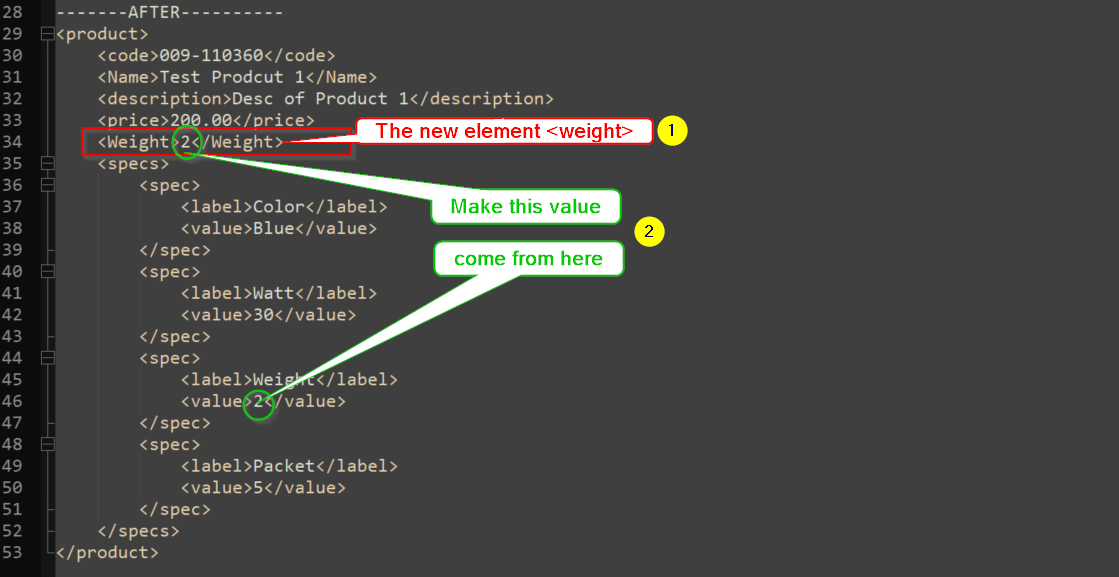
Thank you all in advance!
Chris -
It would have been better if you had followed the advice HERE for posting your question, because that way your sample data would be more representative of your real data. I know that these are different things because you posted data AND a screenshot of that data as it appears to you in N++. I’m speaking specifically of all of the leading whitespace shown in the screenshot but not reflected in your sample data.
-
Even with your data represenation problems, I think something like this could work:
Find:
(?s-i)^(<product>.*?(\h+)<price>.*?</price>(\R))(.*?Weight.*?(\d+).*?</product>)
Replace:${1}${2}<Weight>${5}</Weight>${3}${4}
Mode: Regular expressionMore info on regex is HERE.
-
This post is deleted! -
I apologize for that. You’re right about my posting.
Your solution solved my question!!!
Thank you very very much!!! -
Hello, @software-support, @alan-kilborn and All,
Oh ! Alan beat me at it :-)
Two possible solutions :
-
SEARCH
(?s)<product>.+?</price>\R(?!\h*<Weight>)\K(?=(?:(?!</product>).)+?Weight.+?(\d+)) -
REPLACE
<Weight>\1</Weight>\r\nOR<Weight>\1</Weight>\nif you use UNIX files -
Check the
Regular expressionsearch mode -
Click once on the
Replace Allbutton ( Do not use theReplacebutton !)
OR
-
SEARCH
(?s)(<product>.+?</price>\R)(?!\h*<Weight>)(?=(?:(?!</product>).)+?Weight.+?(\d+)) -
REPLACE
\1<Weight>\2</Weight>\r\nOR\1<Weight>\2</Weight>\nif you use UNIX files -
Check the
Regular expressionsearch mode -
Click once on the
Replace Allbutton or several times on theReplacebuton
For instance, with the INPUT text :
<product>
<code>009-110360</code>
<Name>Test Prodcut 1</Name>
<description>Desc of Product 1</description>
<price>200.00</price>
<spec>
<label>Color</label>
<value>Blue</value>
</spec>
<spec>
<label>Watt</label>
<value>30</value>
</spec>
<spec>
<label>Weight</label>
<value>2</value>
</spec>
<spec>
<label>Packet</label>
<value>5</value>
</spec>
</specs>
</product>
<product>
<code>009-110360</code>
<Name>Test Prodcut 1</Name>
<description>Desc of Product 1</description>
<price>200.00</price>
<spec>
<label>Color</label>
<value>Blue</value>
</spec>
<spec>
<label>Watt</label>
<value>30</value>
</spec>
<spec>
<label>Weight</label>
<value>279</value>
</spec>
<spec>
<label>Packet</label>
<value>5</value>
</spec>
</specs>
</product>
you’ll get the expected OUTPUT text :
<product>
<code>009-110360</code>
<Name>Test Prodcut 1</Name>
<description>Desc of Product 1</description>
<price>200.00</price>
<Weight>2</Weight>
<spec>
<label>Color</label>
<value>Blue</value>
</spec>
<spec>
<label>Watt</label>
<value>30</value>
</spec>
<spec>
<label>Weight</label>
<value>2</value>
</spec>
<spec>
<label>Packet</label>
<value>5</value>
</spec>
</specs>
</product>
<product>
<code>009-110360</code>
<Name>Test Prodcut 1</Name>
<description>Desc of Product 1</description>
<price>200.00</price>
<Weight>279</Weight>
<spec>
<label>Color</label>
<value>Blue</value>
</spec>
<spec>
<label>Watt</label>
<value>30</value>
</spec>
<spec>
<label>Weight</label>
<value>279</value>
</spec>
<spec>
<label>Packet</label>
<value>5</value>
</spec>
</specs>
</product>
In addition, there’s a security as you cannot run the regex S/R twice in order to get the wrong OUTPUT :
...
...
<description>Desc of Product 1</description>
<price>200.00</price>
<Weight>2</Weight>
<Weight>2</Weight>
<spec>
...
...
Best Regards,
guy038
-
-
@Software-Support said in XML File - Create an element and get a value from existing attribute:
Your solution solved my question!!!
That’s good, but also, hopefully you decided to learn more about HOW the solution works, for the NEXT time you need such a thing.
-
@guy038 said:
Two possible solutions
Actually, there are MANY possible solutions, and some “protect” your data more than others by enforcing validation of conditions. It’s all about what you need in a given situation.
When we respond to help requests here, we typically provide exactly what is requested, which MAY not meet the true need.
-
Hello Alan.
As I mentioned before, your way worked perfect and it does what I wished!
But, as I can see, decimal numbers are rounded and they are appeared as integers.
For example: The value 2.92 will be appeared as 2, the value 3.1 as 3 etc…How could it be fixed ?
Thanx in advance!! -
@Software-Support said in XML File - Create an element and get a value from existing attribute:
The value 2.92 will be appeared as 2
Well, for exactly that situation, you’d want to change the
\d+appearing in the original Find expression to\d+\.\d+, I guess…But this gets into a bigger topic of how to match floating point numbers as well as integers.
And that really isn’t a Notepad++ topic, so patience with such questions wears thin. Suggest you follow the link I provided before about regular expressions.



Hello! It looks like you're interested in this conversation, but you don't have an account yet.
Getting fed up of having to scroll through the same posts each visit? When you register for an account, you'll always come back to exactly where you were before, and choose to be notified of new replies (either via email, or push notification). You'll also be able to save bookmarks and upvote posts to show your appreciation to other community members.
With your input, this post could be even better 💗
Register Login