Wordcount splitting words on apostrophes
-
Hello!
My Notepad++ has been giving me weird results for wordcount for a while now. I finally figured out today that the issue is apostrophes–the word counter seems to think that apostrophes are whitespace. I have a document with only the word it’s in it, and the program says there are two words instead of one.
Is there any setting I can change to fix this, or should I file an issue in GitHub? I’m not sure if it’s just doing this because I messed up a setting somewhere or what. I just updated to the latest version in case that was the problem, but I am still seeing this.
Thanks!
-
It does this because it doesn’t consider an apostrophe to be a “word character”. You can certainly do a github issue if you’d like to.
You might try this as an alternate method for obtaining word count:
Pull up the Find window and do a regular expression search mode search for
\S+by pressing theCountbutton. Here’s a demo of it counting yourit'sas 1 word instead of 2: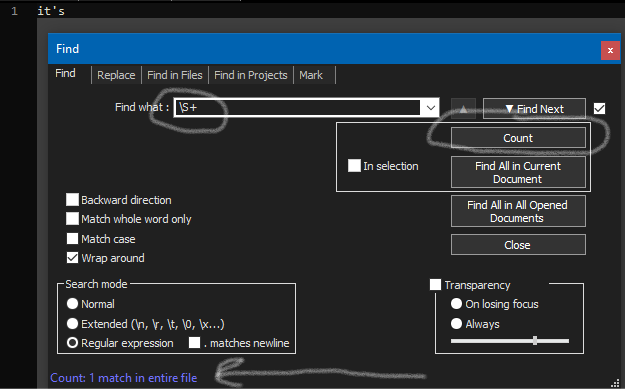
BTW,
\S+may not be appropriate in all instances. What it means is: “Consider a match to be the longest string you can find between traditional whitespace characters”. -
Hello, @stewart-baker, @alan-kilborn and *All,
Here is an alternative to the @alan-kilborn’s solution :
Open the
Finddialog (Ctrl + F)-
SEARCH
[\w'’]+ -
Tick the
Wrap aroundoption -
Un-tick all the squared box options
-
Select the
Regular expressionserch mode -
Click on the
Countbutton or use the defaultAlt + Tshortcut
The regex
[\w'’]forces the regex engine to consider the two Unicode characters APOSTROPHE'(\x{0027}) and RIGHT SINGLE QUOTATION MARK’(\x{2019}) as word char, as well !In addition, you may feel interesting to have a look to this other post of mime, about the
Summaryfeature, especially the first part :https://community.notepad-plus-plus.org/post/59069
Best Regards,
guy038
-
-
Just for reference the “word count” function (found via View menu > Summary… and then looking at
Words:in the output) in Notepad++ uses this regular expression to determine what is a word:[^\x20\t\\.,;:!?()+\r\n\-\*/=\]\[{}&~"'`|@$%<>\^]+
Note that because this is a regex of the form
[^...]that this list of characters is saying what is NOT a word character rather than what IS a word character.So we basically have these characters which will terminate counting some bit of text as a “word”:
\x20\t\\.,;:!?()+\r\n\-\*/=\]\[{}&~"'`|@$%<>\^
I took some liberties with the
\x20and the\tby changing them from literal space and tab character (so that they are more easily seen).Anyway, I see an apostrophe in there, so that’s what is causing
it'sto be counted as two words.But, how does this handle UTF-8 characters?
If we copy the “it’s” from the OP (the bolded “it’s”) and paste it into a Notepad++ tab and then run the “word count” function, we see that it showsWords: 1. Success? Yes, but really No. :-(
This is a UTF-8 special apostrophe, and it isn’t accounted for in Notepad++'s expression for what is not a word character.Perhaps the conclusion to be drawn is that Notepad++ is not a great counter of words. :-)
-
Thanks for all the comments!
Perhaps the conclusion to be drawn is that Notepad++ is not a great counter of words. :-)
This does, alas, seem to be the conclusion… :) I will live!
(ETA: I didn’t realize it had turned my non-smart apostrophes into the special ones in the forum post. In the text files, I just use standard apostrophes. Oh well!)
-
@Alan-Kilborn For analogous reasons, I just found that when the curly apostrophe is used in “JOHN’S CAR”, then Edit > Convert Case to > Proper Case, the result will be “John’S Car”, which I can understand and deal with, but I was initially surprised that the possessive s was still upper case.
-
@Ken-H said in Wordcount splitting words on apostrophes:
found that when the curly apostrophe is used in “JOHN’S CAR”, then Edit > Convert Case to > Proper Case, the result will be “John’S Car”
Sounds like a bug to me.
Feel free to report it; info on doing that is HERE. -
Hello, @ken-h, @stewart-baker, @alan-kilborn and All,
Refer also to my post here
Best Regards,
guy038




Hello! It looks like you're interested in this conversation, but you don't have an account yet.
Getting fed up of having to scroll through the same posts each visit? When you register for an account, you'll always come back to exactly where you were before, and choose to be notified of new replies (either via email, or push notification). You'll also be able to save bookmarks and upvote posts to show your appreciation to other community members.
With your input, this post could be even better 💗
Register Login