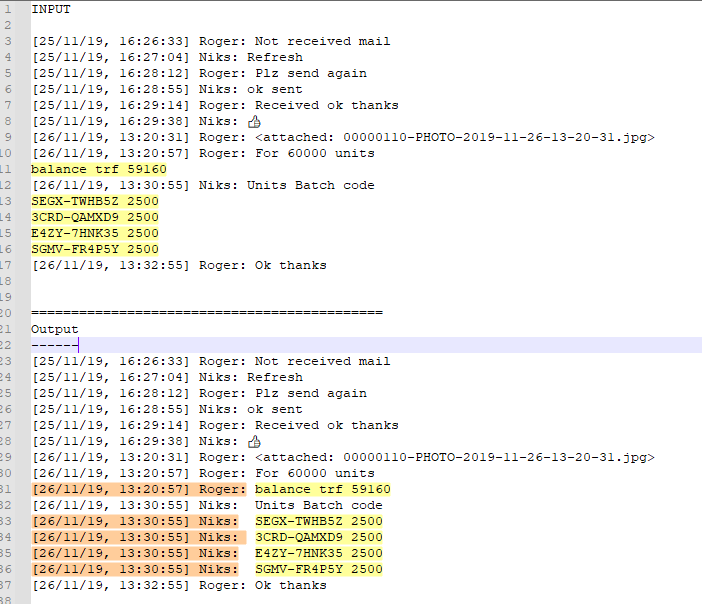
Find and replace line not starting with pattern and copy text from previous line
-
Hi, @nitin-jain, @peterjones, @alan-kilborn and All,
Ah ah ! Alan, I, first, didn’t understand why you had the LRM sigle in the second line of my text. My second thought was that you created a Python script to make all these fancy Unicode format characters clearly visible ! But, luckily, marking any
\x{200e}character did the trick and showed me a thin red mark when this special char is present !
So, @nitin-jain, as @peterjones said, use this simple regex S/R, below, to get rid of these format characters !
SEARCH
[\x{200B}-\x{200F}\x{202A}-\x{202F}]REPLACE
Leave EMPTYHowever, verify that this operation does not break down your text in any way ! I personally saw this case, while pasting Unicode characters from a long list, produced by this excellent and valuable site, regarding Unicode :
https://r12a.github.io/uniview/
Now, I’m pleased to note that there is no bug of our
Boostregex engine, in this matter, as that specialLRMchar is quite a character different from a[symbol !BR
guy038
-
@guy038 said in Find and replace line not starting with pattern and copy text from previous line:
Alan, … you created a Python script to make all these fancy Unicode format characters clearly visible
Well, yes, I did. :-)
-
@PeterJones I have a similar scenario where i have 10K lines i need to fix, is there any shorter way? Also, is there any way we can unmark the line number for those identified lines which does not start with a pattern.
Example: My line number starts with datetime (2021-09-14T21:10:55+00:00)
And can i make all these lines which does not start with “2021-” without line numbers provided by notepad++?
-
@Ahamed-Nawas-Ali said in Find and replace line not starting with pattern and copy text from previous line:
is there any shorter way?
The way described above is reasonably short. I am not sure what “improvement” you think is necessary (or even possible).
is there any way we can unmark the line number for those identified lines which does not start with a pattern.
Sorry, I don’t understand how that’s different than the original question.
You’ll have to give a better example – use the
</>button on the toolbar when you are writing the post to create pairs of ```, between which you can paste your actual data:, something like**data I have**: ``` [1234] abcxyz next line [5678] pdq aonther ``` **desired data after transformation** ``` [1234] abcxyz [1234] next line [5678] pdq [5678] aonther ```…
This would be rendered as the following, so we know exactly what your “before” and “after” data needs to be.
-–
data I have:[1234] abcxyz next line [5678] pdq aontherdesired data after transformation
[1234] abcxyz
[1234] next line
[5678] pdq
[5678] aonther
-—
Useful References
-
@PeterJones, Thanks for your reply. I am sorry, I am new to this platform.
Example scenario i am dealing with is with Date_Time Sender Recepients Message delimited with ‘Tab’
2021-09-14T21:10:55+00:00	Nawas	Ram Kumar,Ahamed Ali	Learning
Selection
B. Home
Webinar
IDB
20214980
202216
2021-09-15T11:19:14+00:00	Ahamed Ali	Nawas	Thanks!
And i should make it like below
2021-09-14T21:10:55+00:00 Nawas Ram Kumar,Ahamed Ali Learning 2021-09-14T21:10:55+00:00 Nawas Ram Kumar,Ahamed Ali Selection 2021-09-14T21:10:55+00:00 Nawas Ram Kumar,Ahamed Ali B. Home 2021-09-14T21:10:55+00:00 Nawas Ram Kumar,Ahamed Ali Webinar 2021-09-14T21:10:55+00:00 Nawas Ram Kumar,Ahamed Ali IDB 2021-09-14T21:10:55+00:00 Nawas Ram Kumar,Ahamed Ali 20214980 2021-09-14T21:10:55+00:00 Nawas Ram Kumar,Ahamed Ali 202216 2021-09-15T11:19:14+00:00 Ahamed Ali Nawas Thanks! -
@Ahamed-Nawas-Ali said :
Example scenario i am dealing with is with Date_Time Sender Recepients Message delimited with ‘Tab’
For this one, I considered the following to be enough to distinguish a timestamp line leader:
2021-09-15TThus I tried (based upon @guy038’s solution earlier in this thread):
Find:
(?-s)^(\d{4}-\d\d-\d\dT.+\t).+\R\K(?!\d{4}-\d\d-\d\dT)
Replace:${1}
Options: Wrap around, Regular expression
Action: Replace All (multiple times, until no more changes occur)And after several Replace All presses, I obtained the following:
2021-09-14T21:10:55+00:00	Nawas	Ram Kumar,Ahamed Ali	Learning
2021-09-14T21:10:55+00:00	Nawas	Ram Kumar,Ahamed Ali	Selection
2021-09-14T21:10:55+00:00	Nawas	Ram Kumar,Ahamed Ali	B. Home
2021-09-14T21:10:55+00:00	Nawas	Ram Kumar,Ahamed Ali	Webinar
2021-09-14T21:10:55+00:00	Nawas	Ram Kumar,Ahamed Ali	IDB
2021-09-14T21:10:55+00:00	Nawas	Ram Kumar,Ahamed Ali	20214980
2021-09-14T21:10:55+00:00	Nawas	Ram Kumar,Ahamed Ali	202216
2021-09-15T11:19:14+00:00	Ahamed Ali	Nawas	Thanks!
2021-09-15T11:19:14+00:00	Ahamed Ali	Nawas
Note that the last line of this output is “extra” and should be manually removed.
-
@Alan-Kilborn I tried with below in order to keep clicking on the buttons to replace everything and it worked in removing the line numbers however the strings are concatenated.
Find box: \n([^2021-])
Replace box: $1Result:
2021-09-14T21:10:55+00:00	Nawas	Ram Kumar,Ahamed Ali	LearningSelectionB. HomeWebinar IDB20214980202216
2021-09-15T11:19:14+00:00	Ahamed Ali	Nawas	Thanks!
And the results are messed up a bit. Anyway, thank you so much for the time stamp line leader and for now, i will have to use it anyway to avoid further delay in my project! Thanks @guy038 & @PeterJones for your guidance! Greatly appreciate your guidance to this community! God bless you all!
-
@Ahamed-Nawas-Ali said:
\n([^2021-])That’s totally wrong for what you’re wanting… in several ways…
But since you seem to be in a hurry…and you can’t reasonably do anything with regex in a hurry…I won’t explain and I’ll just wish you good luck. -
@Alan-Kilborn Sorry Alan! I know i am wrong with that “\n([^2021-])” as it will spoil my delimiter as well and there could be some other issues as well. Its true that one can’t learn Regex in a hurry! I am using yours snippet and thank you for that!
-
Hello, @ahamed-nawas-ali, @peterjones, @alan-kilborn and All,
@ahamed-nawas-ali, I’ll use a similar search regex to the @alan-kilborn’s one !
For example , given this INPUT text , below :
2021-09-14T21:10:55+00:00 ATX Field3 Guy Field5 Learning Selection B. Home Webinar IDB 20214980 2021420214202216 2021-09-15T11:19:14+00:00 BYQ Field3 Alan Field5 Test B. Home Webinar IDB 20214980 2021-09-16T15:07:46+00:00 ATX Field3 Peter Field5 Try Selection B. Home Webinar IDB 20214980 2021420214202216 Blablah OK END of story-
Open the Replace dialog (
Ctrl+H) -
Uncheck all box options
-
Search
(?-s)^(\d{4}-.+\t).+\R\K(?!\d{4}-|\R|\z) -
Replace
$1 -
If necessary, check the
Wrap aroundoption -
Select the
Regular expressionsearch mode -
Click, exclusively, on the
Replace Allbutton, several times, till the messageReplace All: 0 occurrences were replaced...is displayed !
At the end, you should get this expected OUTPUT text :
2021-09-14T21:10:55+00:00	ATX	Field3	Guy	Field5	Learning
2021-09-14T21:10:55+00:00	ATX	Field3	Guy	Field5	Selection
2021-09-14T21:10:55+00:00	ATX	Field3	Guy	Field5	B. Home
2021-09-14T21:10:55+00:00	ATX	Field3	Guy	Field5	Webinar
2021-09-14T21:10:55+00:00	ATX	Field3	Guy	Field5	IDB
2021-09-14T21:10:55+00:00	ATX	Field3	Guy	Field5	20214980
2021-09-14T21:10:55+00:00	ATX	Field3	Guy	Field5	2021420214202216
2021-09-15T11:19:14+00:00	BYQ	Field3	Alan	Field5	Test
2021-09-15T11:19:14+00:00	BYQ	Field3	Alan	Field5	B. Home
2021-09-15T11:19:14+00:00	BYQ	Field3	Alan	Field5	Webinar
2021-09-15T11:19:14+00:00	BYQ	Field3	Alan	Field5	IDB
2021-09-15T11:19:14+00:00	BYQ	Field3	Alan	Field5	20214980
2021-09-16T15:07:46+00:00	ATX	Field3	Peter	Field5	Try
2021-09-16T15:07:46+00:00	ATX	Field3	Peter	Field5	Selection
2021-09-16T15:07:46+00:00	ATX	Field3	Peter	Field5	B. Home
2021-09-16T15:07:46+00:00	ATX	Field3	Peter	Field5	Webinar
2021-09-16T15:07:46+00:00	ATX	Field3	Peter	Field5	IDB
2021-09-16T15:07:46+00:00	ATX	Field3	Peter	Field5	20214980
2021-09-16T15:07:46+00:00	ATX	Field3	Peter	Field5	2021420214202216
2021-09-16T15:07:46+00:00	ATX	Field3	Peter	Field5	Blablah
2021-09-16T15:07:46+00:00	ATX	Field3	Peter	Field5	OK
2021-09-16T15:07:46+00:00	ATX	Field3	Peter	Field5	END of story
Voila :-))
Notes :
-
As you can see, the number of columns, before the last one, is not a problem !
-
From beginning of line (
^), the regex looks for a line beginning with4digits, followed with a dash character (\d{4}-) and anything else till the last tabulation (.+\t) of current line -
This search, so far, is memorized and stored as group
1 -
After the last field of the line and the line-break (
.+\R), all the matched string is discarded (\K) -
Thus, the regex engine is now searching for a zero-length string, at beginning of the next line, but ONLY IF this next line does not begin with :
-
4digits and a dash char -
An other line-break
-
The very end of current file
-
-
When this assertion is true, it just inserts the group
1contents at the very beginning of current line
Best Regards
guy038
P.S. :
If the condition to detect the header lines seems not restrictive enough, you may use this alternate search regex :
- Search
(?-is)^(20\d\d-\d\d-\d\dT.+\t).+\R\K(?!20\d\d-\d\d-\d\dT|\R|\z)
-




Hello! It looks like you're interested in this conversation, but you don't have an account yet.
Getting fed up of having to scroll through the same posts each visit? When you register for an account, you'll always come back to exactly where you were before, and choose to be notified of new replies (either via email, or push notification). You'll also be able to save bookmarks and upvote posts to show your appreciation to other community members.
With your input, this post could be even better 💗
Register Login