Macro works normally, but fails when shortcut is Ctrl+Shift+C
-
Hi All,
I have a Macro that works 100% from the Macro menu, as well as setting it to Ctrl+Shift+V, but does not work with Ctrl+Shift+C. Any ideas? I have tried restarting, rerecording, etc. Current code and Debug info are below. I have also tried deleting the Action type “2” line to match the old backup file, with no behavior change.
        <Macro name="Copy line no break" Ctrl="yes" Alt="no" Shift="yes" Key="86">
            <Action type="0" message="2453" wParam="0" lParam="0" sParam="" />
            <Action type="0" message="2452" wParam="0" lParam="0" sParam="" />
            <Action type="0" message="2178" wParam="0" lParam="0" sParam="" />
            <Action type="2" message="0" wParam="42002" lParam="0" sParam="" />
        </Macro>
Notepad++ v8.6 (64-bit) Build time : Nov 23 2023 - 16:58:44 Path : C:\Program Files\Notepad++\notepad++.exe Command Line : Admin mode : OFF Local Conf mode : OFF Cloud Config : OFF OS Name : Windows 11 Pro (64-bit) OS Version : 23H2 OS Build : 22631.2715 Current ANSI codepage : 1252 Plugins : mimeTools (2.9) NppConverter (4.5) NppExport (0.4)-–
Moderator Note: This topic was split off into its own topic, but was originally part of HELP: Having trouble with Macros in v8.5.3 or later
-
@Mike-Newman said in HELP: Having trouble with Macros in v8.5.3 or later:
does not work with Ctrl+Shift+C.
Well, if you are talking about v.8.6 (you didn’t say), then in that version Ctrl+c has been hard-bound to some special “copy” functionality, going around the normal shortcut capability. The addition of Shift to the combo may not matter. (It’s just a theory that this might be what is interfering, not fact).
-
This post is deleted! -
I would move @Mike-Newman’s post and follow-up to it’s own thread. It seems to have nothing to do with the
Having trouble with Macros in v8.5.3 or latertopic.Ctrl+Shift+C is not bound to anything in v8.6. Doing so results in an
ETXcharacter getting added to the file you are editing. Recording a simple macro and saving it, to be activated by Ctrl+Shift+C shows that Ctrl+Shift+C works and activates my simple macro. I then copy/pasted the Actions from Mike Newman’s on top of the Actions for the I created for Ctrl+Shift+C and it seems to work. I saw that the example macro Mike posted is for Ctrl-Shift-V and so also copied all of that macro into my shortcuts.xml. Ctrl-Shift-V now does the same thing as Ctrl-Shift-C.While I wrote “seems to work” I did not attempt to decode what the macro is supposed to do. It seems to ignore all lines in a selection other than the last and to load that into the copy/paste buffer. If that’s the intent, then it works.
-
P PeterJones locked this topic on
-
@mkupper ,
I have “moved” the original post and responses to this separate topic
Based on @mkupper’s results, I am thinking that you have a shortcut conflict: maybe you have another macro (or other menu entry) already mapped to Ctrl+Shift+C. The easiest way to see this is to open Macro > Modify Shortcut/Delete Macro. If there is a conflict with your
Copy line no breakmacro shortcut, it will show up in a different color; and if you click on it, the dialog will show you where the conflict is.For example, in my screenshot below, the macro
Begin/End ColumnSelecthas a conflict with Edit > Begin/End Select in Column Mode (‡):
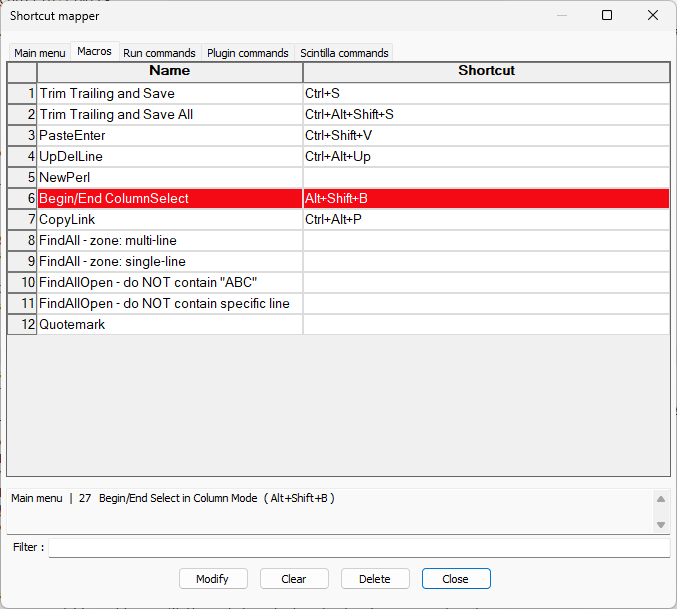
‡ Note: The screenshot shows
Main menu | 27 Begin/End Select in Column Mode, and if I look on the Main menu tab in the dialog, I can see that the 27th entry is actually in the Edit menu; you may have to do a similar investigation to figure out exactly where the conflict lies.

-
-
Thanks, @mkupper and @PeterJones. Yes, the macro is Home>Shift+End>Copy. No conflicts in my case. Not sure why mine is strange. I’ll double-check all updates and try a full machine restart again.
-
@Mike-Newman - As the things you have tried seem like the correct actions I took a closer look at your debug info from the first post of this thread. I noticed
OS Name : Windows 11 Pro (64-bit)
OS Version : 23H2
OS Build : 22631.2715
I am running
OS Name : Windows 11 Home (64-bit)
OS Version : 22H2
OS Build : 22621.2861
and am now wondering if something in your Windows system or another app is capturing the
Ctrl+Shift+Cbefore it gets to Notepad++.On my machine a
Ctrl+Shift+Cin plain old Notepad*seems to behave the same asCtrl+C*I uninstalled the Microsoft Notepad app from my machine and notepad.exe runs C:\WINDOWS\system32\notepad.EXE which loads instantly and behaves much like the classic Notepad. -
M mkupper referenced this topic on
-
@mkupper Just following up here, as I finally got this working correctly. It was indeed another app (Webex in my case) capturing the shortcut first. I typically don’t like to download third-party apps (fourth-party?), but I gave Hotkey Detective a try, and it led me to the culprit.



Hello! It looks like you're interested in this conversation, but you don't have an account yet.
Getting fed up of having to scroll through the same posts each visit? When you register for an account, you'll always come back to exactly where you were before, and choose to be notified of new replies (either via email, or push notification). You'll also be able to save bookmarks and upvote posts to show your appreciation to other community members.
With your input, this post could be even better 💗
Register Login