How to replace strings involving search of multiple lines?
-
Hello community,
Newbie here on regex…
I have a pgn text file with multiple Events such as this (one example):
[Event "Santander"]
[Site "?"]
[Date "1945.??.??"]
[Round "?"]
[White "Aljechin"]
[Black "Ricondo"]
[Result "1-0"]
[Annotator "1TA"]
I require the Annotator be added to the Event information such as this:
[Event "Santander 1TA"]
[Site "?"]
[Date "1945.??.??"]
[Round "?"]
[White "Aljechin"]
[Black "Ricondo"]
[Result "1-0"]
[Annotator "1TA"]
I have successfully created find:
Event "(.+)"\\]\r\n(.*)\r\n(.*)\r\n(.*)\r\n(.*)\r\n(.*)\r\n(.*)\r\n\\[Annotator "(.+)"… And Replace (all) with:
Event "$1 $8"]\r\n$2\r\n$3\r\n$4\r\n$5\r\n$6\r\n$7\r\n[Annotator "$8"But, it looks too long/cumbersome. Is there a more compact or shortest way to rewrite the find and replace that achieves the exact thing?
Many thanks in advance,
-–
moderator added code markdown around text; please don’t forget to use the
</>button to mark example text as “code” and `backticks` aroundregular expressionsso that characters don’t get changed by the forum -
@Budana-P said in How to replace strings involving search of multiple lines?:
I have successfully created … But, it looks too long/cumbersome.
Good job on figuring out what you did. We’re not really focused on optimizations, because that’s more regex-specific rather than being related directly to Notepad++.
However, there are some of the regex gurus who might take an interest. And I will at least point you in the direct that I would research if I were doing it for myself.Is there a more compact or shortest way to rewrite the find and replace that achieves the exact thing?
Look into the multiplying operators like
{ℕ}… A matched group like((?:\r\n.*){6})would put six lines into the same single group, which would make the replacement easier as well (since you’d only need one$ℕfor all those lines). (I used a unnamed/unnumbered group(?:...)inside the main capture group to avoid wasting a group# on the subgroup-—
Useful References
-
Hello, @budana-p, @peterjones and All,
Here is one possible solution :
Starting with that INPUT text :
[Event "Santander"]
[Site "?"]
[Date "1945.??.??"]
[Round "?"]
[White "Aljechin"]
[Black "Ricondo"]
[Result "1-0"]
[Annotator "1TA"]

[Event "Santander"]
[Site "?"]
[Date "1945.??.??"]
[Round "?"]
[White "Aljechin"]
[Black "Ricondo"]
[Result "1-0"]
[Annotator "2TA"]

[Event "Santander"]
[Site "?"]
[Date "1945.??.??"]
[Round "?"]
[White "Aljechin"]
[Black "Ricondo"]
[Result "1-0"]
[Annotator "3TA"]
With the following regex S/R :
-
SEARCH
(?-is)^(\\[Event.+)(?="\\]\R(?:.+\R)+?\\[Annotator "(.+)") -
REPLACE
\1 \2
You should get this expected OUTPUT text :
[Event "Santander 1TA"]
[Site "?"]
[Date "1945.??.??"]
[Round "?"]
[White "Aljechin"]
[Black "Ricondo"]
[Result "1-0"]
[Annotator "1TA"]

[Event "Santander 2TA"]
[Site "?"]
[Date "1945.??.??"]
[Round "?"]
[White "Aljechin"]
[Black "Ricondo"]
[Result "1-0"]
[Annotator "2TA"]

[Event "Santander 3TA"]
[Site "?"]
[Date "1945.??.??"]
[Round "?"]
[White "Aljechin"]
[Black "Ricondo"]
[Result "1-0"]
[Annotator "3TA"]
NOTES :
-
First, the search is non-insensitive
(?-i)and the dot matches standard chars only ( not the EOL chars )(?-s) -
Then, this regex searches, from beginning of line, for the string
[Eventfollowed with some characters, before a trailing double-quote, which are stored as group1 -
But that search matches ONLY IF it is followed with the look-ahead
(?="\\]\R(?:.+\R)+?\\[Annotator "(.+)"). That is to say :-
A double-quote, followed with a closing square bracket and the line-break (
\Ris a shorthand for\r\nor\nor\r) -
A non-capturing group, repeated, containing the shorter number of lines ( due to the lazy quantifier
+?), till it reaches a first[Annotatorline -
This
\\[Annotator "(.+)"line , beginning with the string[Annotator "is followed with some characters, stored as group2and the trailing double-quote -
In replacement, we simply rewrite the beginning of the
Eventline ( group1), followed with a space char and the Annotator value ( group2)
-
Best Regards,
guy038
-
-
Hi @guy038 , thank you for the compact code approach, but I got an “Invalid Regular Expression” error such at this screenshot
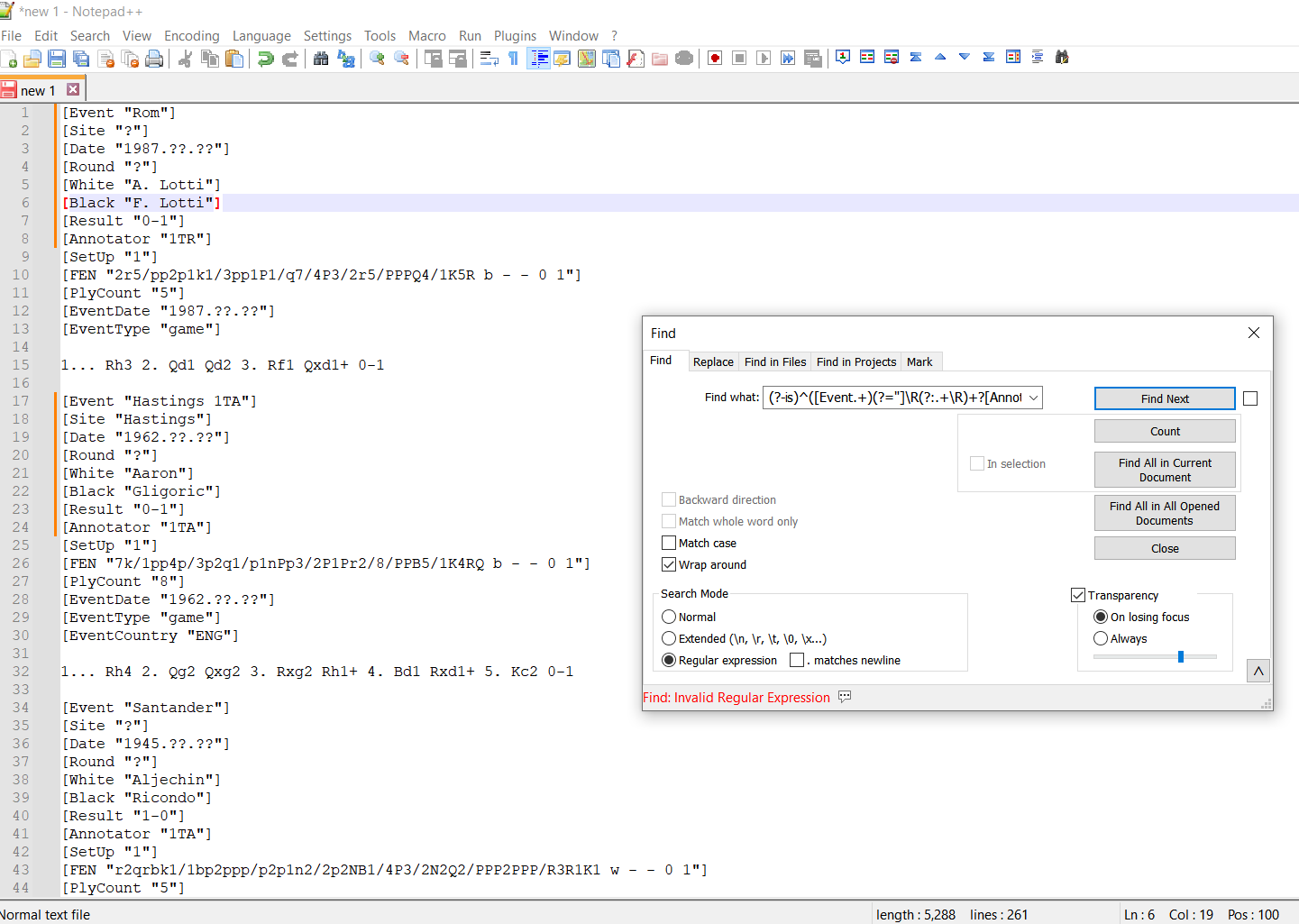
I am using notepad++ v8.5.8 . Do I need to activate any plugins to enable syntax as suggested above?
(?-is)^([Event.+)(?="]\R(?:.+\R)+?[Annotator "(.+)")Also, thank you @PeterJones for the reference suggestions. I need lots of practice especially for lookbacks and lookaheads and also multiplying operators.
Awesome.
-
@guy038 found it…
Just a minor oversight that the forum postings between backticks could not display the backslash before each open and close square brackets.
Beginning to see the powers of regex.
Thank you all .
Budana
-
@Budana-P
@guy038 said in How to replace strings involving search of multiple lines?:(?-is)^([Event.+)(?="]\R(?:.+\R)+?[Annotator "(.+)")I think you meant:
(?-is)^(\\[Event.+)(?="]\R(?:.+\R)+?\\[Annotator "(.+)")did you not? The forum software seems to be having trouble with backslashes before open square brackets.
-
Hello, @budana-p, @peterjones, @coises and All,
Yes, you’re right, @coises always this same annoying problem !
So the correct regex S/R is definitively :
- SEARCH     (?-is)^(\\[Event.+)(?="\\]\R(?:.+\R)+?\\[Annotator "(.+)")

- REPLACE    \1 \2
BR
guy038
P.S. :
I’ll try to edit my previous post in order that my explanations on the search regex are coherent.
It’s important to note that when you edit a post, it always rewrite all the post with the wrong syntax, even if you changed something without any relation to the square brackets :-((
Thus, for this kind of post, you must do all your modifications in one go and never modify it anymore ! Else, you have to redo the edit process, from the very beginning
-
Hi, all,
I’m just seeing that, even in a code block, the regex syntax is still erroneous. So, in all cases, you must add a two anti-slashes string, right before any opening or closing square bracket for a correct syntax, once you click the blue SUBMIT button !
BR
guy038
Finally, as suggested by @peterjones, in this FAQ :
https://community.notepad-plus-plus.org/topic/21925/faq-formatting-forum-posts
- When matching literal square brackets, always use the
\x5Band\x5Dsyntaxes, instead !
So, my search regex becomes :
SEARCH
(?-is)^(\x5BEvent.+)(?="\x5D\R(?:.+\R)+?\x5BAnnotator "(.+)") - When matching literal square brackets, always use the
-
@Coises said in How to replace strings involving search of multiple lines?:
The forum software seems to be having trouble with backslashes before open square brackets.
As @guy038 pointed out, that’s in our FAQ.
However, this discussion was the straw that broke my proverbial camel’s back: I’ve reported it as a bug to NodeBB in their bug-reports forum. We’ll see if they can ever figure out how to not mess up backslash-square-bracket.
-
This should be fixed in the latest update, thanks for reporting @PeterJones
-
D dr ramaanand referenced this topic on





Hello! It looks like you're interested in this conversation, but you don't have an account yet.
Getting fed up of having to scroll through the same posts each visit? When you register for an account, you'll always come back to exactly where you were before, and choose to be notified of new replies (either via email, or push notification). You'll also be able to save bookmarks and upvote posts to show your appreciation to other community members.
With your input, this post could be even better 💗
Register Login