Notepad++ delete 2 lines below a specific string
-
I want to delete 2 lines from a long text where system finds a specific string. As an example, if it finds string “Supplier” then only the next 2 lines should be deleted and not the line having Supplier…
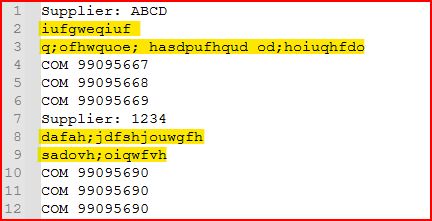
in the below example, the highlighted lines must be removed, and this should happen recursively throughout the file.
-
given data
Supplier: ABCD
deleteme
andme
keepme
keepme
Supplier: 1234
deleteme
andme
keepme
keepme
keepme
keepme
FIND =
(?-s)(Supplier.*)(\R.*){2}
REPLACE =$1
SEARCH MODE = Regular Expression
REPLACE ALL
results inSupplier: ABCD keepme keepme Supplier: 1234 keepme keepme keepme keepme… which is what I believe you want.
Quick explanation:
- Regular Expression mode allows logic in the search-and-replace
(?-s)= makes sure that.*will stay on a single line, and not match across lines(Supplier.*)= matches the wordSupplierplus everything else to the end of the line, and puts it in group#1(\R.*)= matches a newline sequence plus everything on that line{2}= matches the previous thing twice; in this case, it will make it match two lines and the newlines that come before them- Replacement of
$1replaces with the contents of group#1, but nothing else from the match, effectively deleting the two lines after
-—
Useful References
-
@PeterJones said in Notepad++ delete 2 lines below a specific string:
(?-s)(Supplier.)(\R.){2}
@PeterJones - Awesome man, thanks a lot for quick turnaround… it worked as I was expecting…
-
@PeterJones- I am pretty new to using Search options, i am getting the explanation provided but still not getting the core concept of using these expressions \R\N\n {} $ while searching the text.
Could you suggest any link which gives the detailed explanation of all these?
Once again, thanks for your timely help! -
@Foodland2023 said in Notepad++ delete 2 lines below a specific string:
detailed explanation
https://npp-user-manual.org/docs/searching/#regular-expressions
https://www.regular-expressions.info/
At the second website, know that Notepad++ uses the Boost regular expression library, so when differences between regular expression implementations are discussed, Boost is the relevant one.
-
@Coises - Thanks a lot, this helps for me to get started!
-
@Foodland2023 said in Notepad++ delete 2 lines below a specific string:
Could you suggest any link which gives the detailed explanation of all these?
Yes. In fact, I already did. In my post above: the USEFUL REFERNCES in big bold letters led to links to the Notepad++ Online User Manual: Searching/Regex and to the “FAQ: Where to find other regular expressions (regex) documentation”. That rather gave you what you asked for two hours before you asked for it.
-
This post is deleted! -
This post is deleted! -
This post is deleted!


Hello! It looks like you're interested in this conversation, but you don't have an account yet.
Getting fed up of having to scroll through the same posts each visit? When you register for an account, you'll always come back to exactly where you were before, and choose to be notified of new replies (either via email, or push notification). You'll also be able to save bookmarks and upvote posts to show your appreciation to other community members.
With your input, this post could be even better 💗
Register Login