Notepad++ v8.5.1 Release Candidate
-
Hello, @coises, @don-ho, @peterjones and All,
I, personally, very much like the solution proposed by @coises which seems quite intuitive !
But, these specific arrows should not be very easy to display ?!
Best Regards,
guy038
Of course :
-
The
Copy Find to Replaceoption needs a non-emptyFindfield -
The
Exchangeoption needs non-emptyFindandReplacefields -
The
Copy Replace to Findoption needs a non-emptyReplacefield
Ah… I think that these actions should be possible in the
Normalsearch mode only ! -
-
@donho
There is one bug I posted about:
The word call up function of WordWeb Pro (v10.1) Ctrl & right mouse button works in every app except notepad++.
https://community.notepad-plus-plus.org/topic/24258/wordweb-pro-10-1-not-working-in-notepad-8-5?_=1679157389718 -
@R-D said in Notepad++ v8.5.1 Release Candidate:
There is one bug I posted about:
The word call up function of WordWeb Pro (v10.1) Ctrl & right mouse button works in every app except notepad++.This is not specific to 8.5.1, so leave that discussion out of this thread, as it doesn’t belong here.
-
FYI:
v8.5.1 RC 2 which fixes the Windows 11 Explorer context menu entry “Edit with Notepad++” not removed after uninstallation of Notepad++ issue is available here:
http://download.notepad-plus-plus.org/repository/8.x/8.5.1.RC2/ -
FYI: RC3 is available.
The difference between RC2 and RC3 is:
RC2 use old NppShell.dll for the creation of “Edit with Notepad++” entry for old windows (10, 8 & 7), and it use new NppModernShell.dll for Windows 11.In RC3, only one NppShell.dll is used for the creation of “Edit with Notepad++” entry for all supported Windows.
For people who have Windows 7 (I have no Windows 7), please test installer and let me know if it works as usual.
Thank you!
-
Notepad++ v8.5.1   (64-bit)
OS Name : Windows 10 Pro (64-bit)
OS Version : 22H2
OS Build : 19045.2728
Current ANSI codepage : 1251
RC3
Open in Notepad++ disappeared from context menu of Windows. -
Open in Notepad++ disappeared from context menu of Windows.
However, is Edit with Notepad++ installed on Windows 10 explorer context menu by RC3?
-
@donho
O_o
If you about Flag in installer Context menu Entry, yes.
In RC2 is working. -
RC3 doesn’t add
Edit with Notepad++on Windows 7, even if I restart theexplorer.exe(x86 and x64 of Npp).
RC2 work as expexted, no need to restart theexplorer.exe.Both RCs can not uninstall the
NppShell.dll. The dll is still available.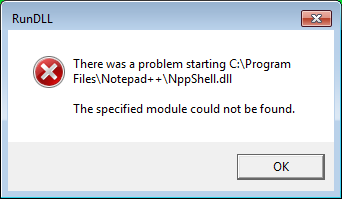
UPDATE:
The RC4 witch is not posted here work as expected. The
Edit with Notepad++is available without restarting ofexplorer.exeand the dll is removed after uninstall (x64).N++ x86 does not add
Edit with Notepad++Note: The uninstaller does not remove the
tabContextMenu_example.xmlfrom%appdata% -
FYI
The new release will be based on RC2, which is more stable than other candidates are.Thank you for your testing and report!
-
D donho unpinned this topic on
-
P PeterJones locked this topic on





Hello! It looks like you're interested in this conversation, but you don't have an account yet.
Getting fed up of having to scroll through the same posts each visit? When you register for an account, you'll always come back to exactly where you were before, and choose to be notified of new replies (either via email, or push notification). You'll also be able to save bookmarks and upvote posts to show your appreciation to other community members.
With your input, this post could be even better 💗
Register Login