Find All Words in Line Containing Specific String
-
Hello everyone,
So I tried the regex I found here to do what I want. But it only finds the first match of each line if the lines contain more than one of the same word. I want it to find all of the words.This is the regex:
(?-s)string.*?\K"word1"And here is the sample text with expected matches in bold:
string@[“word1”]
string@[“word1”, “word1”, “word3”]
strong@[“word1”, “word2”, “word3”]
string@[“word1word2”, “word3”]Could anyone please help me…
-
Try:
Find:
(?-si:string@\\[|(?!\A)\G)(?s-i:(?!\\]).)*?\K(?-si:"word1")
Search mode: Regular expressionFor background on this technique, see HERE.
-
This post is deleted! -
@Alan-Kilborn
Thanks for the reply.
I tried your regex, but it doesn’t work unfortunately. -
@Mayonnaisu said:
I tried your regex, but it doesn’t work unfortunately.
On this text:
And here is the sample text with expected matches in bold:
string@["word1"]
string@["word1", "word1", "word3"]
strong@["word1", "word2", "word3"]
string@["word1word2", "word3"]
Could anyone please help me...
A Find All in Current Document using my regex produces this:
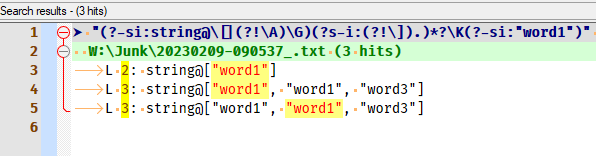
which is, I believe, exactly what you said you were looking for…
-
@Alan-Kilborn
Ah, my bad. You’re right. It turned out that the quotation marks I copied from the code text and plain text here are different. Hence, no match was found. Thank you so much for this! -
Hmm, in your original post, you used a code block for your regex but no code block for your data. Hence you knew about code blocks; seems a pity you didn’t code-block your sample data, originally.
Ah, maybe the explanation: You skipped the code block for the data because you wanted to put bold in the data.
Okeee…
-
Hello, @mayonnaisu, @alan-kilborn and All,
As you’re doing a per line search, you could use the simplified generic regex, below ( also described here )
SEARCH
(?-s)(?-i:string@|(?!\A)\G).*?\K(?-i:"word1")Or, if we use the free-spacing mode,
(?x), for a better lisibility :SEARCH
(?x-s) (?-i: string@ | (?! \A) \G ) .*? \K (?-i: "word1" )
To test this functional regex :
- Copy this text in a new tab :
string@["word1"] string@["word1", "word1", "word3"] strong@["word1", "word2", "word3"] string@["word1", "word2", "word1"] STRING@["word1", "word2", "word1"] string@["word1word2", "word3"] string@["word1", "WORD1", "word1", "word1"] string@["word2", "word3", "word1"]-
Move the caret ( cursor ) at the very beginning of the file
-
Open the Mark dialog (
Ctrl + M) -
SEARCH
(?x-s) (?-i: string@ | (?! \A) \G ) .*? \K (?-i: "word1" ) -
Uncheck all box options
-
Select the
Regular expressionsearch mode -
Click on the
Mark Allbutton -
Possibly, click on the
Copy Marked Textbutton to paste it afterwards, wherever you want, with aCtrl + Vcommand
=> This regex finds all the strings
"word1", with that exact case, of each line beginning with the stringstring@, with that exact case too !Best regards
guy038
-
Hi @guy038,
Thank you very much for your reply. I really appreciate the additional solutions provided by you. They work like a charm! -
Hi, @mayonnaisu and All,
If using the regex below, which would run a non-sensitive to case search, so an insensitive one
(?i:...):SEARCH
(?-s)(?i:string@|(?!\A)\G).*?\K(?i:"word1")You should detect, of course, some more matches when run against my previous example !
BR
guy038
-
Awesome! Now, I have more solutions to the future problems at my disposal. Thanks!


Hello! It looks like you're interested in this conversation, but you don't have an account yet.
Getting fed up of having to scroll through the same posts each visit? When you register for an account, you'll always come back to exactly where you were before, and choose to be notified of new replies (either via email, or push notification). You'll also be able to save bookmarks and upvote posts to show your appreciation to other community members.
With your input, this post could be even better 💗
Register Login