Wildcard Find/Replace with numerous lines in between?
-
Find/Replace with a wildcard that could span multiple lines.
Found a mistake in a JSON that would end up with me having to hand edit about 35,000 lines by hand. OR I assume I could somehow wildcard it but I have never touched RegEx in my life. Desperately looking to salvage my work day LOL
Basically I need things to END UP like this …
“items”: [],
But sadly there are thousands of those that have many lines of data in between those [] brackets that I need to get rid of.
Example:
“items”: [
{
“amount”: 2,
“id”: 980333378,
“position”: 0
},
{
“amount”: 3,
“id”: 1722154847,
“position”: 1
},
{
“amount”: 138,
“id”: 69511070,
“position”: 2
}
]Really has to be a wild card because some entries could have even more fields than what I showed above. Anyone know if this is possible?
-
@Michael-Beck said in Wildcard Find/Replace with numerous lines in between?:
Anyone know if this is possible
Yes, someone knows it is possible.
Oh, you wanted more than that, eh? ;-)
Then yes, I know it is possible.
Still not enough? ;-)
Use the “Regular Expression” mode an “☑ . matches newline” checkbox.
Specifically:
- FIND =
"items": \\[.*?\\]
REPLACE ="items": []
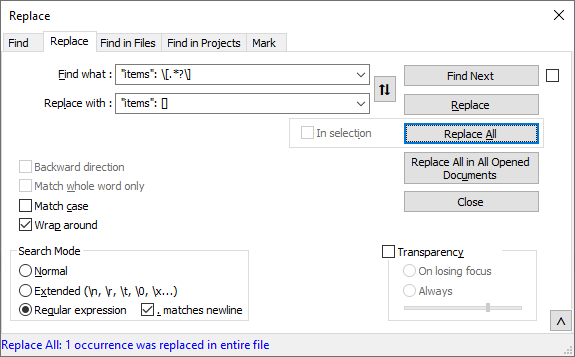
You need to use
\\[instead of just[in the FIND expression, because[has special meaning to regex, and the\prefix tells the regex to look for the literal opening square bracket, not treat it as the special regex character-—
Useful References
- FIND =


Hello! It looks like you're interested in this conversation, but you don't have an account yet.
Getting fed up of having to scroll through the same posts each visit? When you register for an account, you'll always come back to exactly where you were before, and choose to be notified of new replies (either via email, or push notification). You'll also be able to save bookmarks and upvote posts to show your appreciation to other community members.
With your input, this post could be even better 💗
Register Login