Replace specific line #s within multiple programs
-
So I have about 1000 CNC programs that I am trying to edit for a new machine. Each one of them look like this (the #s to the left are not part of the program, but the line # in notepad++, each program actually starts with the N)
1  O0032
2  N00/     .44 R1;
3  N01/  G10 P010000 X-0.   Z-1.8495
Now, The #s are not the same in every program, however these lines are ALWAYS on lines 1, 2, and 3 of the program (subsequently 1, 2, and 3 in notepad++)
I want to be able to open all of the files in my folder (I know how to do that) and replace those 3 lines with the same line of programming code for every programs
1  O0024  ;
2  N001;
3  N004;
4  n005;
5  n007 g94 g53 g56 t0000 ;
6  g92 x0.602  z2.2 ;
7  n011 g59 ;
Now, if the first section I wrote were the same in every program, it would be a simple extended search and replace function as Ive done many times. However, with the code not being the same in all of the programs, my next thought was "can I just tell it to replace anything in lines 1 through 3, with what I wrote which would now be lines 1 through 7?)
Any help would be greatly Appreciated!
I am lost. I honestly have no idea where to start
-
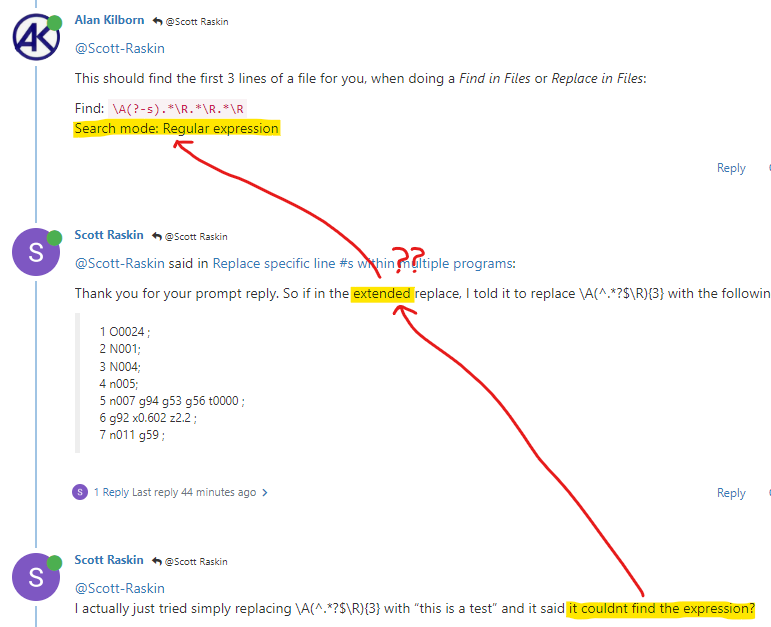
Use Regular Expression mode instead of Extended mode.
One way to FIND the first three lines is
\A(^.*?$\R){3}You implied you already knew how to fill out the REPLACE section for an “extended” replacement; since you aren’t using any of the regex fancy features for the REPLACE, you should be able to use the same expression.
(edit: fixed the expression a couple minutes after I posted it)
-—Useful References
-
This should find the first 3 lines of a file for you, when doing a Find in Files or Replace in Files:
Find:
\A(?-s).*\R.*\R.*\R
Search mode: Regular expression -
@Scott-Raskin said in Replace specific line #s within multiple programs:
Thank you for your prompt reply. So if in the extended replace, I told it to replace \A(^.*?$\R){3} with the following, it would do so?
1 O0024 ;
2 N001;
3 N004;
4 n005;
5 n007 g94 g53 g56 t0000 ;
6 g92 x0.602 z2.2 ;
7 n011 g59 ; -
@Scott-Raskin
I actually just tried simply replacing \A(^.*?$\R){3} with “this is a test” and it said it couldnt find the expression? -
-
@Alan-Kilborn ok, that looks like it finds it exactly as I wanted (I actually realized the program has the first 4 lines blank, so I added a few more .*\R expressions for it to cover the first 7 lines needed to be replaced), however I am blanking on how to replace that with all of that text below (starting from the 4th line as it is in the current file)
O0024 ;
N001;
N004;
n005;
n007 g94 g53 g56 t0000 ;
g92 x0.602 z2.2 ;
n011 g59 ;Thank you so much for your help
-
@Scott-Raskin said in Replace specific line #s within multiple programs:
how to replace that with all of that text below
Arguably the easiest way is to do this:
-
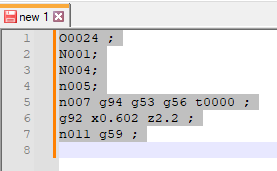
select your desired replacement text:
-
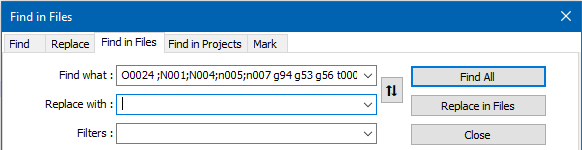
press Ctrl+Shift+f to bring up Find in Files window; your desired replacement data will be in the Find what box (not in Replace with where you want it):
-
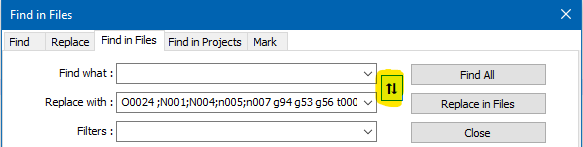
press the “up/down arrow” – aka “swap” – button to move your data from Find what to Replace with:
-
put your search expression into Find what, and continue on with hopefully obvious steps to accomplish your replacement operation
-
-
 A Alan Kilborn referenced this topic on


Hello! It looks like you're interested in this conversation, but you don't have an account yet.
Getting fed up of having to scroll through the same posts each visit? When you register for an account, you'll always come back to exactly where you were before, and choose to be notified of new replies (either via email, or push notification). You'll also be able to save bookmarks and upvote posts to show your appreciation to other community members.
With your input, this post could be even better 💗
Register Login