How to delete a mysterious line.
-
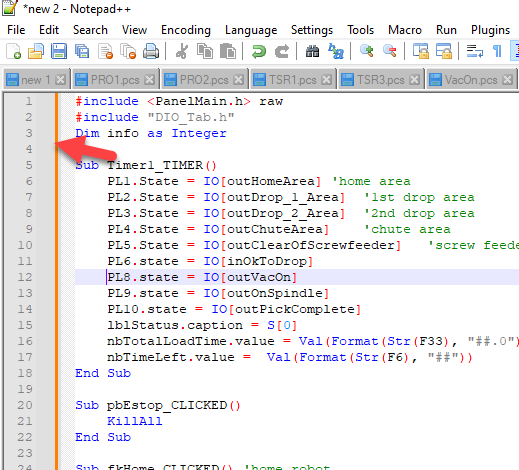
What is this Orange line for?
-
It’s the new change-history feature, as announced in the change.log and the announcements page and downloads page.
There is a setting in the Margins/Border/Edge preferences to turn that off, if you are really intent on disabling one of the most promising new features of Notepad++ … but please don’t. Once you see what it tells you (an indicator of changed/added lines and lines that have and haven’t been saved since they were changed), you are likely to see that it brings great benefits to you.
-
@PeterJones
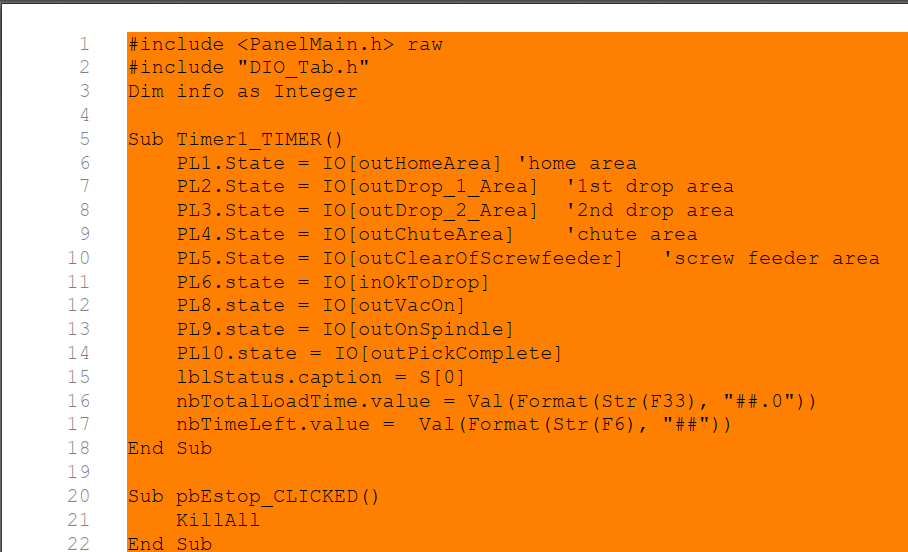
The problem is, it prints all orange background. How do I turn the background color off for this feature
-
That’s a known issue with an underlying library. it has been reported to the library developers, but until that upstream library is fixed, it cannot be fixed in Notepad++.
As a workaround, if you add the macro described in my post here, you can then use
Ctrl+Shift+Hto toggle the history off before printing, then toggle it back on when done printing (though, unfortunately, after toggling it back on, you may have to restart Notepad++). The other option would be to save, restart Notepad++, and then do the print (because the change history will be reset to no changed lines). Whichever workaround will help you get through your printing until the bug in the library can be fixed so that Notepad++ can be updated so that the problem is actually solved. -
T Terry R referenced this topic on


Hello! It looks like you're interested in this conversation, but you don't have an account yet.
Getting fed up of having to scroll through the same posts each visit? When you register for an account, you'll always come back to exactly where you were before, and choose to be notified of new replies (either via email, or push notification). You'll also be able to save bookmarks and upvote posts to show your appreciation to other community members.
With your input, this post could be even better 💗
Register Login