Community
    • Login

    Notepad++ v8.4.5 Release

    Scheduled Pinned Locked Moved Announcements
    21 Posts 10 Posters 29.8k Views 2 Watching
    Loading More Posts
    • Oldest to Newest
    • Newest to Oldest
    • Most Votes
    Reply
    • Reply as topic
    Log in to reply
    This topic has been deleted. Only users with topic management privileges can see it.
    • donhoD Online
      donho @Bibliothecarius77
      last edited by donho

      @Bibliothecarius77

      Could you zip the folder of %APPDATA%\Notepad++\ and send the zip to don;h@free.fr ?
      I will try to reproduce the problem you have.

      BTW, how did you update to the recent versions?
      By using the installer?

      Bibliothecarius77B 2 Replies Last reply Reply Quote 0
      • Bibliothecarius77B Offline
        Bibliothecarius77 @donho
        last edited by

        @donho
        Thank you for helping me! I sent you my zipped APPDATA folder.
        And yes, I always use the installer.

        1 Reply Last reply Reply Quote 0
        • DomOBUD Offline
          DomOBU
          last edited by

          Hello,

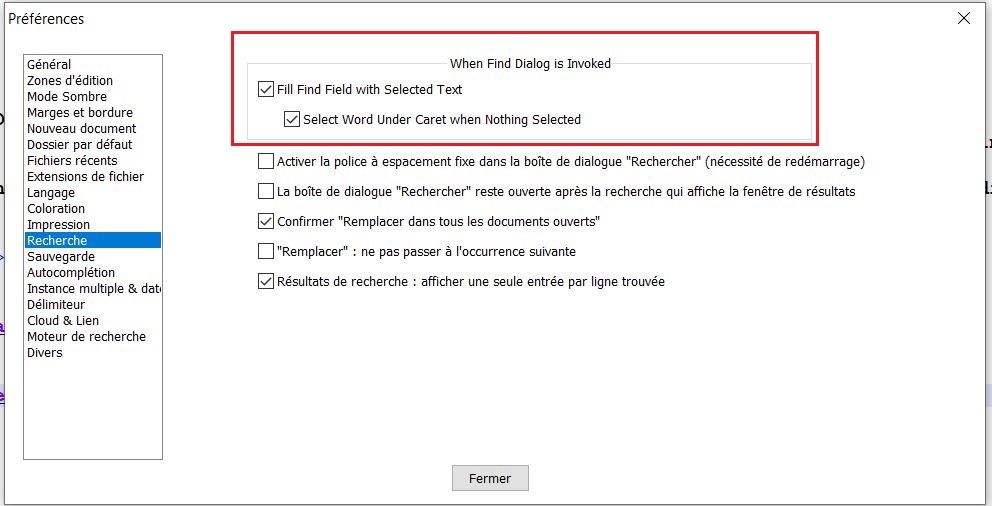
          For your information, in the French version a part of a screen is not translated (see attachment).
          KInd regards
          Notepad Recherche Capture.JPG

          Alan KilbornA 1 Reply Last reply Reply Quote 0
          • Alan KilbornA Online
            Alan Kilborn @DomOBU
            last edited by

            @DomOBU said in Notepad++ v8.4.5 Release:

            in the French version a part of a screen is not translated

            This relates to a new feature; see point 7 at the top of this announcement.

            Sometimes translation for new features lags behind a release, as translation relies on others not involved in making the release. I would guess that this would be fixed in the next version, without your prompting, as the translators “catch up”.

            1 Reply Last reply Reply Quote 0
            • Fruchtzwerg94F Offline
              Fruchtzwerg94
              last edited by

              Checking the french translation this can be confirmed.

              DomOBUD 1 Reply Last reply Reply Quote 0
              • DomOBUD Offline
                DomOBU @Fruchtzwerg94
                last edited by DomOBU

                @Alan-Kilborn
                @Fruchtzwerg94

                Thank you for your answers.

                I took a look at the xml files about this specific point:

                • In the french.xml file, lines 1048->1053 there are the id 6901->6906
                • In the english.xml file, lines 1051->1058 there are the id 6902->6909
                • In the english_customizable.xml file, lines 967->971 there are the id 6901->6905

                I don’t understand these differences.

                Fruchtzwerg94F 1 Reply Last reply Reply Quote 0
                • Fruchtzwerg94F Offline
                  Fruchtzwerg94 @DomOBU
                  last edited by

                  @DomOBU Not sure, but ID 6901 is not present in french.xml. Also line 1048 in french.xml is

                  <Item id="6615" name="Bas"/>
                  

                  https://github.com/notepad-plus-plus/notepad-plus-plus/blob/master/PowerEditor/installer/nativeLang/french.xml#L1048

                  Your question is a little bit confusing to me.

                  1 Reply Last reply Reply Quote 0
                  • Alan KilbornA Online
                    Alan Kilborn
                    last edited by

                    @DomOBU @Fruchtzwerg94

                    6907 through 6909 are the relevant ones.
                    Neither are present in the french.xml file for release 8.4.5.
                    Both ARE present, however, in the 8.4.6RC release, and it seems to be translating there:
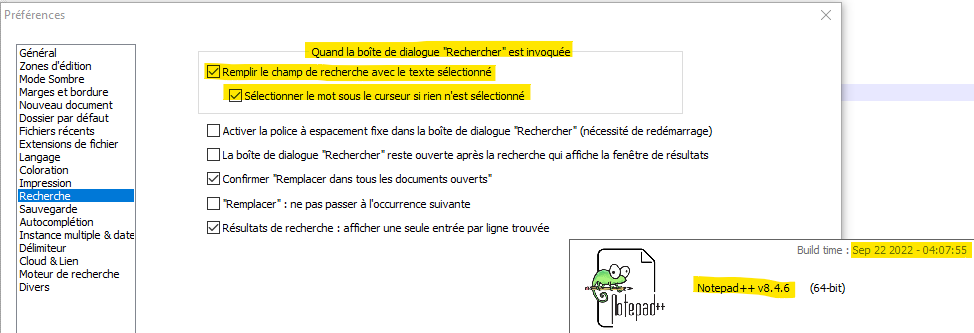
                    deea3ceb-0d09-47fb-961e-1f021c85d35f-image.png

                    If you want to keep using 8.4.5 for now, you can probably just copy over the french.xml file and then reselect your localization in the dropdown.

                    1 Reply Last reply Reply Quote 1
                    • Alan KilbornA Alan Kilborn referenced this topic on
                    • Eric PayneE Offline
                      Eric Payne
                      last edited by

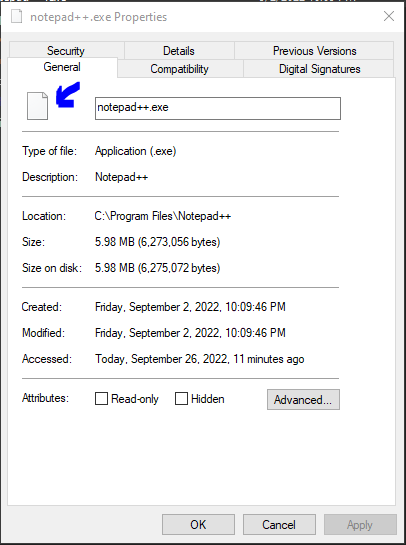
                      Since updating to 8.4.5, I’ve noticed that the pin to my Windows taskbar no longer has the icon present. Additionally, when I right click on the EXE file within file explorer it no longer has an icon there either. I have uninstalled and reinstalled, so I’m not sure if this is a me problem or a package problem, but figured I would ask.
                      843e2c87-0bac-4ca8-84a2-7d9005699899-image.png

                      Stefan PendlS 1 Reply Last reply Reply Quote 0
                      • Stefan PendlS Offline
                        Stefan Pendl @Eric Payne
                        last edited by

                        @Eric-Payne
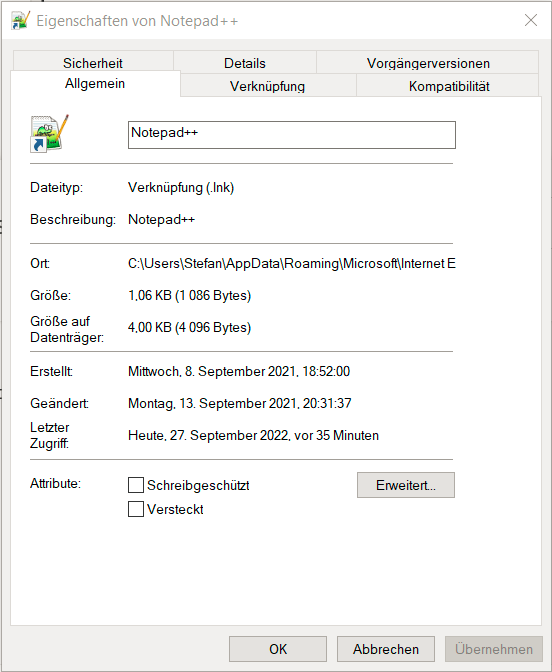
                        No problem here, the icon is still there after the update.
                        3d522204-2727-4282-8413-410584d1b125-image.png

                        1 Reply Last reply Reply Quote 0
                        • donhoD donho unpinned this topic on
                        • Bibliothecarius77B Offline
                          Bibliothecarius77 @donho
                          last edited by

                          @donho
                          Any progress in this matter? The problem persists in version 8.4.6 and I’m still unable to use a newer version than 8.4.1…

                          1 Reply Last reply Reply Quote 0
                          • PeterJonesP PeterJones locked this topic on

                          Hello! It looks like you're interested in this conversation, but you don't have an account yet.

                          Getting fed up of having to scroll through the same posts each visit? When you register for an account, you'll always come back to exactly where you were before, and choose to be notified of new replies (either via email, or push notification). You'll also be able to save bookmarks and upvote posts to show your appreciation to other community members.

                          With your input, this post could be even better 💗

                          Register Login
                          • First post
                            Last post
                          The Community of users of the Notepad++ text editor.
                          Powered by NodeBB | Contributors