Inserting 2 lines of text 2 lines prior to a known variable
-
I am working on modifying G-code file and I need to enter 2 lines of code 2 lines before a known value.
“M96” is the consistent value:
N149 G02 X50.0063 Y84.3353 I0.8597 J34.9894
N150 G03 X50.2137 Y85.8542 I-6.7013 J1.6885
N151 G260
N152 M96

I need to insert:
M107
FV.E. FEEDRATE[7]
2 Lines before every instance of “M96”
N149 G02 X50.0063 Y84.3353 I0.8597 J34.9894
M107
FV.E.FEEDRATE[7]
N150 G03 X50.2137 Y85.8542 I-6.7013 J1.6885
N151 G260
N152 M96
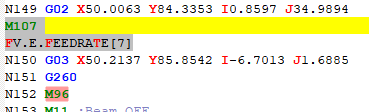
I am able to add the text right above M96 by using the below, but I am not sure how to enter it 2 lines prior.
Find What =
M96
Replace With =\n\M107\n\FV.E.FEEDRATE[7]\n\M96
Search Mode = REGULAR EXPRESSION
Dot Matches Newline =NOT CHECKED -
There are multiple ways of doing it.
One is to use a “lookahead” that matches two whole lines followed by a line containing
M96. Because it’s a lookahead, the “cursor” is still at the beginning of the first of those three lines, so any replacement you do will be before those three lines, so 2 lines before theM96:
FIND =(?-s)(?=^.*$\R.*$\R.*M96\b)
REPLACE =M107\nFV.E.FEEDRATE[7]\n
SEARCH MODE = regular expression
(the(?-s)will cause the regex to be equivalent to .-matches-newline not checked whether or not it’s checked)
(Because the cursor was at the start of the line two lines before M96, I put the newlines at the end of each line in the replacement)Note that I used the Unix LF
\nfor the newline in the replacement, which is what you showed (though I was confused by the extra\between your\nand yourM107in the replacement). If you really have Windows CRLF newlines, use\r\nfor each newline in the replacement.You could also do a non-lookahead match which stores the previous two lines through the M96 in a capture group, or makes use of the
$0“whole capture” group:
FIND =(?-s)^.*$\R.*$\R.*M96\b
REPLACE =M107\nFV.E.FEEDRATE[7]\n$0
SEARCH MODE = Regular Expression-—
Useful References
-
@peterjones Thank you! I appreciate it!
-
Hello @daniel-James, @peterjones and All,
The regex S/R, provided by @peterjones, supposes that you click ONCE only on the
Replace AllbuttonIndeed, given this INPUT text :
N149 G02 X50.0063 Y84.3353 I0.8597 J34.9894
N150 G03 X50.2137 Y85.8542 I-6.7013 J1.6885
N151 G260
N152 M96

N153 G04 X50.0063 Y84.3353 I0.8597 J34.9894
N154 G05 X50.2137 Y85.8542 I-6.7013 J1.6885
N155 G870
N156 M96
Assuming that the
Wrap aroundis tickedAnd the following regex S/R :
SEARCH
(?-si)(?=^.+\R.+\R.+M96\b)REPLACE
M107\nFV.E. FEEDRATE[7]\nIf you click, for instance, three times on the
Replace Allbutton, you’ll get the following OUTPUT text :N149 G02 X50.0063 Y84.3353 I0.8597 J34.9894 M107 FV.E. FEEDRATE[7] M107 FV.E. FEEDRATE[7] M107 FV.E. FEEDRATE[7] N150 G03 X50.2137 Y85.8542 I-6.7013 J1.6885 N151 G260 N152 M96 N153 G04 X50.0063 Y84.3353 I0.8597 J34.9894 M107 FV.E. FEEDRATE[7] M107 FV.E. FEEDRATE[7] M107 FV.E. FEEDRATE[7] N154 G05 X50.2137 Y85.8542 I-6.7013 J1.6885 N155 G870 N156 M96Not exactly what we want, isn’t it ?
We can solve this problem by using backtracking control verbs. The idea is to use the couple
(*SKIP)(*FAIL)or(*SKIP)(*F)with the generic regex :What I DON’T want
(*SKIP)(*F)|What I DO wantThis leads to the practical regex S/R :
SEARCH
(?-si)^M107\R(?:.+\R){3}.+M96\b(*SKIP)(*F)|(?=^.+\R.+\R.+M96\b)REPLACE
M107\nFV.E. FEEDRATE[7]\nNote that the part to discard, before
(*SKIP), is the five complete lines beginning withM107and ending withM96
So, given the INPUT text, below, containing two sections where the two lines
M107...FV.E...have already being inserted :N149 G02 X50.0063 Y84.3353 I0.8597 J34.9894 N150 G03 X50.2137 Y85.8542 I-6.7013 J1.6885 N151 G260 N152 M96 N153 G05 X50.0063 Y84.3353 I0.8597 J34.9894 M107 FV.E. FEEDRATE[7] N154 G06 X50.2137 Y85.8542 I-6.7013 J1.6885 N155 G500 N156 M96 N157 G07 X50.0063 Y84.3353 I0.8597 J34.9894 N158 G08 X50.2137 Y85.8542 I-6.7013 J1.6885 N159 G100 N160 M96 N161 G00 X50.0063 Y84.3353 I0.8597 J34.9894 M107 FV.E. FEEDRATE[7] N162 G99 X50.2137 Y85.8542 I-6.7013 J1.6885 N163 G300 N164 M96 N165 G10 X50.0063 Y84.3353 I0.8597 J34.9894 N166 G20 X50.2137 Y85.8542 I-6.7013 J1.6885 N167 G000 N168 M96The new regex S/R would give, after a first click on the
Replace Allbutton :N149 G02 X50.0063 Y84.3353 I0.8597 J34.9894 M107 FV.E. FEEDRATE[7] N150 G03 X50.2137 Y85.8542 I-6.7013 J1.6885 N151 G260 N152 M96 N153 G05 X50.0063 Y84.3353 I0.8597 J34.9894 M107 FV.E. FEEDRATE[7] N154 G06 X50.2137 Y85.8542 I-6.7013 J1.6885 N155 G500 N156 M96 N157 G07 X50.0063 Y84.3353 I0.8597 J34.9894 M107 FV.E. FEEDRATE[7] N158 G08 X50.2137 Y85.8542 I-6.7013 J1.6885 N159 G100 N160 M96 N161 G00 X50.0063 Y84.3353 I0.8597 J34.9894 M107 FV.E. FEEDRATE[7] N162 G99 X50.2137 Y85.8542 I-6.7013 J1.6885 N163 G300 N164 M96 N165 G10 X50.0063 Y84.3353 I0.8597 J34.9894 M107 FV.E. FEEDRATE[7] N166 G20 X50.2137 Y85.8542 I-6.7013 J1.6885 N167 G000 N168 M96And, as expected, all the subsequent clicks, on the
Replace Allbutton, would return the messageReplace All: O occurrences were replaced!
If we do not want to use the uncommon
(*...)syntaxes, a solution, with a conditional replacement, could be :SEARCH
(?-si)(^M107\R(?:.+\R){3}.+M96\b)|(?=^.+\R.+\R.+M96\b)REPLACE
?1$0:M107\nFV.E. FEEDRATE[7]\nHowever, with this solution, and assuming our second INPUT text, we get :
-
Five replacements after a first click on the
Replace Allbutton ( Twoidenticalreplacements and threeinsertions) -
Five
identicalreplacements after any subsequent click on theReplace Allbutton
Best Regards,
guy038
-
-
@guy038 said in Inserting 2 lines of text 2 lines prior to a known variable:
What I DON’T want(*SKIP)(*F)|What I DO wantTHAT is a nice way to put it. :-)
-
Hi, @alan-kilborn, and All,
Actually, I was inspired by this article :
https://www.rexegg.com/backtracking-control-verbs.html#skipfail
where it is said :
In effect,
(*SKIP)(*FAIL)says: “Throw away anything you can match to the left of me.”
Please, visit this excellent regex site :
BR
guy038




Hello! It looks like you're interested in this conversation, but you don't have an account yet.
Getting fed up of having to scroll through the same posts each visit? When you register for an account, you'll always come back to exactly where you were before, and choose to be notified of new replies (either via email, or push notification). You'll also be able to save bookmarks and upvote posts to show your appreciation to other community members.
With your input, this post could be even better 💗
Register Login