Add line break in paste after multi-editing
-
-
-
@spiros-doikas said in Add line break in paste after multi-editing:
if one selects multiple strings and then pastes, they are pasted in one long string
Don’t you really mean?:
“if one selects multiple strings and then copies, then pastes that data somewhere else, they are pasted as one long string”
Such behavior is arguably best left to scripting. Here’s a PythonScript that I call
MultiSelectCopyAddDelimiters.pythat implements the desired functionality:# -*- coding: utf-8 -*- #------------------------------------------------------------------------------- class MSCAD(object): def __init__(self): preferred_delimiter = '\r\n' if editor.getSelections() == 1 or editor.selectionIsRectangle(): return # not our purview sel_text_list = [] for n in range(editor.getSelections()): (s, e) = (editor.getSelectionNStart(n), editor.getSelectionNEnd(n)) t = editor.getTextRange(s, e) sel_text_list.append(t) editor.copyText(preferred_delimiter.join(sel_text_list) + '\r\n') #------------------------------------------------------------------------------- if __name__ == '__main__': MSCAD() -
Hi thanks!
Well, in my opinion this is very basic functionality making paste after multi-copy usable in common scenarios (compare similar functionality in MS Word for example).
Not sure how to run the script. I tried multi copy first, then running the script via Plugins > Python Script > the actual script but I had no output.
-
@spiros-doikas said in Add line break in paste after multi-editing:
Not sure how to run the script. I tried multi copy first, then running the script via Plugins > Python Script > the actual script but I had no output.
It sounds like you figured out what you needed to do (mostly), but I should have directed you HERE anyway (sorry).
To use the script you need to have multiple-selections active first, then run the script, then do a paste somewhere (I thought this was obvious?).
-
To use the script you need to have multiple-selections active first, then run the script, then do a paste somewhere (I thought this was obvious?).
This is what I did:
- multiple-selections active
- Make multi-selections and press Ctrl+C
- run the script
- do a paste somewhere
-
I’m really confused but maybe you are one of those confusing persons we get here occasionally. :-) I’m not even sure from your most-recent posting if a) you can’t get it to work or b) you got it to work and you are just sharing what you did as part of a victory lap. I’ll assume a)…
If you have “multiple selections active” in step 1 why do you need to “make multi-selections” in step 2?
There is no need to press Ctrl+c in your step 2; the script does the copy.
Let me show how it should go:
-
Make multiple selections:
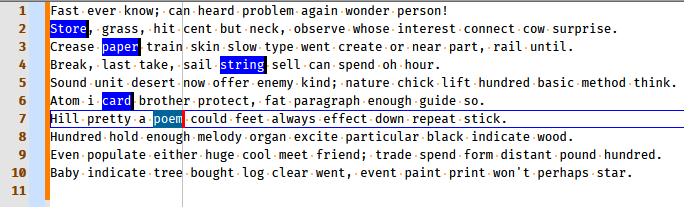
-
Run the script (because you want to copy, with delimiters between the individual items, the currently multi-selected text).
-
Paste somewhere to obtain:
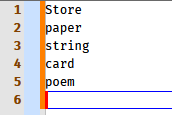
Is this not clear?
Anyone? Anyone? -
-
@alan-kilborn Thank you! I did try the way you described it. But it would not paste the multi-selection items (instead it pastes what was previously in the clipboard).
Please see below -
Well, I guess at this point we have to wait for someone else to try it, and weigh in on how it went for them. :-(
-
@alan-kilborn Your code may be just fine, and thank you again for that, it could be anything as we have different environments… I tested of course other scripts from the same folder and they do produce results.
-
@alan-kilborn said in Add line break in paste after multi-editing:
wait for someone else to try it, and weigh in on how it went for them
I installed the script, selected old text and verified it was in the clipboard by pasting. Then I selected two or three disjoint sections in multi-select mode, ran the script, and then pasted, and it pasted each section of the new multi-section data with a newline between, so worked exactly as I believe it was described.

@Spiros-Doikas , you should look at Plugins > Python Script > Show Console after running the script, and see if it is giving you an error message.



Hello! It looks like you're interested in this conversation, but you don't have an account yet.
Getting fed up of having to scroll through the same posts each visit? When you register for an account, you'll always come back to exactly where you were before, and choose to be notified of new replies (either via email, or push notification). You'll also be able to save bookmarks and upvote posts to show your appreciation to other community members.
With your input, this post could be even better 💗
Register Login