[Suggestion] Restoring a closed tab
-
Hello.
Please add the opportunity to restore the tab after closing.Regards.
-
-
@user-soft said in [Suggestion] Restoring a closed tab:
Hello.
Please add the opportunity to restore the tab after closing.Regards.
Thank you, but can you add the same function to the right mouse button when clicking on the tab?
-
can you add the same function to the right mouse button
Using Settings > Edit popup ContextMenu, edit your context menu, adding 41021:
<Item id="41021"/>or by name,
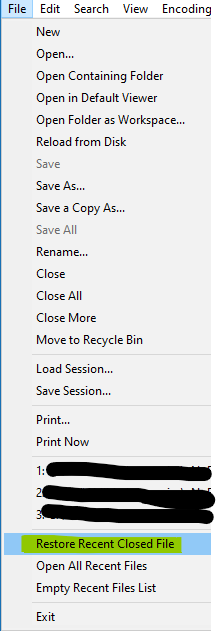
<Item MenuEntryName="Edit" MenuItemName="Restore Recent Closed File"/>-----
Addenda:
when clicking on the tab
Sorry, didn’t see that at first. That one isn’t user-customizable. But there seem to be enough ways to do that same action to me. Does it absolutely have to be in the tab-title right-click? I mean, if your cursor is on the tab’s title already, you’re literally a few pixels above (or to the left) of the editor portion of the window, which allows you to use the customized right click menu.
-
@peterjones i suggestion to make this function as on the Internet browsers. Press the right button on any tab and select “Restore the Closed tab.”
-
As I said, the feature you want can be added literally pixels away
But if those pixels, and having to edit the config file, just don’t meet your desires, then please see the FAQ:
https://community.notepad-plus-plus.org/topic/15741/faq-desk-feature-request-or-bug-report -
Reopening a “just-closed” file is somewhat of an exceptional action. Thus, having to go to the File menu for it is not that big of a deal.



Hello! It looks like you're interested in this conversation, but you don't have an account yet.
Getting fed up of having to scroll through the same posts each visit? When you register for an account, you'll always come back to exactly where you were before, and choose to be notified of new replies (either via email, or push notification). You'll also be able to save bookmarks and upvote posts to show your appreciation to other community members.
With your input, this post could be even better 💗
Register Login