Search and replace window: tab (to navigate) doesn't work as it used to
-
Hi.
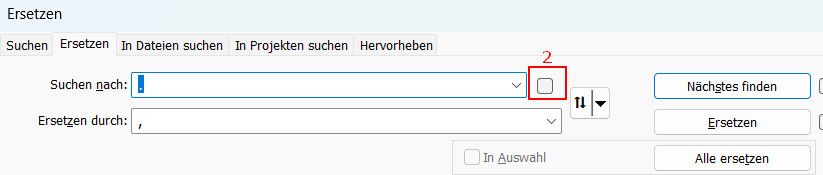
When using the S+R popup, nowadays the second navigation item when using Tab (as we all do, I think), is the checkbox - at least for me it seems new. Therefore, when pasting the replacement phrase or trying to write it, there’s always an error first. I think it would be wise to put this checkbox as third item on the tab navi list. Btw: With my version (and even when I extend the window), no text for the box will be visible. Somewhat impracticable…
Thanks
Olli
Debug-info:
Notepad++ v8.9.9.1 (64-bit)
Build time: Nov 12 2026 - 02:04:15
Scintilla/Lexilla included: 5.6.9/5.5.5
Boost Regex included: 1_92
pugixml included: 1.16
nlohmann JSON included: 3.12.0
Path: C:\Program Files\Notepad++\notepad++.exe
Command Line: “C:\Users\OliverBarrenbrügge\OneDrive - Seokratie GmbH\Desktop\claude spielwiese\claude-rahmenversand\google_de_1-4-cm-1-cm-10-x-10_overview_2026-11-20_11-27-44.csv” “C:\Users\OliverBarrenbrügge\OneDrive - Seokratie GmbH\Desktop\claude spielwiese\claude-rahmenversand\google_de_1-4-cm-1-cm-10-x-10_overview_2026-11-20_11-28-04.csv” “C:\Users\OliverBarrenbrügge\OneDrive - Seokratie GmbH\Desktop\claude spielwiese\claude-rahmenversand\google_de_3d-bilderrahmen-3d-bilderr_overview_2026-11-20_11-22-35.csv” “C:\Users\OliverBarrenbrügge\OneDrive - Seokratie GmbH\Desktop\claude spielwiese\claude-rahmenversand\google_de_13x18-bilderrahmen-18x24-1_overview_2026-11-20_11-28-33.csv” “C:\Users\OliverBarrenbrügge\OneDrive - Seokratie GmbH\Desktop\claude spielwiese\claude-rahmenversand\google_de_40-x-60-bilderrahmen-40x40_overview_2026-11-20_11-24-47.csv” “C:\Users\OliverBarrenbrügge\OneDrive - Seokratie GmbH\Desktop\claude spielwiese\claude-rahmenversand\google_de_bilder-mit-schwarzen-rahme_overview_2026-11-20_11-27-05.csv” “C:\Users\OliverBarrenbrügge\OneDrive - Seokratie GmbH\Desktop\claude spielwiese\claude-rahmenversand\google_de_bilderrahmen-10-5x15-braun_overview_2026-11-20_11-25-26.csv” “C:\Users\OliverBarrenbrügge\OneDrive - Seokratie GmbH\Desktop\claude spielwiese\claude-rahmenversand\google_de_bilderrahmen-10-5x15-gold_overview_2026-11-20_11-25-59.csv” “C:\Users\OliverBarrenbrügge\OneDrive - Seokratie GmbH\Desktop\claude spielwiese\claude-rahmenversand\google_de_bilderrahmen-10-5x15-natur_overview_2026-11-20_11-26-33.csv”
Admin mode: OFF
Local Conf mode: OFF
Cloud Config: OFF
WinGUp: present
disableNppAutoUpdate.xml: absent
Periodic Backup: OFF
Placeholders: OFF
Scintilla Rendering Mode: SC_TECHNOLOGY_DIRECTWRITE (1)
Multi-instance Mode: monoInst
asNotepad: OFF
File Status Auto-Detection: cdEnabled4CurrentFile
Dark Mode: OFF
Display Info:
primary monitor: 5120x1440, scaling 125%
visible monitors count: 1
installed Display Class adapters:
0000: Description - Intel® Iris® Xe Graphics
0000: DriverVersion - 32.0.101.7085
OS Name: Windows 11 Pro (64-bit)
OS Version: 26H2
OS Build: 26300.9974
Current ANSI codepage: 1252
Plugins:
mimeTools (3.2)
NppConverter (4.7)
NppExport (0.4) -
When using the S+R popup, nowadays the second navigation item when using Tab (as we all do, I think), is the checkbox - at least for me it seems new
Lots of people have already complained about this, including multiple in the 8.9.9.1 announcement, here, here, and here; as well as two issues, #18639 and #18662
. The code has been updated, so the order will be changed in the next version, so that one TAB from FIND is REPLACE, as it used to be.

Hello! It looks like you're interested in this conversation, but you don't have an account yet.
Getting fed up of having to scroll through the same posts each visit? When you register for an account, you'll always come back to exactly where you were before, and choose to be notified of new replies (either via email, or push notification). You'll also be able to save bookmarks and upvote posts to show your appreciation to other community members.
With your input, this post could be even better 💗
Register Login