Tab spacing copying from Notepad++ into WordPress
-
Hi,
I’m having this strange issue where I am editing a css file in NP++ and have all my indentations perfect to 2 spaces. I then copy and paste the entire code from NP++ in to WordPress via Appearance > Editor > Styles > Additional CSS field.
For some reason, the indentation of the pasted code in Additional CSS window is completely out of whack. The spacing varies from 4 to 8 and there’s no consistency at all, as if it completely randomises it. Because I sometimes edit my css directly in WordPress, it makes it awful to work with.
Does anyone know what’s up with this?
Thanks.
-
indentations perfect to 2 spaces
Does this mean that you have Notepad++ set up such that tab characters are visualized as two spaces, or that you aren’t using tab characters at all and simply have Notepad++ directly insert two spaces when you press the Tab key when your caret is in a tab-stop column?
If you are inserting tab characters in your Notepad++ document, then copying your text to another program for processing allows that other program to interpret tab characters as it sees fit (which could easily be different from “two spaces” in Wordpress’s default handling).
Possible solutions to your “problem” might be to stop using tab characters (if that’s truly what you are doing), or look into adjusting Wordpress’s settings for how to handle tab characters (if it has such settings).
-
Hi,
Yes I’m using tab setting of 2.
The problem seems to be weirder that just application processing tab characters differently because it’s not uniform. Like I said, in Notepad++, I have the same amount of tabs per line for clean formatting of my CSS file. Yet in the WP portal, the lines will have different amount of tabs/spaces, not all uniformly different by the same amount.
For example, this is how it might appear in NP++
. div {
(2 spaces)display: block;
(2 spaces)font-family: Arial;
(2 spaces)text-align: right;
(2 spaces)font-size: 20px;
}In WordPress, it might look like this:
. div {
(2 spaces)display: block;
(8 spaces)font-family: Arial;
(4 spaces)text-align: right;
(4 spaces)font-size: 20px;
}Note: I had to represent the spaces in brackets as the forum editor removes them from my post.
-
The problem seems to be weirder that just application processing tab characters differently because it’s not uniform. Like I said, in Notepad++, I have the same amount of tabs per line for clean formatting of my CSS file. Yet in the WP portal, the lines will have different amount of tabs/spaces, not all uniformly different by the same amount.
I’m not sure where this will lead, but something worth checking might be this: After you have pasted your text into WordPress and you see the unexpected results, highlight and copy that text and paste it into a new Notepad++ tab. See if the text itself is changing, or if WordPress is just displaying it differently.
Also of possible relevance to diagnosis:
At Settings | Preferences… | Indentation have you selected Indent using Tab character or Space character(s)?
At View | Show Symbols consider checkmarking Show Space and Tab, if you don’t already have it checked, so you can see anything unexpected that might be happening in your source file.
Finally, showing us ? | Debug Info… is always a good idea; if for no other reason, to confirm no plugins are in use that might cause issues.
-
Yes I’m using tab setting of 2.
The problem seems to be weirder that just application processing tab characters differently because it’s not uniform.
That tells me that you probably have a mix of spaces and tabs, without realizing it. In Notepad++, use View > Show Symbol > Show Space and Tab. You will see a middot
•for spaces, and an arrow→for tabs… the width of the arrow will grow to fit the remaining space in the tab-spacing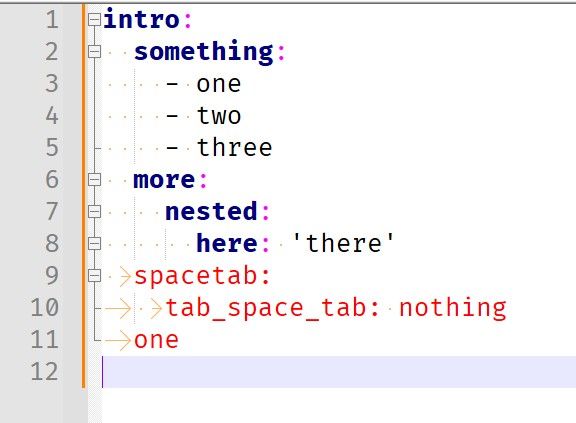
(2 spaces)display: block; (8 spaces)font-family: Arial; (4 spaces)text-align: right; (4 spaces)font-size: 20px;So what this tells me is that your actual file, in Notpead++, is really as follows, with your WordPress being set to show 4 spaces per tab instead of two:
[SPACE][SPACE]display: block;
[TAB][TAB]font-family: Arial;
[SPACE][TAB]text-align: right;
[SPACE][TAB]font-size: 20px;
Though the 8-wide version being two tabs surprises me, because that wouldn’t look aligned properly in Notepad++
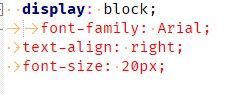
But my guess is it’s similar to that, if not that exactly.
-
Yep, you both got it. When I checkmarked Show Space and Tab, I could see that there’s a mixture of spaces and tabs that correlates directly to the funky spacing in WP.
I’m fairly new to coding. Could someone offer a reason for using the tab vs space character setting or vice versa for html and css docs? Why I might choose one over the other?
Cheers.
-
Could someone offer a reason for using the tab vs space character setting
Personal preference. Corporate coding standards.
Some use tabs because they save a few bytes – which was more important in the old days.
I use spaces because the tab character breaks “monospace”. IMO, tab was a useful character for people who were used to mechanical typewriters, and for remote virtual terminals in the era of 300 baud connection, but that control character shouldn’t be part of a text document in the modern era. (I exaggerate my case intentionally.)
Really, the important thing is self-consistency.
-
-
Don’t worry I googled it.




Hello! It looks like you're interested in this conversation, but you don't have an account yet.
Getting fed up of having to scroll through the same posts each visit? When you register for an account, you'll always come back to exactly where you were before, and choose to be notified of new replies (either via email, or push notification). You'll also be able to save bookmarks and upvote posts to show your appreciation to other community members.
With your input, this post could be even better 💗
Register Login