Vertical tabs with horizontal text?
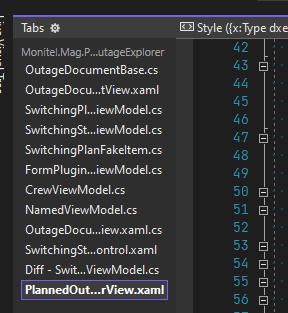
-
@PeterJones Acceptable Thanks, this is acceptable decision except closing documents by mouse wheel clicking in documents list
-
@Michael-Mankiewicz said in Vertical tabs with horizontal text?:
this is acceptable decision except closing documents by mouse wheel clicking in documents list
Not 100% sure about what you mean by this.
Middle button click-to-close in Document List is coming to N++ 8.5, see point number 7 HERE. -
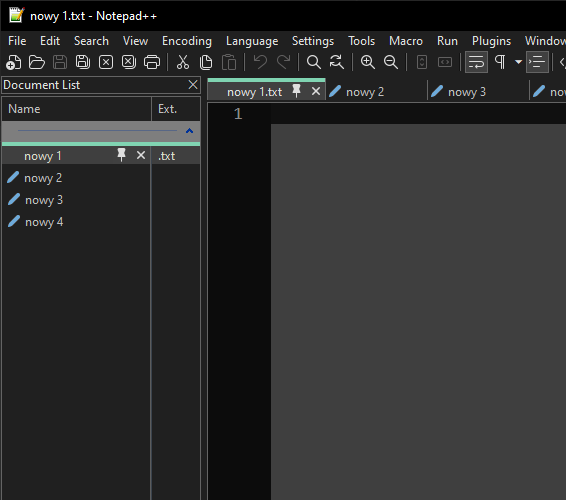
Vertical tabs are becoming increasingly popular in the browser world, it would be great if they were fully implemented in N++ as well.
The Document List panel is unfortunately not the solution, as it does not inherit the functionality, behavior, and style of the currently existing tab bar. The open tab is not even highlighted in any way.
It would be great if vertical tabs could fully replace the tab bar if the user decides to disable it.
Here’s a visualization of what I mean.
-
@YellowAsterisk said:
The open tab is not even highlighted in any way.
Yes it is.
does not inherit the functionality, behavior, and style of the currently existing tab bar.
I guess you’d better start typing in specifics about what you’re missing…
-
@Alan-Kilborn said in Vertical tabs with horizontal text?:
Yes it is.
You’re right, it’s selected until you click somewhere else on the panel. This is in no way equal to the behavior as in the tab bar.
I guess you’d better start typing in specifics about what you’re missing…
- Highlighting the opened tab as in the tab bar (with colored top etc.).
- Option to drag the tab.
- Button to close the tab.
- Button to pin the tab.
- Option to enlarge vertical tabs, like the current horizontal tabs with ‘Reduce’ option unchecked.
-
@YellowAsterisk said:
it’s selected until you click somewhere else on the panel
If you click in the whitespace of the panel, then yes, current-tab highlighting disappears. But, why would you click in the whitespace? Clicking anywhere else, the current tab is differentiated from the other tabs – unless (very possible), I’m missing something…
Button to close the tab.
Right-click > Close
Button to pin the tab
Right-click > Pin
But… the tab doesn’t move to the “top” of the list. Probably this is just a vestige of pinned tab support gradually evolving. -
@Michael-Mankiewicz Ya, it blow my mind that we still do not have this in 2025, considering the world migrated to widescreen monitors way back around 2009.
To be fair, Web Browsers took ages to begin implementing it as well, and it was an even more obvious solution in that use case; seeing as displays are widescreen and most websites are vertically oriented leading to unused horizontal space. I banged my head on the desk for almost a decade before browser finally began implementing proper vertical tab solutions. Horizontal tabs you can fit about 8 across the top while still seeing page titles, versus something like 25-30 tabs with titles when stacking tabs vertically on the side.
The same holds true for note apps. In most cases my text file work is vertically oriented, and even when text lines are wide I am used to using word wrap. So using a small percentage of screen real estate for a margin on the side to show quite a few more tabs with filenames just seems logical. It may even be more useful having this on note apps than even web browsers for people like myself that put a lot of info into filenames, causing those tabs across the top to be very long. I just checked my current notepad++ instance and it fits 7 tabs across the top, which makes for a lot of left/right scrolling.
PLEASE consider proper vertical tabs! The current “feature” feels like it was implemented as a troll to everyone that bothered asking for proper vertical tabs over the years.
-
@n3tcom said in Vertical tabs with horizontal text?:
PLEASE consider proper vertical tabs! The current “feature” feels like it was implemented as a troll to everyone that bothered asking for proper vertical tabs over the years
The readers of this post are users of Notepad++, not the Developer of the app. See our FAQ
it blow my mind that we still do not have this in 2025
Easily explainable if no one has officially requested it, and/or if the developer never thought of it, was never interested in it, or believes that the Document List feature is close enough.
-
Any updates on this? Or do I have to “vibe-code” a fork of Notepad++?
-
You wrote the same thing about an hour earlier in Issue #4661, so I feel it is reasonable to assume you read the entire conversation there: if so, then you saw that the issue was rejected because the developer felt that Document List is a sufficient alternative. As such, there will be no “progress” on a rejected issue unless someone convinces him to re-open the issue. (There are thousands of open issues; my guess is that he stops reading replies to closed issues, as one person doesn’t have the bandwidth to watch conversations in thousands more closed issues.)
If you wanted to vibe-code something that works, then do so. And submit a PR against that closed Issue – and if it’s a good solution, where you can show how it’s better than just using Document List, there is a chance it would be accepted, especially if you politely point out all the requests to reopen. … but only a very small chance. Especially if the coding is not up to snuff. So make sure you check against CONTRIBUTING.md before you submit.
-
This discussion does have something that the Issue doesn’t: the explicit list of limitations/improvements to the Document List that would need to be implemented to make it an acceptible alternative.
Highlighting the opened tab as in the tab bar (with colored top etc.).
Color would be nice. But as @alan-kilborn pointed out, it does show the “selected” bar on the active Document when you’re working in the editor side of things. And true, if you click in the empty space in the Document List, it de-highlights that… but I’m not sure that’s unexpected, so probably color would be better.
Option to drag the tab.
You cannot drag (yet), though #13961, #7690, and #2221 are all open requests for the drag-the-tab. If someone wanted to successfully code that (vibe or otherwise), meeting all the requirements in CONTRIBUTING.md, that would be awesome, since it’s literally been a request since 2016.
As a workaround, as mentioned in this comment, and as I reiterated in this comment, the
Ctrl+Shift+PageUp/PageDownshortcuts for View > Tab > Move Tab Backward/Forward do work, even when the Document List panel has focus: so if you click on the tab you want to move, instead of dragging, you canCtrl+Shift+PageXXXto move it around in the list. For long lists, you can hold the combo to just wait while it progresses through the long list. (And if you assign keys to the View > Tab > Move to Start/End actions in Shortcut Mapper, you can use those shortcuts there, as well.)Option to enlarge vertical tabs, like the current horizontal tabs with ‘Reduce’ option unchecked.
Admittedly, this doesn’t exist.
(update: deleted portions of my reply that were basically replica’s of @alan-kilborn’s response from Jan 2025)




Hello! It looks like you're interested in this conversation, but you don't have an account yet.
Getting fed up of having to scroll through the same posts each visit? When you register for an account, you'll always come back to exactly where you were before, and choose to be notified of new replies (either via email, or push notification). You'll also be able to save bookmarks and upvote posts to show your appreciation to other community members.
With your input, this post could be even better 💗
Register Login