Style Configurations Reset After Update
-
Are you using the installed version or the portable version?
The portable version will do this by design. It is a replacement process.
Terry
-
-
-
Notepad++ v8.8.7 (64-bit)
Build time: Oct 19 2025 - 16:19:15
Scintilla/Lexilla included: 5.5.7/5.4.5
Boost Regex included: 1_85
Path: C:\Program Files\Notepad++\notepad++.exe
Command Line:
Admin mode: ON
Local Conf mode: OFF
Cloud Config: OFF
Periodic Backup: ON
Placeholders: OFF
Scintilla Rendering Mode: SC_TECHNOLOGY_DIRECTWRITE (1)
Multi-instance Mode: monoInst
asNotepad: OFF
File Status Auto-Detection: cdEnabledNew (for current file/tab only)
Dark Mode: OFF
Display Info:
primary monitor: 1920x1080, scaling 125%
visible monitors count: 1
installed Display Class adapters:
0001: Description - Intel® Iris® Xe Graphics
0001: DriverVersion - 32.0.101.7076
OS Name: Windows 11 Enterprise (64-bit)
OS Version: 25H2
OS Build: 26200.6901
Current ANSI codepage: 1252
Plugins:
mimeTools (3.1)
NppConverter (4.7)
NppExport (0.4) -
@subodhjaiswar
You have “admin” mode on. Do you often or always run in admin mode?It’s late here so no time to confirm my suspicion but I think that will possibly be the reason for your issue. Likely by the time I wake up others will have confirmed what I suspect.
Terry
-
I am only user using my system and I have the admin privilege as its needed for during my routine work.
Do I need as different method why installing NP or I can switch to non-Admin mode only in NP, also will non-admin mode allow software update/install.
Thanks for your reply.
-
I am only user using my system and I have the admin privilege as its needed for during my routine work.
Your account can have administrative privileges without running every application in Admin mode.
And, especially with Notepad++ v8.8.7, there is no reason to run Notepad++ “as Administrator”, because anytime that Notepad++ v8.8.6 or newer tries to save a file but doesn’t have permission, it will pop up a UAC, so it will properly save that file. And unless you are editing a lot of files in the Windows hierarchy, Notepad++ shouldn’t actually need UAC permission all that often.
Do I need as different method why installing NP or I can switch to non-Admin mode only in NP, also will non-admin mode allow software update/install.
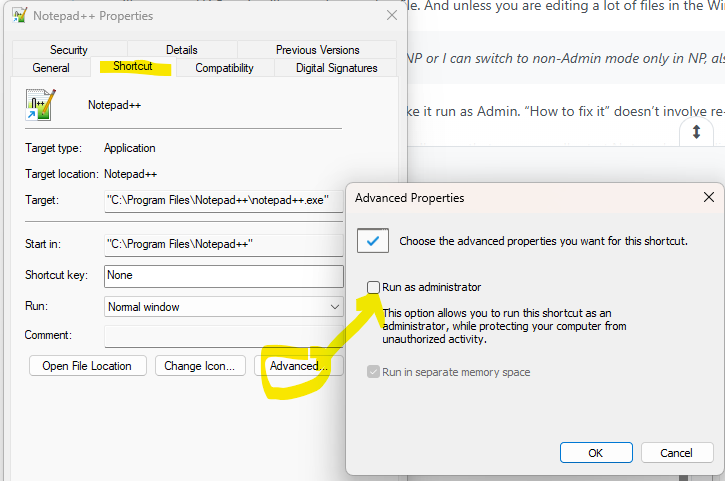
You actually had to do something special to make it run as Admin. “How to fix it” doesn’t involve re-installing, though it might involve changing one or more shortcuts:
- If you have the N++ icon pinned to your toolbar, so that you normally start Notepad++ by clicking its icon on the same bar as the start menu and where the running programs are shown, you can right click on the icon, then right click on
Notepad++in that menu, then choose Properties, which will allow you to edit that shortcut’s properties. Click on Advanced… , and if Run as Administrator is checkmarked, uncheckmark it, then OK a couple times to get it to save. - If you have the N++ icon on your desktop, so that you normally or often start Notepad++ by double-clicking on the desktop icon, you can right click on that desktop icon, choose Properties then Advanced… and if Run as Administrator is checkmarked, uncheckmark it, then OK a couple times to get it to save.
- If you usually use the the Notepad++ icon in the Start menu to run Notepad++, then you can right click that icon, Open File Location. In the folder that it pulls up, right click on the Notepad++ icon, choose Properties then Advanced… and if Run as Administrator is checkmarked, uncheckmark it, then OK a couple times to get it to save.
- If you usually double-click a file, and Notepad++ gets launched as a result, under normal circumstances, this should not run as Administrator. if it is, I am not sure how to fix it.
(I thought there was a similar run-as-admin checkbox for the exe itself, but I cannot see it in the properties or advanced for the exe, so my memory is playing tricks on me)
So, if you aren’t able to get it to stop running in the
Admin mode: ON(the title bar will also say[Administrator]at the end if it’s admin mode), then let us know which things you tried, and how Notepad++ is normally launched (whether by a shortcut, or double-clicking the file you want to edit, or whether Notepad++ starts when you boot Windows), and maybe someone else will remember how to turn it off for your specific circumstances.
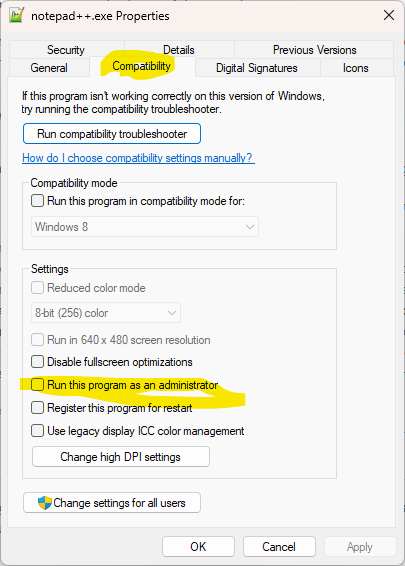
update: Ahh, if you go to the Notepad++ directory and right-click Properties on the
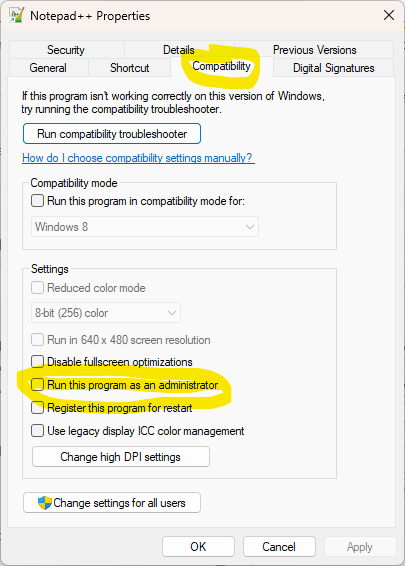
notepad++.exeitself, it’s on the Compatibility tab of the dialog; and you can actually find the checkbox there for the shortcuts, too, instead of going to the Advanced… button.exe properties > compatibility:
shortcut properties > advanced:
shorcut properties > compatibility:
- If you have the N++ icon pinned to your toolbar, so that you normally start Notepad++ by clicking its icon on the same bar as the start menu and where the running programs are shown, you can right click on the icon, then right click on
-
- When my IT admin gave me my laptop with my ID(Domain) configured as part of local administrator group, I just simply install NP++ by downloading from Chrome.
- Then I launched from desktop, or Start–>N+±-> Enter
- Then I pinned NP++ and every time my laptop restart I launch NP++ from taskbar
- For the update I check from site if new version have released I simply download from chrome and install it, and NP++ is updated to latest version.
- Since my TP is a single user and no other user I am not sure how to run NP++ with No Admin
- Yes the NP++ shows [Administrator]
Please advise on how do I retain my style settings.
Regards,
Subodh Jaiswar -
@subodhjaiswar said in Style Configurations Reset After Update:
- When my IT admin gave me my laptop with my ID(Domain) configured as part of local administrator group, I just simply install NP++ by downloading from Chrome.
Being part of the administrator group does not force Notepad++ to run in Admin mode. I have always been part of the administrator group, both on my personal PCs and on my work machines. I do not run Notepad++ as administrator.
- Then I launched from desktop, or Start–>N+±-> Enter
Did you look at those shortcuts, as I explained?
- Then I pinned NP++ and every time my laptop restart I launch NP++ from taskbar
Did you look at that shortcut, as I explained?
- Since my TP is a single user and no other user I am not sure how to run NP++ with No Admin
I gave you detailed instructions on how to look for the “Run this program as an administrator” checkbox, both for shortcuts and for the
notepad++.exeexecutable. You have to find the ones that are checked, and uncheckmark themPlease advise on how do I retain my style settings.
The instructions already given told you the first step. If you ignore the first step, you cannot hope to fix your problem.
-
 T Terry R referenced this topic on
-
But what if I want (need) to run in “Admin Mode” ??? Is Notepad++ unable to run in “Admin Mode” and still save Style Configurations? That seems silly.
-
@networkproblemsolver said in Style Configurations Reset After Update:
But what if I want (need) to run in “Admin Mode” ??? Is Notepad++ unable to run in “Admin Mode” and still save Style Configurations? That seems silly.
Security experts would tell you that constantly running any app in admin/root mode is a lot worse than silly.
And since Notepad++ v8.6.6, there is no reason to run Notepad++ in Admin mode to edit/save UAC-protected files, because Notepad++ can ask for UAC Elevation for the individual save actions . So the only activity that you might still need to run Notepad++ in Admin mode for is when installing a new plugin, and you don’t need to be constantly running in Admin mode for that. That is: you most likely don’t “need” to run in Admin mode anymore.
That said, the reason why Notepad++ often has problem with Admin mode and settings is because of cross-contamination of permissions: running an app in Elevated privileges makes WINDOWS treat that app differently. It may be that with your current setup, the Elevated/Admin-mode won’t allow writing to AppData (since that’s a per-user, and for some system configurations, WINDOWS won’t allow admin to write to %AppData%). Or it might be that because you often ran N++ as Admin that the AppData-based settings might have been created/saved with Admin-privileges, so when you run N++ as normal user it cannot read or save the settings. Without being able to look at your file permissions for you, I cannot say exactly what caused it – you would need to verify where Notepad++ is trying to do the settings, and look at the directory and the
stylers.xmlin that directory, looking at Windows’ SECURITY settings for both; and then maybe try running experiments to see whether changing a setting/style-configurator in Notepad++ is saved when you exit Notepad++ when running normally and/or when running as Admin.
