Restore Default-Ticked ‘Follow File Path’ Option or Allow State Saving
-
Hello,
Before version 8.7.5 (in 8.7.4 and earlier), the “Follow File Path” option was enabled (ticked) by default. Users could untick it if they didn’t want it, but when reopening the feature, it would be ticked again by default. This meant we didn’t have to click it manually every time.In 8.7.5, the tick box has been replaced with a button. However, the button’s state is not saved — so for every new search or file path, I have to click it again manually.
Would it be possible to restore the old default-ticked checkbox system, or at least allow the setting to be saved (for example, when clicking the <<< arrow) so it works like the old tick method?
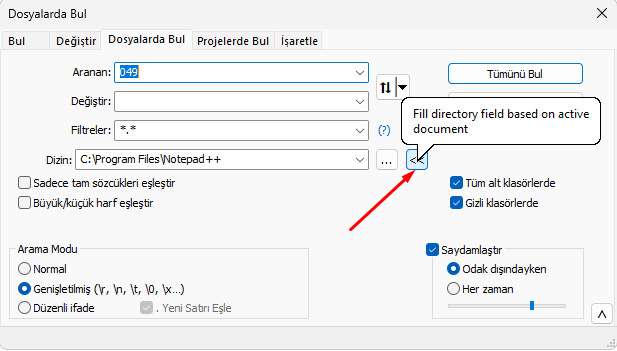
-
@BoomBook said in Restore Default-Ticked ‘Follow File Path’ Option or Allow State Saving:
In 8.7.5, the tick box has been replaced with a button. However, the button’s state is not saved — so for every new search or file path, I have to click it again manually.
In v8.7.5, that checkbox was moved to a setting in Settings > Preferences > Searching >
☐ Fill Find in Files Directory Field Based On Active Document, as there wasn’t enough room in the dialog for both the<<and the labeled checkbox.This is also described in the Find In Files documentation in the User Manual
update: and also mentioned in the v8.7.5 Change Log as item 11
-
@PeterJones Thank you. As far as I can see, the function has not been removed. Before concluding this, I downloaded the versions one by one and checked the settings to see if it was still there. I was only able to find an option under “Default Directory.” My issue is now resolved. Thank you.


Hello! It looks like you're interested in this conversation, but you don't have an account yet.
Getting fed up of having to scroll through the same posts each visit? When you register for an account, you'll always come back to exactly where you were before, and choose to be notified of new replies (either via email, or push notification). You'll also be able to save bookmarks and upvote posts to show your appreciation to other community members.
With your input, this post could be even better 💗
Register Login