Search++ (\W)'(\w) regex replace failure
-
I know this is a pain, but would you try:
In the process of attempting to follow your instructions, I suffered a handful of detrimental (though not catastrophic) NPP-related events. Am I supposed to be able to run the portable copy of NPP while the installed copy is also running? When I tried to open the portable, it just brought my installed copy window to the front, and didn’t open anything new. Then I tried closing the installed copy, but immediately got an error dialog. I was hoping to do a screenshot of it but somehow failed to (it may have been something about my session file having been corrupted, as there was no session restoration when I eventually re-opened my installed copy). Rather than hitting OK or whatever option it gave me in the dialog, I tried opening a new installed NPP instance via my AutoHotkey keyboard sequence so I could take some notes that hopefully wouldn’t be affected by whatever problems the first instance was having at that point, but I then immediately got another error dialog, this one specifically for Search++:
A configuration file was found, but it does not contain valid JSON and will be ignored.I hit OK in that one. The new instance opened, and the first error dialog disappeared. I then went ahead and closed the second instance, which resulted in this Search++ dialog:
A configuration file found at startup was ignored because this plugin could not use it.
Do you want to save the current configuration settings? (If Yes, the old file will be overwritten.)
I hit YES, and then also closed the first instance.
I then finally got the portable copy to open, and tried my regex in it. It all worked.
-
@M-Andre-Z-Eckenrode said:
Am I supposed to be able to run the portable copy of NPP while the installed copy is also running? When I tried to open the portable, it just brought my installed copy window to the front, and didn’t open anything new.The portable version has its own settings stored within the portable folder. By default, Notepad++ runs in single instance mode. I tried it and it appears that when the Notepad++ you are attempting to open is in single instance mode, if any Notepad++ executable is open, it will switch to it instead. If you open the portable alone, with no other Notepad++ running, and change Settings | Preferences… | Multi-Instance & Date to Always in multi-instance mode, then you’ll be able to open the portable when the installed version is already running.
Then I tried closing the installed copy, but immediately got an error dialog. I was hoping to do a screenshot of it but somehow failed to (it may have been something about my session file having been corrupted, as there was no session restoration when I eventually re-opened my installed copy).
I have no guess about that.
Rather than hitting OK or whatever option it gave me in the dialog, I tried opening a new installed NPP instance via my AutoHotkey keyboard sequence so I could take some notes that hopefully wouldn’t be affected by whatever problems the first instance was having at that point, but I then immediately got another error dialog, this one specifically for Search++:
A configuration file was found, but it does not contain valid JSON and will be ignored.Installed copies all share a single set of configuration files (for Notepad++ and plugins). This was probably related to the previous error. A possibility is that, since (if I’m following correctly) the instance with the error was still open, the file might have been present but locked, or incomplete.
Search++ puts up that message when the system says there is a file in the right place with the right name, but when I pass the file name to the JSON parser, it says it doesn’t make sense. I haven’t tested, but I suspect that could happen if the file is inaccessible as well as if it contains invalid JSON.
The next message:
A configuration file found at startup was ignored because this plugin could not use it.
Do you want to save the current configuration settings? (If Yes, the old file will be overwritten.)
is then expected when you close Notepad++; if there was some reason you didn’t want to lose the current contents of the file (for example, to diagnose how the file came to contain invalid JSON), that would let you preserve them.
I’m sorry that was such a mess. :-(
I then finally got the portable copy to open, and tried my regex in it. It all worked.
Then that means the cause is almost certainly either a plugin or a Notepad++ setting. I don’t know of any Notepad++ settings that would cause what you saw. My guess is that it’s an interaction with one of the plugins.
If you want to try to figure it out, I think the easiest way would be to go to your installed copy of Notepad++ in Windows Explorer, copy the plugins folder, then go to the portable copy, delete the plugins folder, and paste what you copied. Run the portable again and verify that all your plugins are listed. Then see what happens.
If the problem still doesn’t occur in the portable, then there must be a setting that Search++ doesn’t accommodate properly. If the problem does occur in the portable, try removing plugins one by one to see if you can isolate which one makes it go away.
I understand if you don’t want to pursue all this, though. I’ll look at the plugins listed in your debug information and see if I can find any that might cause a conflict.
-
By default, Notepad++ runs in single instance mode. I tried it and it appears that when the Notepad++ you are attempting to open is in single instance mode, if any Notepad++ executable is open, it will switch to it instead. If you open the portable alone, with no other Notepad++ running, and change Settings | Preferences… | Multi-Instance & Date to Always in multi-instance mode, then you’ll be able to open the portable when the installed version is already running.
I think that rather than mucking with the settings that you already have set the way you want in your main N++, to run a portable alongside it is as simple as adding the
-multiInstcommand line parameter to the invocation of the portable. -
By default, Notepad++ runs in single instance mode. I tried it and it appears that when the Notepad++ you are attempting to open is in single instance mode, if any Notepad++ executable is open, it will switch to it instead. If you open the portable alone, with no other Notepad++ running, and change Settings | Preferences… | Multi-Instance & Date to Always in multi-instance mode, then you’ll be able to open the portable when the installed version is already running.
(emphasis added)
I think that rather than mucking with the settings that you already have set the way you want in your main N++, to run a portable alongside it is as simple as adding the
-multiInstcommand line parameter to the invocation of the portable.I didn’t suggest changing the settings of the installed copy, nor would it help if he did. There’s nothing wrong with your method, either, if he’d rather create a shortcut and/or run from the command line.
-
-
I didn’t experiment with adding or subtracting any plugins (other than having already added Search++) in the portable version yet. but I did just open the portable again, this time via command line and
-multiInst, per @Alan-Kilborn’s suggestion (thanks, Alan), while my installed version was already open. I then retried my regex, but this time got anomalous results, such as:this u’dos I am that this ’Round and ’round thatI then undid all replacements, and redid them, with all results correct the second time around.
Quit the portable copy, then reopened it (as
-multiInst) again, then redid the regex, with anomalies:this ’Cos I am that this ’Round and-’-ound thatQuit the portable copy again, then reopened it (as
-multiInst) again, then redid the regex again, with slightly different anomalies:this ’Cos I am that this -’-ound and ’round thatTalk about bizarre. But it seems we can rule out conflicts from the other plugins I use in my installed version, unless there’s some way for them (or something else) to cross-contaminate the process in active memory due to the installed version still being open.
[…shuts down both portable and installed versions; reopens portable version; retries regex…]
Nope. Still had anomalous results:
this ’Cos I am that this -’-ound and ’round thatI’m out of guesses. It’s hit or miss whether or where or how it happens.
-
I’m out of guesses. It’s hit or miss whether or where or how it happens.
Thank you for the reports. I don’t know the cause yet either, but I now think it is very likely that it is a fault in my code which I just haven’t encountered yet.
I notice that the literal
’is always correct; when something is wrong, it’s the\1and\2substitutions. I have a hunch that if you were to show line endings, in the ones where a spurious character appears before a’at the beginning of a line the preceding line ending would have lost its LF and become just a lone CR.I will work on it. Thank you again for your patience and this information. The reports that it occurred in a clean, portable version are very helpful in that they tell me what it isn’t; with something I can’t readily reproduce, that’s valuable knowledge.
-
I notice that the literal
’is always correctAh, but don’t forget in my initial post, I was sometimes getting question marks (
?) instead of’. When I first saw that, I suspected that maybe Search++ was failing to make the conversion back from UTF to ANSI, since I believe it was previously stated that text is treated internally as UTF, but I was actually working on ANSI text at the time, and a question mark is what I usually get when accidentally trying to paste a UTF character in an ANSI file. But, I guess that’s not the case. -
I have a hunch that if you were to show line endings, in the ones where a spurious character appears before a
’at the beginning of a line the preceding line ending would have lost its LF and become just a lone CR.Here ya go… This is what happened when I just now tried it:
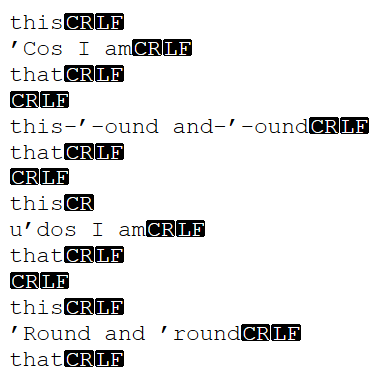
Note that only one CRLF became just LF (line 8), but also that in the case of what you see here as line 5, it’s actually a combination of what were lines 5 and 6 from the pre-replacement text, so an entire CRLF is now missing. I don’t particularly think that’s related to the fact that I had View > Show Symbol > Show End of Line enabled, but what do I know?
-
M-Andre-Z-Eckenrode said:
Note that only one CRLF became just LF (line 8)
Correction: Only one CRLF became just CR.
-
Hello, @m-andre-z-eckenrode, @alan-kilborn, @coises, @mpheath, @thomas-knoefel and All,
Just an observation : if you modify the proposed replacement :
FIND
(\W)'(\w)REPLACE
\1’\2by this one :
FIND
(?<=\W)'(?=\w)REPLACE
’No problem occurs for a step by step replacement sequence or a
Replace Alloperation for, either, anANSIorUTF-8encoded file. I verified this assumption with four regex engines :-
The native
Search > Replacedialog of N++ -
The
Plugins > Column++ > Search...dialog -
The
Plugins > Search++ > Search...dialog -
The
Plugins > MultiReplace > MultiReplace...dialog
May be, this result will help to resolve possible bugs, with the other regex syntaxes
Best Regards,
guy038
-
-
I’ve been looking, but so far I have not found a potential cause for the results you obtained.
@guy038’s post just led me to think of something.
The debug information in the post where you asked about the failure to replace in Notepad++ showed that you have Columns++ installed.
The search and replace code Search++ uses is derived from what I used in Columns++, but I have made some changes. Would you try and see if you can get the search in Columns++ to misbehave under the same circumstances as the one in Search++? (It’s fine to use the installed version of Notepad++ for this test.)
Knowing whether or not the fault also appears in Columns++ could help me narrow the scope of what I could be missing.
As always, I understand if you don’t have the time for this sort of thing. Thank you for your observations so far, and many thanks in advance if you are willing to do this additional test.
-
Hi, @m-andre-z-eckenrode, @alan-kilborn, @coises, @mpheath, @thomas-knoefel and All,
@coises, personally, I confirm that the step by step replacement with the regex pattern :
-
FIND
(\W)'(\w) -
REPLACE
\1’\2
Works correctly with both your two plugins
Columns++andSearch++and with theMultiReplaceplugin as well, when using the N++v8.9release !The bug seems to occur only with native N++ regex engine !
BR
guy038
-
-
Would you try and see if you can get the search in Columns++ to misbehave under the same circumstances as the one in Search++?
In installed NPP, using Columns++ search in regex mode with a rectangular selection of multiple copies of my previously shown example text, I find that only the instances of “
'r” (preceded by a regular space, NOT by any EOL) are matched, and are all replaced correctly with no anomalous characters. To be clear, this, again, is the starting text:this 'Cos I am that this 'Round and 'round that this 'Cos I am that this 'Round and 'round thatAnd resulting text:
this 'Cos I am that this 'Round and ’round that this 'Cos I am that this 'Round and ’round that -
-
Hello, @m-andre-z-eckenrode, @coises and All,
@m-andre-z-eckenrode, you said :
I’m confused. You’re saying that a native N++ regex replacement, using my example text and regex strings, results in anomalous characters for you? I haven’t seen that at all.
I didn’t say that anormalous characters appear. I just said that no replacement occurs at all !
Indeed, with the native regex N++ replacement, and the text below :
this
'Cos I am
that

this
'Round and 'round
that
and with the following REPLACEMENT :
-
FIND
(\W)'(\w) -
REPLACE
\1’\2
The first two replacements do not occur ! Only the last one will change the normal quote
'into the’character (\x{2019}RIGHT SINGLE QUOTATION MARK )IMPORTANT : This test was done with N++
v8.9. May be, the lastv8.9.7release would produce a different result !Best Regards,
guy038
-
-
using Columns++ search in regex mode with a rectangular selection of multiple copies of my previously shown example text, I find that only the instances of “ 'r” (preceded by a regular space, NOT by any EOL) are matched
I’m sorry… I didn’t think to mention that quirk. If you start with a rectangular selection, Columns++ searches each row independently, so the ones with
'at the beginning of a line would fail to match.If Auto set is checked (the default) in the Search in indicated region dialog and no region is already indicated, when you start a search with nothing selected the indicated region is set to include the whole document. (You can also select the entire document, or make any multiple line selection or multiple selection, before you search.¹) This is different from a rectangular selection converted to an indicated region: rectangular selections are multiple selections which never include line endings.
(Yet another complication is that Scintilla does not reliably restore indicators (marked text) on undo. I think this only affects cases where a replacement begins at the first character of a contiguous span of marked text — Scintilla restores the text, but not the marker, on undo.)
So it is expected that only occurrences within a single line would match if you start with a rectangular selection. If you start with the entire document selected, or with no selection at all, it should match all the same occurrences as Search++ (with no selection or marked region).
¹ The rules are complicated. The confusing nature of the “indicated region” was one of the reasons I wanted to split Search++ entirely instead of doing more work on the search in Columns++. I didn’t want to change the concept for people who are already used to Columns++ search, but outside of the specific case of searching in column selections, I think it is more confusing than it needs to be.
-
I didn’t say that anormalous characters appear. I just said that no replacement occurs at all !
You might be confusing @m-andre-z-eckenrode’s topic (\W)'(\w) Regex replace failure, about Notepad++, and this topic, about Search++, with the same search.
He was surprised that Notepad++ found the text but would not replace it. The cause is how Notepad++ treats CRLF pairs combined with how it decides whether Replace should replace or find next — as I wrote there, whether it is a bug is, I suppose, a matter of opinion.
Search++ has a different potentially user-unfriendly behavior: with different find or replace expressions (any regular expression that can match starting with an LF, combined with a replacement string that doesn’t copy the first matched character as the first character of the replacement) a user could invisibly change line endings from CRLF to just CR (though if the user understands the regular expression and replacement entered, it would be expected).
Notepad++ has the same behavior as Search++ when using Replace All (including that it can replace the LF in a CRLF pair with something else); it’s just step-by-step replace that can find but fail to replace (for the same reason that
\Kdoesn’t work in step-by-step native searches).
In this topic, the problem is that Search++ is, apparently randomly, replacing with garbage instead of the correct replacement string.
I have not yet found a possible cause. It does not happen on my machine.
-
I didn’t think to mention that quirk. If you start with a rectangular selection, Columns++ searches each row independently
Aha. That explains my own confusion. That was actually the first time I’d used the Search feature of Columns++. For the record, any time I’m doing regex search & replace in NPP that either turns out to be more complicated than I expected, or involves some trial and error, or which I’m going to want to utilize again elsewhere (such as this topic), I’m in the habit of typing it out right in the text document I’m working on, and then I select/copy the replacement regex, then select the find regex and open the necessary dialog, expecting the Find what to have been automatically populated from my most recent selection (which, of course, didn’t happen in that case). It didn’t occur to me that that wouldn’t work in Columns++. So, when I opened Columns++’s Search dialog with only the content of one line selected and tried to perform my regex search, it threw this at me:
This command requires a rectangular selection. Extend selection to the last line of the document?And, Columns++ Search neophyte that I am, I didn’t heed the suggestion. I closed the dialog and created a rectangular selection.
Now that I’ve been made aware of the error of my ways, I’ve redone the experiment with all the my example text selected, and all instances of
'were successfully replaced with’, without any anomalies. -
This command requires a rectangular selection. Extend selection to the last line of the document?And, Columns++ Search neophyte that I am, I didn’t heed the suggestion.
Had you heeded it, you would still have gotten a rectangular selection, as it says, extending downward from your selection — not necessarily enclosing the whole document, and in any case not the same as selecting the whole document (or selecting nothing at all) first.
I should re-word that message, I’m just not sure what to say instead. It’s not actually true (since version 0.8) that a rectangular selection is required; as I mentioned before, the rules are complicated. They won’t easily fit into a message box. It makes sense when you’re using Columns++ for working with columns, but the search kind of took on a life of its own, apart from column work… hence, among other reasons, Search++.
I’ve redone the experiment with all the my example text selected, and all instances of
'were successfully replaced with’, without any anomalies.Thank you for that information. I do appreciate the help you’ve given me with this. While it doesn’t prove anything (almost nothing is ever proven when dealing with an intermittent bug), it suggests pretty strongly that something I changed in moving the Columns++ search process to Search++ has introduced a hidden instability. I’m still looking for it.





Hello! It looks like you're interested in this conversation, but you don't have an account yet.
Getting fed up of having to scroll through the same posts each visit? When you register for an account, you'll always come back to exactly where you were before, and choose to be notified of new replies (either via email, or push notification). You'll also be able to save bookmarks and upvote posts to show your appreciation to other community members.
With your input, this post could be even better 💗
Register Login