Search++: A work in progress
-
@guy038 said in Search++: A work in progress:
Now, for any command that cancels all previous selection(s), like the
Find in Selectionoption, theReplace and Find in Selectionoption and theFind or Replace in Selectionoption, they seem to act on the whole document, anyway !Not quite (unless there’s a bug). The first match (meaning first in time) will be the first match (meaning top/left) in the selection for a forward find, or the last match in the selection for a backward find.
After that, the selection is lost. However:
Strictly speaking, to handle properly this case, you should keep a map of the beginning and end of EACH selection, in current document ! Probably not easy with huge documents and a nightmare because of all possible types of selection :-((
That came up in the discussion @Alan-Kilborn and I had when I was working out search in Columns++. Later in that discussion, Alan mentioned the idea of marking text, which became the basis for how search in Columns++ works.
In Search++, there is an option is in the Settings dialog: Convert selections to marked text before beginning a stepwise search. This applies only when you use a stepwise command without a scope specified (default scope); so, if that option is checked, Find when there is a selection (but no marked text) will convert the selection to marked text and search within the marked text, but Find in Selection won’t.
BTW, why the choice between the
Replace and Find...options and theFind or Replace...options is not placed in theSettingsdialog, like withinNotepad++? This would simplify some menus !My thought was that users might change their mind about whether they want to see what the replacement did before moving on; for example, with a complicated regex replacement, perhaps at first wanting to see each replacement in context, then if they seem to be working as expected, start skipping forward to the next candidate for replacement.
-
Hello, @coises,
For the last time this season, I went skiing with two friends, just three hours, because the snow conditions started to deteriorate in the afternoon. Our previous outing, last week, was great because it was much colder that day !
Let’s back on topic ;-))
You said :
Not quite (unless there’s a bug). The first match (meaning first in time) will be the first match (meaning top/left) in the selection for a forward find, or the last match in the selection for a backward find.
After that, the selection is lost. However:
So, I agree with you that the very first match is correct and expected, but all the subsequent ones are not !
But, luckily, you add :
In Search++, there is an option is in the Settings dialog: Convert selections to marked text before beginning a stepwise search. This applies only when you use a stepwise command without a scope specified (default scope); so, if that option is checked, Find when there is a selection (but no marked text) will convert the selection to marked text and search within the marked text, but Find in Selection won’t.
Ah… very instructive, indeed. So, we have a mean to look within selections ONLY, if we check the
Convert selections to marked text before beginning a stepwise search, in theSettingsdialog. It will automatically cancel the selection(s) and replace them with some equivalent Marked text regions. I tested that feature : nice !
Regarding the choice between the two options
Replace and FindandFind or Replace:You said :
My thought was that users might change their mind about whether they want to see what the replacement did before moving on; for example, with a complicated regex replacement, perhaps at first wanting to see each replacement in context, then if they seem to be working as expected, start skipping forward to the next candidate for replacement.
I do understand your point of view ! Now, I’m thinking about an other solution :
In settings, you would create a new option :
How many times you want to [ immediately ] check the result of replacements, with the possible values :-
Never
-
Always
-
A digit from
1to9
So :
-
In case of the Never answer, the usual
Find And Replacewould be used -
In case of the Always answer, it would be like when the
Replace : Don't move to the following occurrenceoption is checked, inSettings > Preferences > Searchingof native N++ -
In case of a digit answer, between
1to9, the first replacements would act as theFind or Replaceoptions ofSearch++and all the next replacements would act as theReplace and Findoptions ofSearch++
And, to my mind, a default value of
3would be appropriate !Best Regards,
guy038
-
-
Search++ version 0.5.2 addresses a number of issues:
- Fix display of Settings: Mark style drop-down in dark mode. (@Snabel42: this should fix the problem you described here.)
- Add a dialog to resist accidentally clicking the Tools menu options to remove marks from documents in view or from all open documents. (per @guy038, last point here)
- Rearrange Settings dialog and add four new settings:
- Fill after Search… menu command or shortcut even if search dialog is already visible.
- Allow default Select command to Select in Selection.
- When eligible selection and marks are present, default search is within selection.
- Allow default Mark command to Mark in Marked Text.
- Make commands that explicitly specify in Selection or in Marked Text show a failure message (rather than fall back to in Whole Document) if there is no selection or marked text.
- Remove Before and After commands without an explicit scope from command button menus.
- Apply the action Convert selections to marked text when beginning a default stepwise search only when the search finds a match.
- Change names of stepwise replace commands to Replace (then find) and Replace (then wait).
- Fix adding to selection not working when the selection is a rectangular selection. Add note to help regarding unexpected results when adding to existing selections.
- Update and clarify documentation, particularly the Search commands and Settings sections.
Thanks to everyone who has contributed to this discussion so far! Search++ still has a lot of rough spots and omissions, but it’s getting better.
-
@Coises
Thank you for the update!
My next suggestion may ruin one of the initial purposes of Search++, but maybe you’ll find it useful anyway? Here it is: the “icudt78.dll” is a big DLL with a size of 32 MB, and when I think about a portable version of Notepad++, I usually consider a portable and small version of Notepad++. Correspondingly, what do you think about an attempt to load the “icudt78.dll” at runtime and if it is not available then just disable the “ICU” button and allow the rest of the plugin to operate normally? -
@Vitalii-Dovgan said in Search++: A work in progress:
My next suggestion may ruin one of the initial purposes of Search++, but maybe you’ll find it useful anyway? Here it is: the “icudt78.dll” is a big DLL with a size of 32 MB, and when I think about a portable version of Notepad++, I usually consider a portable and small version of Notepad++. Correspondingly, what do you think about an attempt to load the “icudt78.dll” at runtime and if it is not available then just disable the “ICU” button and allow the rest of the plugin to operate normally?
Regex search also depends on ICU, so I can’t really make it optional.
One of the major “under the hood” changes I made when I built Search++ based on the search in Columns++ was to use ICU for all the Unicode properties instead of the rather hacked-together approach I used in Columns++. The underlying engine in both search in Columns++ and Regex search in Search++ is Boost.Regex, with a considerable amount of customization to make it work well with Scintilla and with Unicode.
I’m really hesitant to reverse that, as the ICU properties are more accurate and easier to update when Unicode releases new versions, while the Columns++ approach is tricky and a bit fragile, and still doesn’t get everything right.
However, as you note, it does increase the size: that one dll is over six times the size of the plugin dll. It also appears that the current version of the ICU4C dll files (at least the pre-compiled ones) don’t work on Windows 7 (and presumably Windows 8).
So… I suppose it’s possible that at some point I’ll try to undo the use of ICU and go back to the cobbled-together approach, but this time get it right. I can’t hold out hope that it will happen soon, nor promise that it will happen at all.
Edit to add:
I included the ICU search mostly for testing. ICU’s native search doesn’t integrate well with Scintilla, and it lacks some of the syntax familiar to Notepad++ users from Boost.Regex. Since I haven’t manipulated its search process at all, results from ICU searches can serve as a check on whether Regex is properly implemented (allowing for expected/intentional differences). I might remove it before Search++ comes out of pre-release status; but @guy038 has expressed hope that I will leave it in, so it will probably remain, perhaps hidden in some way.
-
@Coises said in Search++: A work in progress:
Search++ version 0.5.2 addresses a number of issues:
- Fix display of Settings: Mark style drop-down in dark mode. (@Snabel42: this should fix the problem you described here.)
It does indeed, thank you!
-
Hi,@coises and All,
I’m exploring all the possibilities when you click on the
ICUbutton and, really, you access a new regex world with a lot of new options, all related to UNICODE !In addition, you get some new regex syntaxes which are easier to interpret and allow an almost infinite number of ways to define an Unicode range of characters !
For example, if we’re searching ,with the
Match caseoption checked, in myTotal_Chars.txtfile :-
The search
[[\p{letter}][\p{number}]]is the UNION of the[\p{letter}]and the[\p{Number}]properties. Thus, it returns145,672matches OR1,924matches =147,596matches. It could simply be replaced by theBoostsyntax[\p{letter}]|[\p{number}]. -
The search of
[[:letter:]&&[\p{InArabic}]]is the INTERSECTION of the[:letter:]and the\[\p{InArabic}]]properties. Thus, it returns153matches which is the amount of letter characters in the mainArabicblock. It could be replaced by theBoostsyntax(?=[[:letter:]])\p{InArabic}. It returns145,672AND256=153letters within this mainArabicblock. -
The search of
[[:letter:]--[a-z]]is the ASYMETRIC DIFFERENCE between the[[:letter:]]and[a-z]properties =145,672 - 26which returns145,646characters. It could be replaced by theBoostsyntax(?![a-z])[[:letter:]]which also returns145,646chars.
I’m still looking for all the
ICUproperties returning a valid value, against myTotal_Chars.txtfile ! Be patient some days as it remains about600properties not tested !!Best Regards,
guy038
BTW, @coises, what do you think of my idea regarding the two options,
Replace (then find)andReplace (then wait)? -
-
@guy038 said in Search++: A work in progress:
I’m still looking for all the
ICUproperties returning a valid value, against myTotal_Chars.txtfile ! Be patient some days as it remains about600properties not tested !!I would expect that they will all work. I have avoided tampering with the ICU search, so it can serve as a reference standard for the Regex search as far as Unicode properties.
There are some Boost.Regex constructs that ICU does not support. The ones I know about right now are backtracking control (like (*SKIP)(*FAIL)); \K; and \l and \u as shorthand for [[:lower:]] and [[:upper:]]; there may be others. I don’t expect that I will attempt to modify the ICU syntax in any way.
Offering ICU as a “first class” search (working on documents that aren’t UTF-8, being able to replace as well as find, being reasonably efficient for large documents, etc.) is probably possible, but it will take a lot of work. I’m not at all certain it is a task I will attempt.
On the other hand, once the framework is in place and I feel comfortable taking Search++ out of pre-release status, I do hope to add more of the ICU properties to regular Regex.
BTW, @coises, what do you think of my idea regarding the two options,
Replace (then find)andReplace (then wait)?I see your point that the Replace drop-down has become overwhelming with all the options, especially in Plain search.
I’m now planning to add a toggle item (with a check mark) to the Tools menu; something like Jump to next match after Replace. I’m also planning to add keyboard shortcuts for (most or all of) the Tools menu items. That would make it reasonably easy to toggle between Replace (then find) and Replace (then wait) without complicating the menu so badly. (With the shortcut it would be more keyboard-friendly than the present arrangement.) The next version will include something like that, unless I encounter an unexpected obstacle or think of a better idea.
-
Search++ version 0.5.3 is available:
- Avoid a crash when searching in Marked Text in Open Documents or in Marked Text in Documents in this View and a document has no marked text.
- Fix button menus overlapping the button when the button is near the bottom of the screen. This could cause inadvertent activation of the last menu option.
- Make the Scintilla controls (Find box, Replace box and Results list) change colors when dark mode changes. Fix some visibility problems for caret and found text indicators in dark mode.
- Make Show All on the Tools menu scroll current position or selection into view.
- Add toggles Bookmark lines when marking text and Jump to next match after Replace to Tools menu.
- Add keyboard shortcuts for most Tools menu items.
- Condense the Replace button menu and coordinate with the new Jump to next match after Replace toggle.
Note: The keyboard shortcut assignments on the Tools menu are new and might change in the next version in response to my own and others’ experiences, and/or to accommodate any additional menu entries.
@Lachlanmax: Does the implementation of bookmarks in this version work for you? What changes, if any, would you suggest?
@guy038: Do you think the way I’ve done Replace (with the Jump to next match after Replace toggle and the submenu for opposite jump behavior) works sensibly?
All comments, critiques, suggestions and experiences are most welcome!
-
Hello, @coises and All,
Sorry to begin with some bugs :-((
-
The
Bookmarksfeature does not seem to work at all, even if I close and re-open N++ with theBookmark lines when marking textoption already checked in theSearch++ > Toolsdialog ! -
When focus on
Search++, the two shortcutsCtrl + Shift + YorCtrl + Shift + E( which open a new dialog ) wrongly add the control charENorENQto current text typed in the Find dialog. To this purpose, note that inSettings > Preferences... > Editiing 2I personally did not check thePrevent control character (C0 only) typing into documentoption, in order to be able to include some of them in my texts or posts !- Note also that this bug happens ONLY IF you first use the shortcut. In case that you first open the
Toolsmenu and choose theCopy Marked Text...orSettings...option directly, nothing is added in the Find dialog !
- Note also that this bug happens ONLY IF you first use the shortcut. In case that you first open the
Now, regarding the two ways to do a step-wise replacement :
-
I do like your new option, in the
Toolsmenu, which TOGGLE the replacement type, on the fly, thanks to theCtrl + Jshortcut ( I noted theJforJunp ) -
But then, I suppose that the last line of the Replace dialog (
Do not jump to next matchorJump to next match) and its sub-menu ( to adopt the opposite behavior ) are rather redondant and useless ? What is your feeling about it ?
And, personally, I think that a new setting
Force the 'Do not jump to next match' behavior during theXfirst replacements, with0 < X < 9, would be interesting !Indeed :
-
When that new option would be checked :
-
If current behavior is
Jump to next matchit would force theDo not jump to next matchfor the X first replacements, then all subsequent replacements would follow the current behavior. -
If current behavior is
Do not jump to next matchit would not change anything.
-
-
When that new option would not be checked :
-
If current behavior is
Jump to next match, it would follow this behavior -
If current behavior is
Do not jump to next match, it would follow this behavior
-
Best Regards,
guy038
-
-
Hi, @coises,
@coises, very sorry about the supposed bug with the
Bookmarksfeature ! Finally, I understood that this bug happens ONLY IF you choose theICUregex engine ! If you’re using thePlainorRegexoptions, everything woks as expected ;-)) Is there a limitation to useBookmarkswhen the trueICUregex engine is active ?I even noticed that, like with the native Mark dialog, if you have, both, bookmarks and marked text in current document and that the
Bookmark lines when marking textoption, inTools, is unchecked, aRemove marks and bookmarks from active documentaction does not clear theBookmarks, as expected !BR
guy038
-
@guy038 said in Search++: A work in progress:
- When focus on
Search++, the two shortcutsCtrl + Shift + YorCtrl + Shift + E( which open a new dialog ) wrongly add the control charENorENQto current text typed in the Find dialog.
Thank you for catching that! I see it here, too. I will figure out why (no doubt it’s related to the fact that those two combinations open a dialog) and fix it.
- But then, I suppose that the last line of the Replace dialog (
Do not jump to next matchorJump to next match) and its sub-menu ( to adopt the opposite behavior ) are rather redondant and useless ? What is your feeling about it ?
I think it’s not useless because:
-
If you’re going to choose an option from the drop-down menu and you want opposite behavior, it’s easier to open one menu than two.
-
If you just click, rather than shift+click, the options on the sub-menu don’t change the Jump to next match after Replace setting, they just override it for that one command. So if you like to make a setting and keep it but only occasionally do it differently, you can do that and not have to remember to change the setting back again.
And, personally, I think that a new setting
Force the 'Do not jump to next match' behavior during theXfirst replacements, with0 < X < 9, would be interesting !This sounds to me like it would be confusing to use. Your explanation is clear enough, I don’t mean that it is confusing. But using a counter that’s invisible to the user, the behavior of the same command just changes when it counts to a certain point? I can’t see it. Why would it be likely that people would want the same number of searches without automatic find every time, under all conditions?
If others also say they want this behavior, I won’t refuse to give it a try, but… I can’t say I’m fond of the idea.
I note and admit that convenient keyboard navigation of the button drop-down menu options is sorely needed, and as yet I have no good ideas for how to provide it.
- When focus on
-
@guy038 said in Search++: A work in progress:
@coises, very sorry about the supposed bug with the
Bookmarksfeature ! Finally, I understood that this bug happens ONLY IF you choose theICUregex engine ! If you’re using thePlainorRegexoptions, everything woks as expected ;-)) Is there a limitation to useBookmarkswhen the trueICUregex engine is active ?Nothing to be sorry about — thank you for the observation, and for narrowing down to ICU. I see what’s wrong: it’s a coding error. I’ll fix it.
I even noticed that, like with the native Mark dialog, if you have, both, bookmarks and marked text in current document and that the
Bookmark lines when marking textoption, inTools, is unchecked, aRemove marks and bookmarks from active documentaction does not clear theBookmarks, as expected !If you look closely, when Bookmark lines when marking text is checked, the menu item should say Remove marks and bookmarks from active document; when Bookmark lines when marking text is not checked, that menu item should say Remove marks from active document.
(I’m not sure why I didn’t make the same change to Remove marks from multiple documents…, since it also removes bookmarks as well if Bookmark lines is checked.)
It could be that this is a confusing way to do it. I intended to make the Bookmark lines setting so that when it’s checked, bookmarks and marks “go together” for Mark and Show commands and for Remove marks; but when it’s not checked, Search++ only affects marks and does nothing with bookmarks.
Except that Add selection to marked text doesn’t also add bookmarks regardless of whether Bookmark lines is checked.
This does need refinement. There is certainly some inconsistency. I do want to preserve the ability to manipulate marks without touching bookmarks at all; but which commands should affect bookmarks, and whether I need separate commands for some kinds of bookmark manipulation, remains an open question.
-
Hello, @coises an All,
Regarding the two behaviors of the Replace command :
-
First, I suppose that a special mark/sign/icon in the
Search++title zone, to clearly identify the current behavior of theReplaceaction, would be welcome ! -
Then, the user will choose its desired behavior, simply using the
Ctrl + Jshortcut. -
And forget my idea of a new setting ! In this specific case, the user will begin using the alternate
Replacebehavior first then, after some tries, he would toogle to the usualReplacebehavior !
Now, do we need the additional sub-menu in order to occasionally use the opposite
Replacebehavior, without changing the default settings, as you expressed ?To my mind, after using this opposite behavior ( so, of course, changing the default behavior ), the user would just have to hit the
Ctrl + Jshortcut again to restore the previous default !In addition, I probably forget some edge cases and, anyway, it’s your plugin, not my baby !
BR
guy038
-
-
@guy038 said in Search++: A work in progress:
Regarding the two behaviors of the Replace command :
- First, I suppose that a special mark/sign/icon in the
Search++title zone, to clearly identify the current behavior of theReplaceaction, would be welcome !
It is indicated by the icon on the Replace button. Is there some reason that isn’t enough?
Now, do we need the additional sub-menu in order to occasionally use the opposite
Replacebehavior, without changing the default settings, as you expressed ?I agree that the “opposite jump behavior” sub-menu isn’t strictly necessary, but I don’t think it does any harm, either. To my mind, the commands on that menu are still commands that “belong to” the Replace button. If anything, it’s the Jump to next match after Replace option on the Tools menu that strikes me as logically redundant; but I wanted something to which I could assign that Ctrl+J shortcut for easy switching.
If user experience indicates that the sub-menu creates more confusion than convenience, I’ll remove it.
- First, I suppose that a special mark/sign/icon in the
-
Hello, @coises,
When I said :
- First, I suppose that a special mark/sign/icon in the
Search++title zone, to clearly identify the current behavior of theReplaceaction, would be welcome !
You answered me :
It is indicated by the icon on the Replace button . Is there some reason that isn’t enough?
 🡪   replace then jump to a new match forward
 🡨   replace then jump to a new match backward
 🡪❚  replace and highlight replacement; next click finds a new match forward
 ❚🡨  replace and highlight replacement; next click finds a new match backward
You’re certainly younger than me and/or have very good eyes ! I did notice that symbol at right of the
Replacebutton but, it seems a bit tiny !Best Regards,
guy038
P.S. :
Perhaps it would be a good idea to specify, in the manual, that :
-
All sections concerning
regular expressionsandformulaswork correctly when theregexbutton is selected ! -
When the
ICUbutton is selected, you could also point out that the important features, below, are NOT supported :-
The
\Kconstruction -
All the
Backtracking Controlverbs, like(*SKIP)or(*F) -
All the symbolic names, except for
[[:ascii.]] -
The invalid
UTF-8characters, like[[.x80.]]or[[.xff.]] -
The
\land\usyntaxes as shorthand of[[:lowercase letter:]]and[[:uppercase letter:]]( which are the[[:upper:]]and[[:lower:]]equivalents when theRegexbutton is selected ! )
-
- First, I suppose that a special mark/sign/icon in the
-
@guy038 said in Search++: A work in progress:
When I said :
- First, I suppose that a special mark/sign/icon in the
Search++title zone, to clearly identify the current behavior of theReplaceaction, would be welcome !
You answered me :
It is indicated by the icon on the Replace button . Is there some reason that isn’t enough?
 🡪   replace then jump to a new match forward
 🡨   replace then jump to a new match backward
 🡪❚  replace and highlight replacement; next click finds a new match forward
 ❚🡨  replace and highlight replacement; next click finds a new match backward
You’re certainly younger than me and/or have very good eyes ! I did notice that symbol at right of the
Replacebutton but, it seems a bit tiny !Thank you for the observation. I consider those symbols important in general (not just for this specific case) because they remind you if you’ve click-selected one of the alternatives from the drop-down menus. Before Search++ can be considered ready for a first “stable” release, I have to make sure they are clearly legible. (I used symbols instead of words because the buttons would have to be much bigger to show the full command names as used in the drop-down menus, and that in turn would make the minimum useful size of the dialog much bigger.)
I’m 68 — I don’t know if that’s younger than you. It’s surely not that my eyes are that good. One of the main things I wanted to accomplish in Search++ was using Scintilla controls for the find and replace text, partly because I’m so tired of struggling to read what I’ve typed into those boxes in Notepad++ and Columns++ searches. (The other main reason was to avoid the complications that arise with line endings and “invisible” characters in the standard Windows controls.)
So I think it’s either that I can see the difference in the two symbols because I know what I’m looking for — after all, I don’t have any trouble with the buttons and check boxes in standard search dialogs, and their font is the same as the one in the find and replace boxes — or they aren’t displaying the same on all systems. (Or both.)
For development purposes, to keep things simple, I’ve used Unicode characters for the symbols on the buttons. That has somewhat limited my choice of symbols, as well as given me no control over the size and weight (aside from finding a different symbol). It could also be the case that they display differently on different systems. Which all means that using Unicode symbol characters is a bad way to do this. At some point I will need to replace them using a different method that will be more complex, but will give me more control.
Are you using a high-dpi monitor, by any chance? At present I do not have one available for testing. I have read various information from Microsoft about it, but information without actual practice tends to turn into gibberish… at this point I don’t think I can adequately predict how this will look on high dpi.
Perhaps it would be a good idea to specify, in the manual, that :
-
All sections concerning
regular expressionsandformulaswork correctly when theregexbutton is selected ! -
When the
ICUbutton is selected, you could also point out that the important features, below, are NOT supported :-
The
\Kconstruction -
All the
Backtracking Controlverbs, like(*SKIP)or(*F) -
All the symbolic names, except for
[[:ascii.]] -
The invalid
UTF-8characters, like[[.x80.]]or[[.xff.]]
-
Indeed, my documentation says very little about the ICU search at present. At some point before a first “stable” release I will either document the ICU search more thoroughly or “hide” it so users won’t stumble on it and be confused by it.
- The
\land\usyntaxes as shorthand of[[:lowercase letter:]]and[[:uppercase letter:]]( which are the[[:upper:]]and[[:lower:]]equivalents when theRegexbutton is selected ! )
A minor note: this is a point in which Search++ Regex differs from Columns++ as a result of changes I made to use ICU as the source of information for Unicode properties instead of the mechanism I cobbled together in Columns++.
In Columns++, \l and [[:lower:]] are equivalent to [[:lowercase letter:]] (or [[:Ll:]], or \p{Ll}) — 2,283 matches in your Total_Chars.txt file.
In Search++ Regex, \l and [[:lower:]] are equivalent to (?-i)[[:lower:]] in ICU — 2,595 matches in Total_Chars.txt.
You can still use [[:lowercase letter:]] (or [[:Ll:]], or \p{Ll}) in Search++ Regex to match the same 2,283 characters as (?-i)[[:lowercase letter:]] in ICU.
Unlike ICU, both Columns++ and Search++ Regex ignore case insensitivity when matching named character classes (including the \l and \u shorthands).
- First, I suppose that a special mark/sign/icon in the
-
Hi, @coises,
Well, I’m 74. Now, with my glasses I have nearly
20/20vision in my left eye but only3/10in my right eye, due to a vascular problem in the retina that I had about10years ago :-((No, I don’t have an high-dpi monitor and here is a snapshot of the
Replacebutton, in exact size :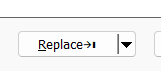
Of course, if I look at the button, I’m able to notice the mark
→❙, after the word Replace, but I may miss it sometimes !
Thank you, to point out the specificities and differences about the character classes regarding
Columns ++andSearch ++,So, here is a summary on this topic :
•==============================•=============•================•=========================================================================•
|               Regex          |  Columns++  | Search++ Regex |                              Search++ ICU                               |
•==============================•=============•================•==============•==========================================================•
|  (?-i)\l                     |    2,283    |      2,595     |         1    |  Letter l                                                |
|  (?-i)[[:lower:]]            |    2,283    |      2,595     |     2,595    |  = (?-i)\p{Ll} + (?-i)\p{Other Lowercase} = 2,283 + 312  |
|                              |             |                |              |                                                          |
|  (?-i)\p{Ll}                 |    2,283    |      2,283     |     2,283    |                                                          |
|  (?-i)[[:lowercase letter:]] |    2,283    |      2,283     |     2,283    |                                                          |
|  (?-i)[[:Ll:]]               |    2,283    |      2,283     |     2,283    |                                                          |
•------------------------------•-------------•----------------•--------------•----------------------------------------------------------•
|  (?-i)\u                     |    1,886    |      2,006     |    Invalid   |  ???                                                     |
|  (?-i)[[:upper:]]            |    1,886    |      2,006     |     2,006    |  = (?-i)\p{Lu} + (?-i)\p{Other Uppercase} = 1,886 + 120  |
|                              |             |                |              |                                                          |
|  (?-i)\p{Lu}                 |    1,886    |      1,886     |     1,886    |                                                          |
|  (?-i)[[:Uppercase letter:]] |    1,886    |      1,886     |     1,886    |                                                          |
|  (?-i)[[:Lu:]]               |    1,886    |      1,886     |     1,886    |                                                          |
•==============================•=============•================•==============•==========================================================•
|  (?i)\l                      |    2,283    |      2,595     |         2    |  Letters L and l                                         |
|  (?i)[[:lower:]]             |    2,283    |      2,595     |     4,082    |                                                          |
|                              |             |                |              |                                                          |
|  (?i)\p{Ll}                  |    2,283    |      2,283     |     3,729    |                                                          |
|  (?i)[[:lowercase letter:]]  |    2,283    |      2,283     |     3,729    |                                                          |
|  (?i)[[:Ll:]]                |    2,283    |      2,283     |     3,729    |                                                          |
•------------------------------•-------------•----------------•--------------•----------------------------------------------------------•
|  (?i)\u                      |    1,886    |      2,006     |    Invalid   |  ???                                                     |
|  (?i)[[:upper:]]             |    1,886    |      2,006     |     3,484    |                                                          |
|                              |             |                |              |                                                          |
|  (?i)\p{Lu}                  |    1,886    |      1,886     |     3,322    |                                                          |
|  (?i)[[:Uppercase letter:]]  |    1,886    |      1,886     |     3,322    |                                                          |
|  (?i)[[:Lu:]]                |    1,886    |      1,886     |     3,322    |                                                          |
•==============================•=============•================•==============•==========================================================•
Note that all the properties, below, are used internally by the Unicode Cconsortium for generating other properties and are not intended to be used stand-alone. These properties only contribute to real properties so there’s no direct support for these properties in
ICUand they all return theInvalid regular expressionmessage !\p{Jamo_Short_Name} \p{JSN} \p{Other Alphabetic} \p{OAlpha} \p{Other Default Ignorable Code Point} \p{ODI} \p{Other Grapheme Extend} \p{OGr Ext} \p{Other ID Continue} \p{OIDC} \p{Other ID Start} \p{OIDS} \p{Other Lowercase} \p{OLower} \p{Other Math} \p{OMath} \p{Other Uppercase} \p{OUpper}You can verify the number of characters, in these categories, from the files https://www.unicode.org/Public/UCD/latest/ucd/PropList.txt and https://www.unicode.org/Public/UCD/latest/ucd/Jamo.txt
Best regards
guy038
-
@guy038 said in Search++: A work in progress:
No, I don’t have an high-dpi monitor and here is a snapshot of the
Replacebutton, in exact size :The proportion is a bit different on my system:

so it seems the display does differ from system to system. I will find a way to make those icons more recognizable and obvious… I just don’t know when.
-
@Coises
It works great for me in this version.I especially like the Remove Marks option and how well it works together with the bookmarks. That combination feels very natural in the workflow now.
For the moment I would not suggest any changes, it already feels quite solid for how I use it.
Thanks for the good work you did for my requests! -
C Coises referenced this topic on




Hello! It looks like you're interested in this conversation, but you don't have an account yet.
Getting fed up of having to scroll through the same posts each visit? When you register for an account, you'll always come back to exactly where you were before, and choose to be notified of new replies (either via email, or push notification). You'll also be able to save bookmarks and upvote posts to show your appreciation to other community members.
With your input, this post could be even better 💗
Register Login