Find and Display *All* Duplicate Lines
-
I used my lunch break productively :-)
Please note that this only works if the corresponding search has taken place, i.e.
You cannot save the search result in a file and reapply the styling when loading.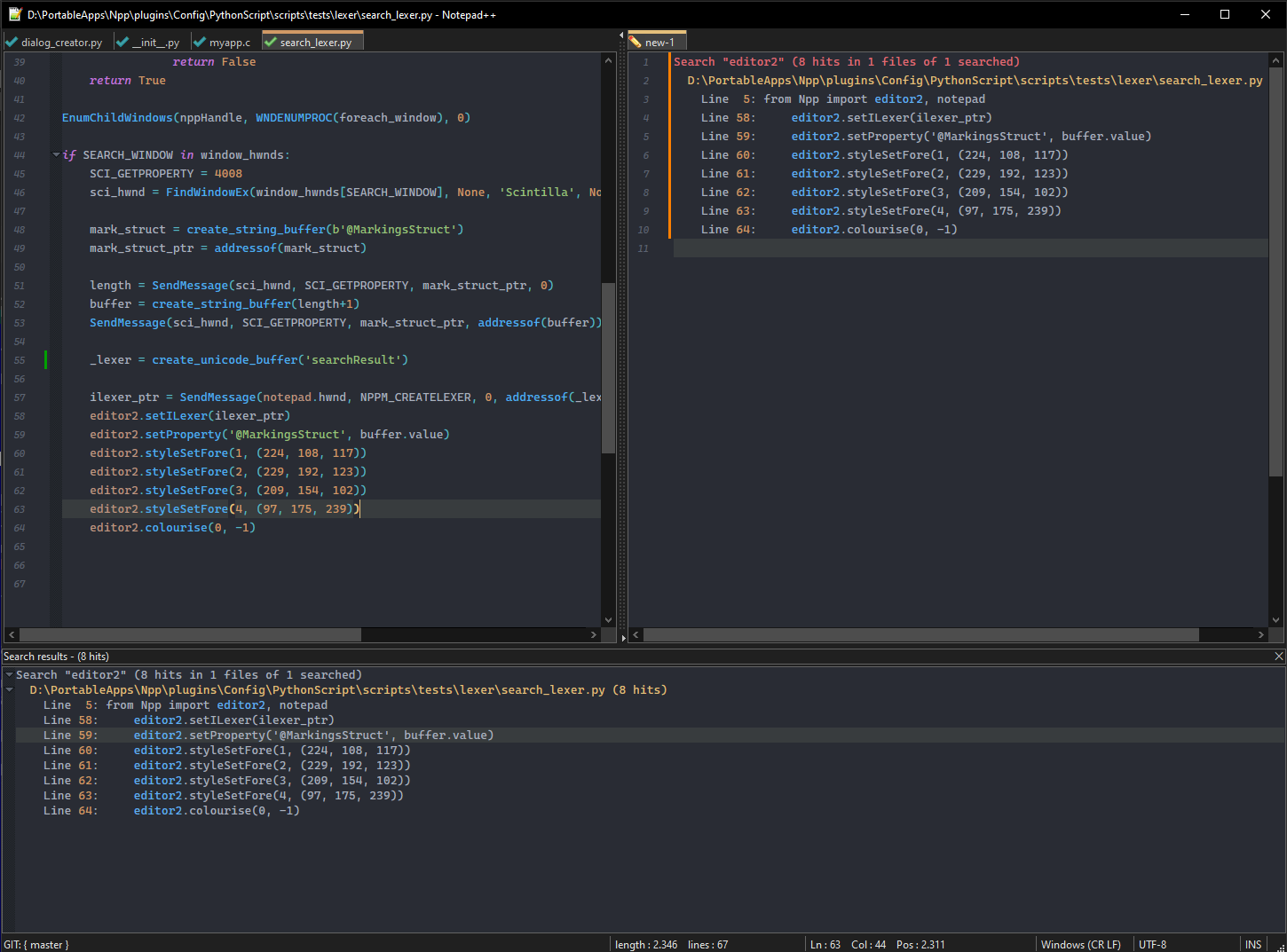
from ctypes import (cdll, windll, create_string_buffer, create_unicode_buffer,
    addressof, pointer, WINFUNCTYPE)
from ctypes.wintypes import BOOL, HWND, LPARAM, WPARAM, UINT

from Npp import editor2, notepad

SendMessage          = windll.user32.SendMessageW
SendMessage.argtypes = [HWND, UINT, WPARAM, LPARAM]
SendMessage.restype  = LPARAM

NPPM_CREATELEXER = (1024 + 1000 + 110)

WNDENUMPROC = WINFUNCTYPE(BOOL, HWND, LPARAM)

FindWindowEx = windll.user32.FindWindowExW
GetWindowText = windll.user32.GetWindowTextW
GetWindowTextLength = windll.user32.GetWindowTextLengthW
EnumChildWindows = windll.user32.EnumChildWindows
GetClassName = windll.user32.GetClassNameW


nppHandle = notepad.hwnd
curr_class = create_unicode_buffer(256)
WM_CLOSE = 0x010
window_hwnds = {}

SEARCH_WINDOW = 'Search results'

def foreach_window(hwnd, lParam):
    if curr_class[:GetClassName(hwnd, curr_class, 256)] == '#32770':
        length = GetWindowTextLength(hwnd)
        if length > 0:
            buff = create_unicode_buffer(length + 1)
            GetWindowText(hwnd, buff, length + 1)
            if buff.value == SEARCH_WINDOW:
                window_hwnds[buff.value] = hwnd
                return False
    return True

EnumChildWindows(nppHandle, WNDENUMPROC(foreach_window), 0)

if SEARCH_WINDOW in window_hwnds:
    SCI_GETPROPERTY = 4008
    sci_hwnd = FindWindowEx(window_hwnds[SEARCH_WINDOW], None, 'Scintilla', None)

    mark_struct = create_string_buffer(b'@MarkingsStruct')
    mark_struct_ptr = addressof(mark_struct)

    length = SendMessage(sci_hwnd, SCI_GETPROPERTY, mark_struct_ptr, 0)
    buffer = create_string_buffer(length+1)
    SendMessage(sci_hwnd, SCI_GETPROPERTY, mark_struct_ptr, addressof(buffer))

    _lexer = create_unicode_buffer('searchResult')

    ilexer_ptr = SendMessage(notepad.hwnd, NPPM_CREATELEXER, 0, addressof(_lexer))
    editor2.setILexer(ilexer_ptr)
    editor2.setProperty('@MarkingsStruct', buffer.value)
    editor2.styleSetFore(1, (224, 108, 117))
    editor2.styleSetFore(2, (229, 192, 123))
    editor2.styleSetFore(3, (209, 154, 102))
    editor2.styleSetFore(4, (97, 175, 239))
    editor2.colourise(0, -1)
Note the use of editor2!
-
@Alan-Kilborn said earlier:
Another reason is that I have a UDL that I made for .sr files which colorizes the output somewhat like N++'s Search results,
Actually, I misspoke. When I first set it up, I was trying to do it with a UDL, but I later switched to using the EnhanceAnyLexer plugin. (I was confused because I didn’t delete my UDL when I went a different way)
EnhanceAnyLexer seems easier than trying to force N++ to artificially use the internal Search-result lexer, but it is definitely interesting to play around with something like that, so I enjoyed considering the code from @Michael-Vincent and @Ekopalypse earlier in this thread.
-
 A Alan Kilborn referenced this topic on
-
Hello, @yaron, @coises, @mkupper, @alan-kilborn and All,
From this post :
In order to always get the target line on top of the visible screen, @mkupper, simply add these
3Python lines :curr_pos = editor.getCurrentPos() curr_line = editor.lineFromPosition(curr_pos) editor.setFirstVisibleLine(curr_line)right after the line
editor.gotoLine(line_in_source_file)in the
FindAndDisplayAllDuplicateLines (FADADL)Alan scriptJust be sure that the parameter
Enable scrolling beyond last lineis checked, in thePreferences > Editingpanel
Now, @mkupper and @alan-kilborn, to get rid of the random selection issue, I personally solve the problem by moving the
DupeLineResults.srfile in the secondary view ! And , in that case, it does not bother anymore about a possible previous selection, in theDupeLineResults.srfile, right before double-clicking to get an other line ;-)WOW…, Alan, everything is perfect with your script, by now !!
Best Regards,
guy038
-
@guy038 said in Find and Display *All* Duplicate Lines:
In order to always get the target line on top of the visible screen, @mkupper, simply add these 3 Python lines :
                        curr_pos = editor.getCurrentPos()
                        curr_line = editor.lineFromPosition(curr_pos)
                        editor.setFirstVisibleLine(curr_line)
right after the line
editor.gotoLine(line_in_source_file)You shouldn’t have to calculate new values (your
curr_posandcurr_line).editor.setFirstVisibleLine(line_in_source_file)should suffice.
to get rid of the random selection issue, I personally solve the problem by moving the
DupeLineResults.srfile in the secondary view ! And , in that case, it does not bother anymore about a possible previous selection, in theDupeLineResults.srfile, right before double-clicking to get an other lineI can’t comment, as I can’t reproduce random selections happening.
Alan, everything is perfect with your script, by now
Well, I doubt this, given mkupper’s continuing strange issues with it.
EDIT: Ah…wait… I may have just had an inspiration on what could be happening for mkupper, even though I can’t repro it. I’ll do some more thinking on it, and if its logic is sound, I’ll post about it…
-
Hi, @yaron, @coises, @mkupper, @alan-kilborn and All,
So, as @alan-kilborn mentioned, to always get the target line on top of the visible screen, @mkupper, simply add this line :
editor.setFirstVisibleLine(line_in_source_file)Right after the line
editor.gotoLine(line_in_source_file)But I forgot to specify that your must cancel, as well, the
Word wrapfeature. That is IMPORTANT !!BR
guy038
-
Hi, @alan-kilborn and All,
An other minor bug :
If you do get a
DupeLineresults.srfile in a tab and that the corresponding source file is presently closed, any double-click on a line of theDupeLineResults.srfile will not open the source file, contrary to a double-click in theSearch resultspanel !BR
guy038
-
@guy038 said in Find and Display *All* Duplicate Lines:
If you do get a
DupeLineresults.srfile in a tab and that the corresponding source file is presently closed, any double-click on a line of theDupeLineResults.srfile will not open the source file, contrary to a double-click in the Search results panel !Yes, well a compromise here, because this is only a single source file situation – not multi-file like a potential find-in-files – is that you already have the source file open in another tab. :-)
We can fix it with…more code… The original intent, like most of my scripts, is just a demo of possible functionality, not all-encompassing behavior. To try to do that…scripts get too long and the main point is lost, with all the error-checking needed, and the full-featuredness ratcheting up the line count…
-
@guy038 said in Find and Display *All* Duplicate Lines:
But I forgot to specify that your must cancel, as well, the Word wrap feature. That is IMPORTANT !!
Do we call this YOUR bug, since you introduced the “setFirstVisibleLine” code? :-)
I didn’t try it, but probably changing:
editor.setFirstVisibleLine(line_in_source_file)to
editor.setFirstVisibleLine(editor.visibleFromDocLine(line_in_source_file))will cure that.
-
Thank you @guy038 on the
editor.setFirstVisibleLine(line_in_source_file)thing. That works perfectly and now I’m consistently taken a view with the desired line at the top.@Alan-Kilborn, as the results are now more consistent I spotted a clue related to the random selection. The end of the random selection is at or very near the mouse which is there because I was double clicking on the line in the
DupeLineResults.srfile. The typing cursor is also at that spot.When we double click on a word in npp that word becomes selected. When working with
DupeLineResults.srI double click on a line and am usually double clicking on the number part ofLine 1234though I could double click on the wordLine. I’m now wondering if npp or Scintilla is still in the middle of painting that double-clicked word in theDupeLineResults.srtab while theFindAndDisplayAllDuplicateLines.pyscript is runningnotepad.activateIndex(view, index)I tried an experiment with starting a bunch of CPU bound processes to tie up the machine but was unable to hit the sweet spot of getting random selections to happen every time. I did discover that if I use
start /highwhen starting a CPU bound thread that having all of my CPU cores running high priority threads results badly performing windows. I killed one of those threads to free up a CPU core and both Windows and Notepad++ work very well. -
Hi @guy038 a bit off topic but…
Congratulations on being the top 3 poster now!!!
Thanks for your great contributions to the Notepad++ community. -
M mkupper referenced this topic on
-
If you’ve used a script in this thread, you might want to double check your copy of it for a bug I’ve discovered.
Look to previous postings in this topic thread where the script has been changed – find the textmoderator edit (2024-Jan-14).
There’s a link there that describes the bug in more detail, and shows what needs to be changed in an old copy (or you can simply grab a copy of the current version).



Hello! It looks like you're interested in this conversation, but you don't have an account yet.
Getting fed up of having to scroll through the same posts each visit? When you register for an account, you'll always come back to exactly where you were before, and choose to be notified of new replies (either via email, or push notification). You'll also be able to save bookmarks and upvote posts to show your appreciation to other community members.
With your input, this post could be even better 💗
Register Login