Community
    • Login

    Notepad++ v8.4.8 Release

    Scheduled Pinned Locked Moved Announcements
    38 Posts 15 Posters 34.2k Views 1 Watching
    Loading More Posts
    • Oldest to Newest
    • Newest to Oldest
    • Most Votes
    Reply
    • Reply as topic
    Log in to reply
    This topic has been deleted. Only users with topic management privileges can see it.
    • zeta orionisZ Offline
      zeta orionis
      last edited by

      but how do i update N++

      Alan KilbornA 1 Reply Last reply Reply Quote 0
      • Alan KilbornA Offline
        Alan Kilborn @zeta orionis
        last edited by

        @zeta-orionis said in Notepad++ v8.4.8 Release:

        but how do i update N++

        This thread is for critical issues with the 8.4.8 release; please start a new thread if you have general questions about Notepad++.

        1 Reply Last reply Reply Quote 3
        • Karlo-FK Offline
          Karlo-F @CennoxX
          last edited by Karlo-F

          @CennoxX said in Notepad++ v8.4.8 Release:

          I use the German translation, but with 8.4.8 the tab context menu is not translated anymore for me.

          There’s an error in localization\german.xml.
          For a quick fix open german.xml and replace all CMID with CMDID

          CennoxXC S. MerkS 3 Replies Last reply Reply Quote 2
          • Alan KilbornA Alan Kilborn referenced this topic on
          • CennoxXC Offline
            CennoxX @Karlo-F
            last edited by

            @Karlo-F said in Notepad++ v8.4.8 Release:

            For a quick fix open german.xml and replace all CMID with CMDID

            Thanks. For a quick fix I also had to update (or delete) the automatically generated file nativeLang.xml.

            Alan KilbornA 1 Reply Last reply Reply Quote 0
            • Alan KilbornA Offline
              Alan Kilborn @CennoxX
              last edited by

              @CennoxX said in Notepad++ v8.4.8 Release:

              For a quick fix I also had to update (or delete) the automatically generated file nativeLang.xml.

              Quick tip: To get nativeLang.xml updated, all you have to do is select your Localization in Preferences > General. Even if you select the same choice that was in the box before dropping it down, the logic will run to update nativeLang.xml.

              1 Reply Last reply Reply Quote 2
              • PeterJonesP PeterJones referenced this topic on
              • donhoD Offline
                donho @donho
                last edited by

                FYI: Auto-update for v8.4.8 has been triggered.

                1 Reply Last reply Reply Quote 1
                • Sami-Jo RossS Offline
                  Sami-Jo Ross
                  last edited by

                  I ran the update when prompted, but after the update Notepad++ doesn’t open at all. It worked fine before updating, though. Not sure if anyone else is having this issue.

                  Graham NorrisG donhoD 3 Replies Last reply Reply Quote 0
                  • Graham NorrisG Offline
                    Graham Norris @Sami-Jo Ross
                    last edited by

                    @Sami-Jo-Ross said in Notepad++ v8.4.8 Release:

                    I ran the update when prompted, but after the update Notepad++ doesn’t open at all. It worked fine before updating, though. Not sure if anyone else is having this issue.

                    Well, it updated and started fine for me (W10 21H2 x64 Intel.) Perhaps some info about your system might help narrow it down.

                    1 Reply Last reply Reply Quote 1
                    • donhoD Offline
                      donho @Sami-Jo Ross
                      last edited by

                      @Sami-Jo-Ross said in Notepad++ v8.4.8 Release:

                      I ran the update when prompted, but after the update Notepad++ doesn’t open at all. It worked fine before updating, though. Not sure if anyone else is having this issue.

                      What was your Notepad++ version?
                      If you re-install the old version, could you provide the debug info (via menu ?->Debug Info...?

                      1 Reply Last reply Reply Quote 1
                      • donhoD Offline
                        donho @Sami-Jo Ross
                        last edited by donho

                        @Sami-Jo-Ross
                        Or you can, if you have plugins installed, remove them and see if your Notepad++ v8.4.8 can be launched.
                        If the problem is due to plugin, please add back one by one to find the culprit, and report it here.

                        1 Reply Last reply Reply Quote 1
                        • S. MerkS Offline
                          S. Merk @Karlo-F
                          last edited by S. Merk

                          @Karlo-F said in Notepad++ v8.4.8 Release:

                          There’s an error in localization\german.xml.
                          For a quick fix open german.xml and replace all CMID with CMDID

                          Thanks for that hint; I just wanted to post this error and found your solution - works perfect, thanks!

                          1 Reply Last reply Reply Quote 1
                          • Mike KM Offline
                            Mike K
                            last edited by Mike K

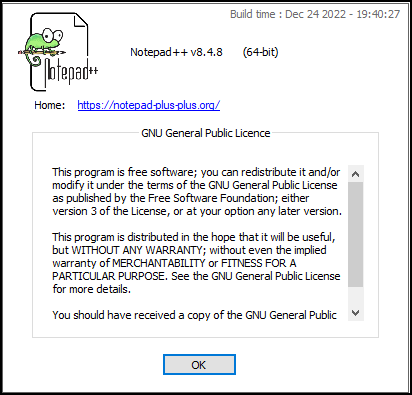
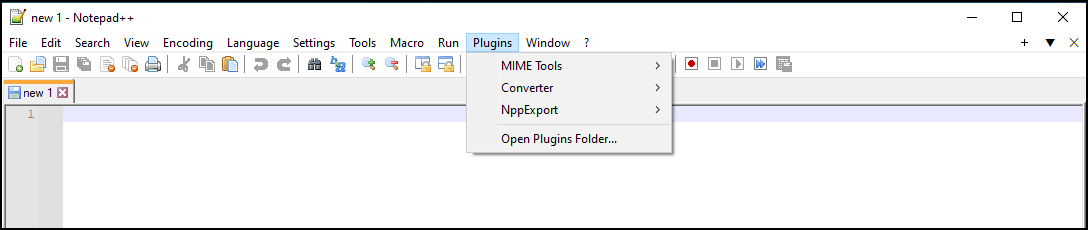
                            Installing silently using the /S switch is not installing the Plugins Admin. Installing manually does install the Plugins Admin.

                            Can this be corrected?

                            Also, please advise if there is a different method for silently installing Notepad++.
                            9324a849-06a4-472f-91f3-e3469d02d11f-image.png

                            ddd1c25c-4114-49f0-926f-ec09d28ed5d9-image.png

                            Alan KilbornA 1 Reply Last reply Reply Quote 0
                            • Alan KilbornA Offline
                              Alan Kilborn @Mike K
                              last edited by

                              @Mike-K said in Notepad++ v8.4.8 Release:

                              Installing silently using the /S switch is not installing the Plugins Admin.
                              Can this be corrected?

                              Probably, if someone…hint, hint…makes a real request for it; see the FAQ.

                              Mike KM 1 Reply Last reply Reply Quote 1
                              • Mike KM Offline
                                Mike K @Alan Kilborn
                                last edited by

                                @Alan-Kilborn The Plugins Admin was installed with previous versions, so this should not be a feature request.

                                Alan KilbornA donhoD 2 Replies Last reply Reply Quote 0
                                • Alan KilbornA Offline
                                  Alan Kilborn @Mike K
                                  last edited by

                                  @Mike-K said in Notepad++ v8.4.8 Release:

                                  The Plugins Admin was installed with previous versions, so this should not be a feature request.

                                  Ah, OK, bug report then. Same FAQ link on how to do that.

                                  Mike KM 2 Replies Last reply Reply Quote 1
                                  • Mike KM Offline
                                    Mike K @Alan Kilborn
                                    last edited by

                                    @Alan-Kilborn gotchya, thanks!

                                    1 Reply Last reply Reply Quote 1
                                    • Mike KM Offline
                                      Mike K @Alan Kilborn
                                      last edited by

                                      @Alan-Kilborn

                                      Issue created on github as directed:

                                      https://github.com/notepad-plus-plus/notepad-plus-plus/issues/12841

                                      1 Reply Last reply Reply Quote 1
                                      • donhoD Offline
                                        donho @Mike K
                                        last edited by

                                        @Mike-K said in Notepad++ v8.4.8 Release:

                                        The Plugins Admin was installed with previous versions, so this should not be a feature request.

                                        “previous versions” is vague.
                                        Could you precise in which version Plugins Admin is installed with /S ?

                                        1 Reply Last reply Reply Quote 1
                                        • Bogdan VoaidasB Offline
                                          Bogdan Voaidas
                                          last edited by

                                          After upgrading to this version, all my open documents (saved and un saved) disappeared from the Document List!!!
                                          After upgrading the Notepad++ opened in a total white state, only menus appearing and on closing it crashed with an error about an existing plugin, ElaticTabStops (a great plugin btw which since some npp versions ago was broken by it).
                                          After deleting the plugin’s folder, NPP opened with just 2 documents in the Document List!!!

                                          Bogdan VoaidasB donhoD 2 Replies Last reply Reply Quote 0
                                          • Bogdan VoaidasB Offline
                                            Bogdan Voaidas @Bogdan Voaidas
                                            last edited by Bogdan Voaidas

                                            Why the update overwritten the session.xml with an empty one ?!?!?!?! (less the hosts and changelog files)
                                            I guess I’m F* * *D now!!! F********************K

                                            donhoD 1 Reply Last reply Reply Quote 0

                                            Hello! It looks like you're interested in this conversation, but you don't have an account yet.

                                            Getting fed up of having to scroll through the same posts each visit? When you register for an account, you'll always come back to exactly where you were before, and choose to be notified of new replies (either via email, or push notification). You'll also be able to save bookmarks and upvote posts to show your appreciation to other community members.

                                            With your input, this post could be even better 💗

                                            Register Login
                                            • First post
                                              Last post
                                            The Community of users of the Notepad++ text editor.
                                            Powered by NodeBB | Contributors