Notepad++ VERY slow to open
-
everything else that happens, is happening in less than a second before that section and less than another second after that.
12:40:02.82 - 12:40:02.86 - Everything before
12:40:03.74 - 12:40:50.75 - Process Profiling section
12:40:50.99 - 12:41:51.43 - Everything else.After it opens it starts doing the process profiling again. it does more of them.
-
@Jeff-Esposito ok, is see it now. the process profiling happens every second. it only looks weird here because nothing else is happening because of a hung process.
It is trying to access a path that doesn’t exist, my old NAS. it looks like there is a file named choice in AppData/roaming/cloud that has a single line with the bad path. I just pointed it to the path on my new nas and everything is working fine now.
Thanks for all the help!
-
@Jeff-Esposito said in Notepad++ VERY slow to open:
What is it and why is it doing this?
Glad to hear you figured it out, and sorry for the late reply, but I try to stay away from the computer on weekends.
Windows provides the ability to collect statistics about running processes, and that is what procmon uses. I don’t think profiling information is particularly useful in most cases. The only scenario I can think of is if you are developing a driver that is loaded by the kernel, then you can get the information if it is working fast enough or leaking memory by comparing the collected values.
-
Hello!
I’m having a similar problem with NPP being slow to open, and I believe it’s related to the fact that I have several “draft” (unsaved) files saved, since I have the options enabled: backup and remember last session.
This has already been reported in another post:https://github.com/notepad-plus-plus/notepad-plus-plus/issues/14000
In my case, I have an SSD and it takes about 20 seconds to load about 200 files. So it spends about 0.1 seconds per file.
I did some tests using Process Monitor, as shown in the image below.
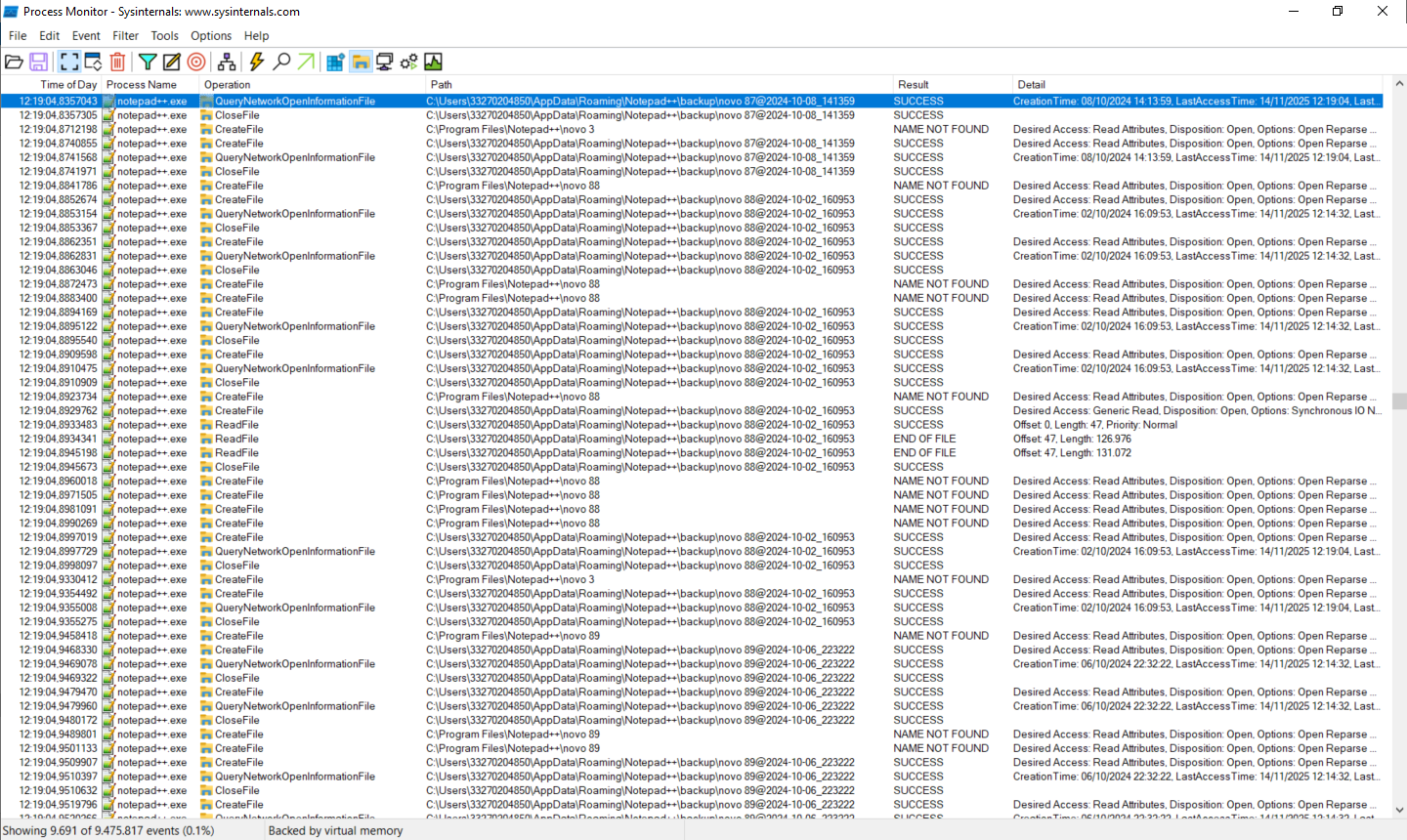
In this case, it seems that NPP keeps trying to create files in the “Program Files” folder, but it gives a “NAME NOT FOUND” error.
After that, it goes to the “AppData/Roaming…” folder where the backup files are located.In short, based on this result, does anyone have any idea how to try to solve this delay, perhaps caused by failures or repeated attempts to read/write the backup files?
-
Hi, I had the same problem.
In my case it was (alsmost certain) caused by heavily editing the DarkMode-Default theme that got a size of over 500Mb. I Suspect it was caused by using many custom colors.
It has nothing to do with BitDefender. We have the BitDefender Endpoint Security running on our machines too.
Switching from dark mode Default to another theme completely solved the problem for me.
\Editing that theme with default colors did not slow down startup.
Give it a try.Tip:
- You can keep your personal theme by coping and renaming it. It will them show up in the themes
list. - You can find the themes in C:\Users\Username\AppData\Roaming\Notepad++
Gerard Kiekens
(Key-Can Computer Services The Netherlands) - You can keep your personal theme by coping and renaming it. It will them show up in the themes
-
@Gerard-Kiekens said in Notepad++ VERY slow to open:
In my case it was (alsmost certain) caused by heavily editing the DarkMode-Default theme that got a size of over 500Mb. I Suspect it was caused by using many custom colors.
I am curious what kind of editing you did to make a 220Kb file grow 2000x in size. Even if you changed every color in the theme, the size of the file would not change at all, since all color attribute values are the same length. I cannot imagine any possible way that any editing of that file would grow it to 500Mb
-
Hi, I had the same problem.
In my case it was (alsmost certain) caused by heavily editing the DarkMode-Default theme that got a size of over 500Mb. I Suspect it was caused by using many custom colors.
It has nothing to do with BitDefender. We have the BitDefender Endpoint Security running on our machines too.
Switching from dark mode Default to another theme completely solved the problem for me.
\Editing that theme with default colors did not slow down startup.
Give it a try.Tip:
- You can keep your personal theme by coping and renaming it. It will them show up in the themes
list. - You can find the themes in C:\Users\Username\AppData\Roaming\Notepad++
Gerard Kiekens
(Key-Can Computer Services The Netherlands) - You can keep your personal theme by coping and renaming it. It will them show up in the themes
-
I changed many of the colors of Darkmode_Default to edited RGB-colors. So not the standard colors.
As I said, I only suspect that caused the problem, because using the standard Darkmode_Default without changing the colors worked fine.
I agree with you that the size should not change, but it did.Maybe caused by another glitch in the system or whatever. Editing a fresh Darkmode_Default afterwards solved the problem. This one also increased in size, but kept working as fast as it should.
If you want to "play"with it, you can find it here:
https://www.key-can.nl/Info/DarkModeDefault.xmlAs you will probably know you can find the themes in %users%\Appdata\Roaming\Notepad++\Themes
-
@Gerard-Kiekens said in Notepad++ VERY slow to open:
I agree with you that the size should not change, but it did.
Hard to argue my side cogently when you provide no data.
Editing a fresh Darkmode_Default afterwards solved the problem. This one also increased in size, but kept working as fast as it should.
But not from 220kB to 500MB.
If you want to "play"with it, you can find it here:
https://www.key-can.nl/Info/DarkModeDefault.xmlThe file you linked there is only about 220kB as well. And the reason it’s a different size than the actual DarkModeDefault is because it obviously started from an old version of Choco.xml, as evidenced by the copyright notice starting:
<?xml version="1.0" encoding="Windows-1252" ?>
<!--//

choco
Copyright (c) 2008 Fabio Zendhi Nagao <http://zend.lojcomm.com.br/>
I can tell it’s an old copy of choco, though, because it is still “Windows-1252”. That was changed to UTF-8 in v7.9.3 from 2021.
DarkModeDefault was originally derived from Zenburn.xml, since the time it was created (it started with the full zenburn preamble, but eventually pared it down to
<!--
Dark mode default style for Notepad++.
This file is based on Zenburn them (zenburn.xml)
License:             GPL2
-->
As you will probably know you can find the themes in %users%\Appdata\Roaming\Notepad++\Themes
That’s where you find your customizations. The originals (kept up to date with each update of the program) are in
c:\program files\Notepad++\themes. Historically, Notepad++ would just leave your customized themes completely alone, so they would never show you any of the new styles that had been added/enabled over the last 5 years; in the recent Notepad++ releases (starting in v8.8.9, though I recommend skipping 8.8.9 and 8.9.0 and going directly to 8.9.1-or-newer because of bugs in the first two releases of this feature), it will add any missing styles or missing languages to your active theme, so that way, your Style Configurator will allow you to edit colors for new styles or languages without losing all your old theme customizations.So the small size difference between your Choco-based theme and the actual DarkModeDefault can be explained by being based on the old Choco. The huge 500Mb size that you reported from earlier cannot be explained by anything that’s been said yet, and I still don’t understand how it could have happened inside Notepad++. And without a hint as to what the edited XML looked like for the super huge file, there’s really no way that mystery will ever be solved.
-
@Jeff-Esposito said in Notepad++ VERY slow to open:
e gotten my new computer Notepad++ takes 40-50 seconds to launch. I have removed all plugins and don’t check recent file history at launch is checked.
There are no open unsaved tabs, even though that is how I want to use it and use it on my old pc and my work laptop. the installIt becomes slow when using “Show Folder As Workspace” (which displays the workspace folder on the left side).
It starts quickly when this option is turned off.




Hello! It looks like you're interested in this conversation, but you don't have an account yet.
Getting fed up of having to scroll through the same posts each visit? When you register for an account, you'll always come back to exactly where you were before, and choose to be notified of new replies (either via email, or push notification). You'll also be able to save bookmarks and upvote posts to show your appreciation to other community members.
With your input, this post could be even better 💗
Register Login