Linked text to open other files into Notepad++
-
@J-Brouwer said in Linked text to open other files into Notepad++:
Where could that version be found?
The same github repository where the non-beta version comes from. You can find out this repository by going to Notepad++'s Plugins > Plugins Admin, clicking on the Installed tab ‡, and clicking on PythonScript – it will show you the
Homepage: .... You paste that into your browser, click on the Releases link on the right, and voila, you can see “v3.0.14 [Pre-Release]” right there at the top of the releases page.(‡: it’s on the Installed tab for you, because you already have PythonScript v2 installed. If someone else found these instructions but they don’t yet have PythonScript installed at all, they will have to look on the Available tab instead.)
I searched the internet for it
You might want to spend some time refining your search, then. When I searched for “Notepad++ PythonScript v3”, the first link was the old sourceforge home for PythonScript (understandable as a first hit, but it’s not the current home); the second link was a 2019 post in this forum (which predated v3); but the third link was a post from this June which talks about how to install the v3 PythonScript – success in 3 links! That’s pretty good for the first combination of search terms I tried.
-
???
-
@PeterJones said in Linked text to open other files into Notepad++:
success in 3 links! That’s pretty good for the first combination of search terms I tried.
Well, not in my case then. With about the same search words, that third hit was not given at all. As we know, everyone individually - person, machine, IP-address -, is put in “bubbles” by search engines. So, after having seen about 15 results, I gave up that effort.
-
@PeterJones said in Linked text to open other files into Notepad++:
success in 3 links!
Same for me (3rd hit) – which in my case was the current github home for the plugin.
My choice of search phrase was not influenced by Peter’s as I purposefully avoided looking at his before trying my own.
Mine was:notepad++ python script pluginIt IS unfortunate that the first hit we both obtained is for a really old version of PythonScript on sourceforge (ugh), but that page makes it fairly clear that the version there is 1.0.8.0, and since this thread was discussion version 3.0.12 (in my earlier post, I just used something 3-ish that I had on hand, I didn’t seek out the latest which appears to be 3.14), it should be obvious that the sourceforge one is not the one wanted here. BTW, any version of “3” should work for purposes of this thread.
I suppose in the future we should probably do more spoonfeeding and post exact links, for those that have trouble searching the internet. More work for the people already doing the work, I guess. :-(
-
@J-Brouwer said in Linked text to open other files into Notepad++:
Well, not in my case then. With about the same search words, that third hit was not given at all. As we know, everyone individually - person, machine, IP-address -, is put in “bubbles” by search engines. So, after having seen about 15 results, I gave up that effort.
Okay, when google’s bubble fails you, then search the forum instead. When sorting results by date (so that more recent links to pythonscript will be found), “pythonscript v3” finds a link to the PythonScript v3.0.14 as the second match (after my post above – so it would have been the first match before you asked this question).
But instead of arguing about search skills, have you been able to follow the instructions I gave on how to find the link inside Notepad++ itself? If so, have you been able to download PythonScript v3.0.14? Or have you just given up, and I’m wasting my time trying to help you learn?
-
Sure, I have found it now. Thanks. But, my initial aim was to find this PythonScript v3.0.14, and, after having read its features, maybe download it. This is my general approach when seeing stable versions against other versions.
And this time, I decided not to download this version. I only can hope that you do not think this way of acting is “forbidden” or ungrateful, after having got an, indeed, useful link from one of the forum members.
I do not really see what would have caused this disapproval towards me; really, things became too complicated for me indeed. Seemingly, there is a broad gap between coders and non-coders.
The course of events in this discussion is making me very shy.
-
@J-Brouwer said in Linked text to open other files into Notepad++:
The course of events in this discussion is making me very shy.
I’m sorry about that.
I wrote a whole many-paragraphs-long post going into the reasons for reactions … but instead, I will just sum it up in the next brief paragraph:
The more willingness you show to follow the suggestions and instructions given during a conversation in a forum like this, the better the answers you will get (in my decades on the internet, I have found this to be nearly universally true – not just in this forum). If you have difficulties, ask for help, explaining exactly what you tried or where you are having difficulty with the process. If you show a willingness to try what’s suggested and to learn, and ask polite questions for clarification without complaining, I think you will find that we will do our best to help you through problems with Notepad++.
-
@J-Brouwer said in Linked text to open other files into Notepad++:
…find this PythonScript v3.0.14, and, after having read its features, maybe download it. This is my general approach when seeing stable versions against other versions.
And this time, I decided not to download this versionThis is mainly for other readers that come along and wonder about trying out this thread’s solutions, and are worried about the statement I quoted just now.
The reason that PythonScript v3.x is not the version “recommended” by PluginsAdmin, and thus is not the easiest to obtain by users, is not because it lacks stability. Surely the people here providing help are not going to recommend you use something with real problems!
So, for interested parties, I’d recommend trying what I said to do above, in my Sep 14 1:23pm posting, to try out embedded Notepad++ text links to any file type, optionally with spaces and “special characters” in the path. I’d be interested in hearing some feedback (good or bad) on how it goes.
-
Just wanted to thank the Alan for his code and instructions and offer a couple of clarifications. This “add on” to NotePad++ has made my work much more productive.
First- When configuring NotePad++ preferences, “Cloud & Link” panel, URI Customized schemes- be aware that the items are separated by a space character. The display on my machine didn’t make this clear and I fumbled around for quite a time before I added a space before the “edit:” addition I made. One might mention that once the preference change is made, the edit URIs in text will start to act like non-working links. Do that first to be sure you got the preference change right.
Two- I am using the UriIndicatorAltClick2.py code because my main use case is opening up images pointed to in my text.
In the startup.py file, I had to add these 2 lines-import UriIndicatorAltClick2 uiac2 = UriIndicatorAltClick.UIAC2()Three- I also use lots of non-ASCII unicode in my text, but, so far all my file names are simple ASCII, so I don’t have to worry about the py code handling unicode properly and updating to PythionScript3.x
All of my python dev experience has been with python 3 so I was concerned about whether PythonScript2.0 using Python 2 would cause problems. As far as I can see, the Python 2 stuff is isolated to the one dll installed in the plugin folder.Thanks again.
Richard Otter -
 A Alan Kilborn referenced this topic on
-
Greetings, everyone!
I recently discovered this post when I was looking for a way to bookmark the class line number at the top of the file and this helped me a lot. However, I wasn’t satisfied and I wanted to upgrade it to have those bookmarks / shortcut links in a side panel but I didn’t know how and if it was even possible to create a panel with PythonScript plugin.
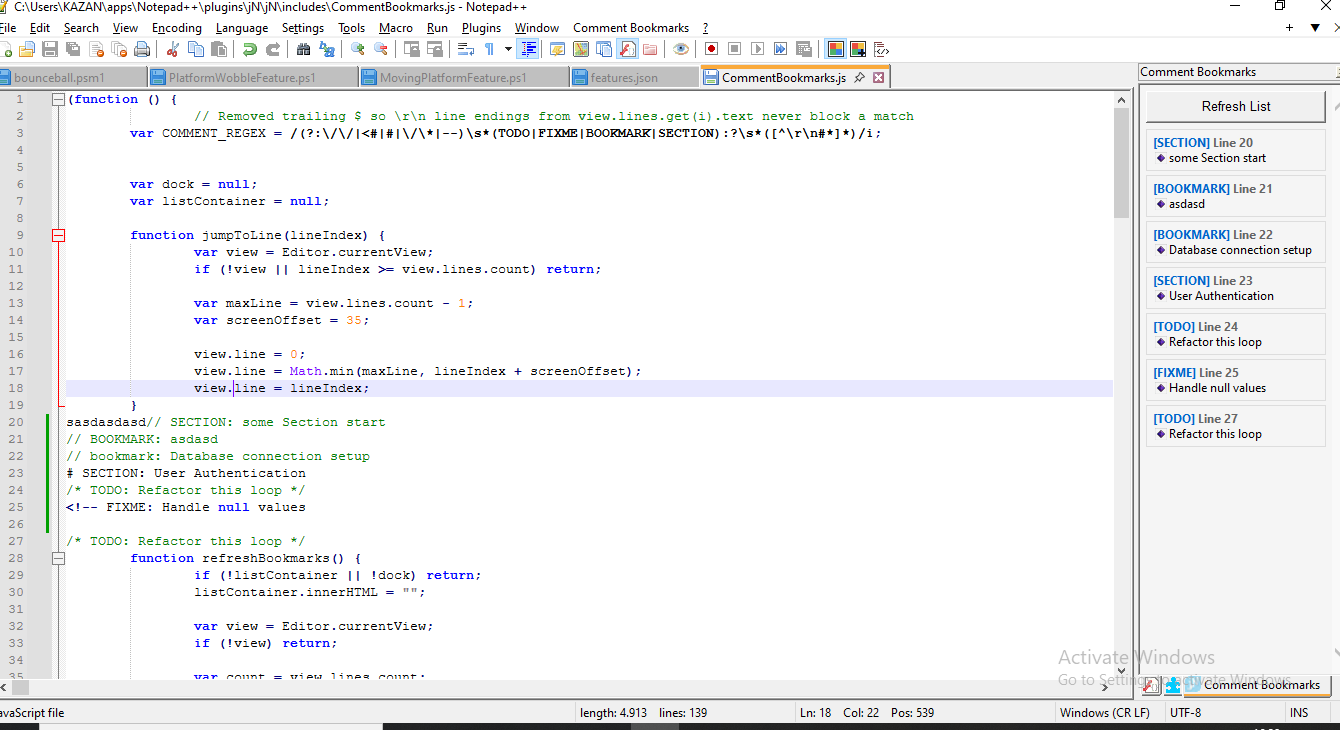
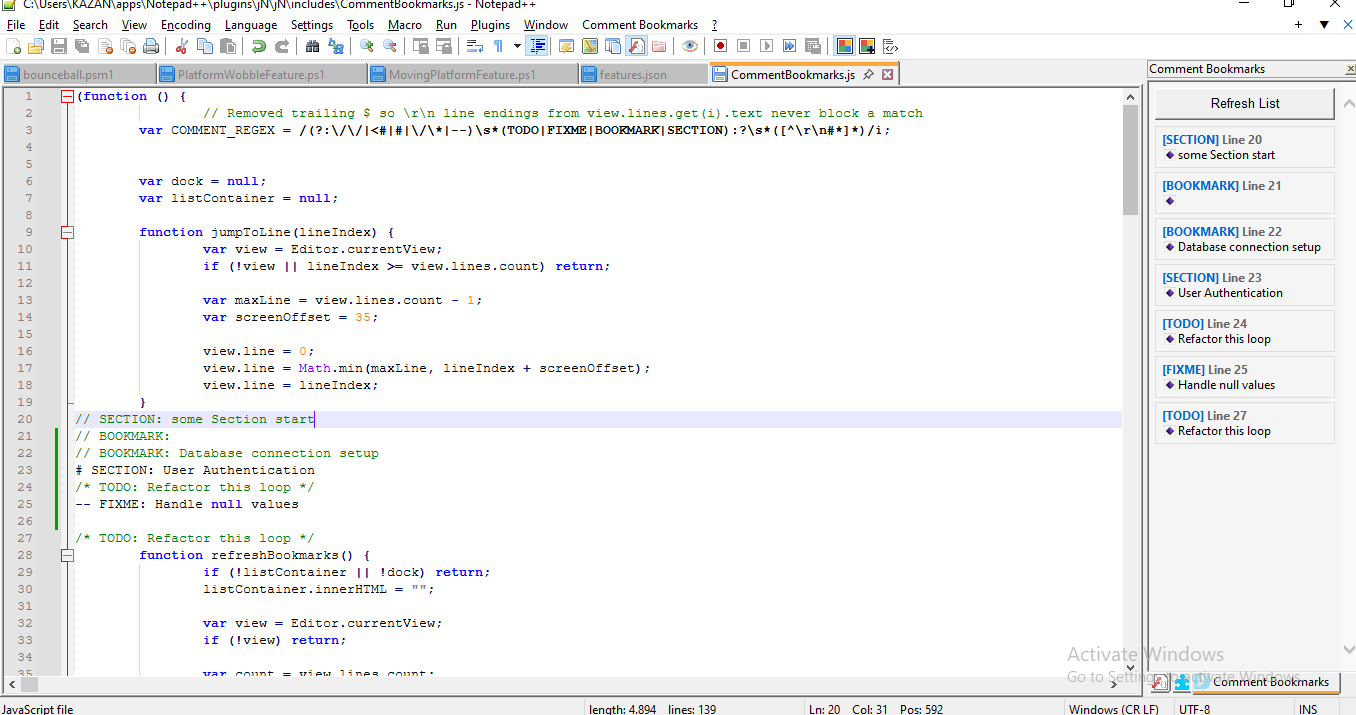
So I discovered this jN Notepad++ plugin that enables user to extend the Scintilla interface with JScript / Javascript wrapper and I came up with this with help of AI:(function () { // Removed trailing $ so \r\n line endings from view.lines.get(i).text never block a match var COMMENT_REGEX = /(?:\/\/|<#|#|\/\*|--)\s*(TODO|FIXME|BOOKMARK|SECTION):?\s*([^\r\n#*]*)/i; var dock = null; var listContainer = null; function jumpToLine(lineIndex) { var view = Editor.currentView; if (!view || lineIndex >= view.lines.count) return; var maxLine = view.lines.count - 1; var screenOffset = 35; view.line = 0; view.line = Math.min(maxLine, lineIndex + screenOffset); view.line = lineIndex; } function refreshBookmarks() { if (!listContainer || !dock) return; listContainer.innerHTML = ""; var view = Editor.currentView; if (!view) return; var count = view.lines.count; var found = 0; for (var i = 0; i < count; i++) { var lineText = view.lines.get(i).text; var match = COMMENT_REGEX.exec(lineText); if (match) { found++; var tag = match[1].toUpperCase(); var desc = (match[2] || "").replace(/</g, "<"); var item = dock.document.createElement("div"); item.className = "bookmark-item"; item.innerHTML = "<span class='tag'>[" + tag + "]</span> "+"<span class='line-num'>Line " + (i + 1) + "</span><br />"+"<span class='icon'></span> " + "<span class='desc'>" + desc + "</span>"; (function (targetLine) { item.onclick = function () { jumpToLine(targetLine); }; })(i); listContainer.appendChild(item); } } if (found === 0) { listContainer.innerHTML = "<div class='empty'>No special comments found.</div>"; } } function showSidebar() { if (dock) { dock.visible = true; refreshBookmarks(); return; } dock = Editor.createDockable({ name: "Comment Bookmarks", docking: "right", onbeforeclose: function () { dock.visible = false; return false; }, onclose: function () {} }); var doc = dock.document; doc.open(); doc.write( "<html><head><style>" + "body { font-family: Segoe UI, Tahoma, sans-serif; font-size: 12px; margin: 0; padding: 6px; background: #f5f5f5; }" + ".toolbar { margin-bottom: 6px; }" + "button { width: 100%; padding: 4px; cursor: pointer; }" + ".bookmark-item { padding: 5px 6px; margin-bottom: 4px; background: b; border: 1px solid #ddd; cursor: pointer; }" + ".bookmark-item:hover { background: #e6f2ff; border-color: #99caff; }" + ".line-num { color: #666; font-weight: bold; }" + ".tag { color: #0066cc; font-weight: bold; }" + ".empty { color: #888; font-style: italic; padding: 8px; }" + ".icon { display: inline-block; width: 12px; height: 12px; vertical-align: middle; margin-right: 4px; background: url('data:image/png;base64,iVBORw0KGgoAAAANSUhEUgAAAAwAAAAMCAYAAABWdVznAAAAAXNSR0IArs4c6QAAAARnQU1BAACxjwv8YQUAAAAJcEhZcwAADsMAAA7DAcdvqGQAAAFBSURBVChThVK/S8NAGH25RiimdBARQRAcHHTSUQpO/gVODv4XWgIWm6GpVgo1WHBwdhRRN1dHi0uWOiloqTa0wVC4/uJ6XuJFghF98PHd3ffe9x33TrFtm09qGgAuQhERQuzDI5n7vT6UluPwVCD4H5RSkGhPH4wxFPaOUC2dBuufIP60EGPOYehF1G88zLgrqJgnMdH3BC7I+WwBD9ce3mgTt/dJTHUysMyqaDSWLCGQGbs7ZVyca2B8FfOpJaS5iqc6wePdBoq5M8mKCBgbgA5ddIcM73QRc+kPdGgSXvsZbOBJVkRQOc5haxtQ2ZW4UgPtro1R7xIL6zXky1nJiggIIShZBaxtLmNWfUHTbWE6M8KBZQS1EIojfNAiPvivYugmVDKB/UMdiURCVr58iAn+QiB4bTR+dZrHvgrQoxSfR8eMDpy8I5cAAAAASUVORK5CYII=') no-repeat center center; color: #0066cc; font-size: 11px; margin: 0 2px; }" + "</style></head><body>" + "<div class='toolbar'><button id='refreshBtn'>Refresh List</button></div>" + "<div id='list'></div>" + "</body></html>" ); doc.close(); listContainer = doc.getElementById("list"); doc.getElementById("refreshBtn").onclick = refreshBookmarks; refreshBookmarks(); } function insertBookmarkAtCursor() { var view = Editor.currentView; if (!view) return; var path = (view.files && view.files[view.file]) ? view.files[view.file].toLowerCase() : ""; var prefix = /\.(ps1|psm1|psd1|py|sh|yml|yaml)$/.test(path) ? "# " : "// "; view.selection = prefix + "BOOKMARK: "; refreshBookmarks(); } var menu = Editor.addMenu("Comment Bookmarks"); menu.addItem({ text: "Show Comment Bookmarks", cmd: showSidebar }); menu.addItem({ text: "Insert Bookmark Comment at Cursor", cmd: insertBookmarkAtCursor }); // Use setTimeout (300ms) instead of addIdleHandler so Notepad++ finishes loading UI and tabs first System.setTimeout({ millis: 300, cmd: showSidebar }); Editor.setListener({ BUFFERACTIVATED: function () { if (dock && dock.visible) refreshBookmarks(); }, FILESAVED: function () { if (dock && dock.visible) refreshBookmarks(); } }); })();This basically creates a side panel (Dockable) and traverses the document to find comment lines beginning with specific strings such as:
• // BOOKMARK: name of bookmark
• # SECTION: name of section
• /* TODO: name of todo */
• – FIXME: name of fixmebefore #, //, /*, – you can write whatever you want because regex is searching for those characters + space and then matches whether KEYWORD + colon used after,
Note: every subsequent space character between comment start character and KEYWORD don’t matter as long as KEYWORD is in same line. Same goes for the spaces between KEYWORD: and the name of the Shortcut.Here are some screenshots:



Hello! It looks like you're interested in this conversation, but you don't have an account yet.
Getting fed up of having to scroll through the same posts each visit? When you register for an account, you'll always come back to exactly where you were before, and choose to be notified of new replies (either via email, or push notification). You'll also be able to save bookmarks and upvote posts to show your appreciation to other community members.
With your input, this post could be even better 💗
Register Login