How to bookmark lines around a line containing a specific expression 'XXX' ?
-
@mkupper said in How to bookmark lines around a line containing a specific expression 'XXX' ?:
(?-i)^(?: +*+ [A-Z][A-Z0-9 ]+ *+\R)(?:.*\R){1,25}(?: +*{4} WARNING - THE REMAINING +[0-9]+ INCREMENT(S) OF THE LOAD STEP WILL BE IGNORED)$
This did the wonder, thanks for the help man on my own i would never been able to figure this out. I am new to notepad++ will appreciate if you can share some learning material to start from basics.
Thanks a Lot.
Regards,
Aaditya -
@PeterJones said in How to bookmark lines around a line containing a specific expression 'XXX' ?:
(?i-s)(.*\R){12}^.ignored.\R
The screenshot looks fuzzy but i had entered the same equation that was been mentioned by @guy038.
Will go through the FAQs for sharing data and will understand how to post on this.
I tried the final Regex :
(?i-s)(.*\R){12}^.*ignored.*\R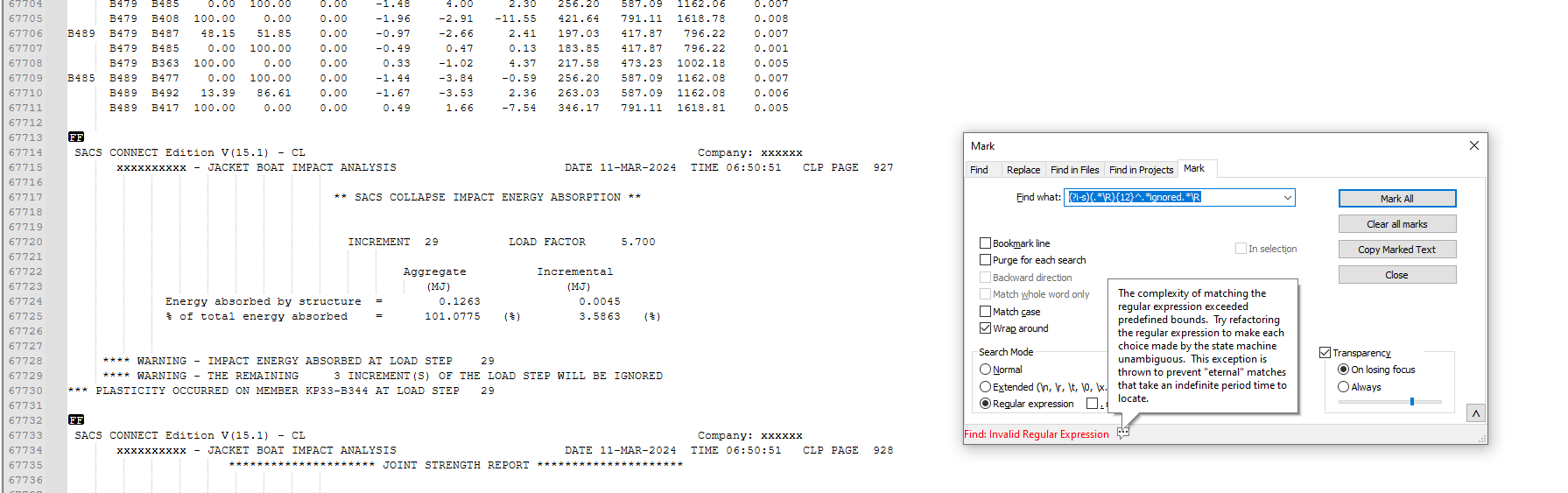
Thanks for actively resolving the issue i was facing, will appreciate if u can share some learning material to start from the basics.
Thanks & Regards,
Aaditya -
@sam-rathod said in How to bookmark lines around a line containing a specific expression 'XXX' ?:
will appreciate if u can share some learning material to start from the basics
A good starting point is HERE.
-
Hello, @sam-rathod, @peterjones, @mkupper, @alan-kilborn and All,
I suppose that dealing with files with important size may lead to this regex message, even if this regex does work properly with small files :-((
So, @sam-rathod, could you try with this new regex version :
SEARCH/MARK
(?-is)^(?:.*\R){12}.*IGNORED.*\RBest Regards,
guy038
-
Hello,
If i have range of text for example
"This is the specific text in the document that i will search"
Line1 that dont want marked
Line2 that dont want marked

Line3 that dont want marked

Line 1 want to mark
Line 2 want to mark
Line 3 want to mark
Line 4 want to mark
Line 5 want to mark

""This is the specific text in the document that i will search"
Line1 that dont want marked
Line2 that dont want marked

Line3 that dont want marked

Line 6 want to mark
Line 7 want to mark
Line 8 want to mark
Line 9 want to mark
Line 10 want to mark
The output i am expecting
Line 1 want to mark
Line 2 want to mark
Line 3 want to mark
Line 4 want to mark
Line 5 want to mark
Line 6 want to mark
Line 7 want to mark
Line 8 want to mark
Line 9 want to mark
Line 10 want to mark
^.*This is the specific text in the document that i will search.*\R(?:.*\R){5}((?:.*\R){5})Tried various option but unable to skip the lines as everything after specific text is getting marked.
Regards,
Aa -
Hi, @sam-rathod and All,
I do not understand clearly what you want to achiveve !
Given this INPUT text, below :
"This is the specific text in the document that i will search"
Line1 that dont want marked
Line2 that dont want marked

Line3 that dont want marked

Line 1 want to mark
Line 2 want to mark
Line 3 want to mark
Line 4 want to mark
Line 5 want to mark

""This is the specific text in the document that i will search"
Line1 that dont want marked
Line2 that dont want marked

Line3 that dont want marked

Line 6 want to mark
Line 7 want to mark
Line 8 want to mark
Line 9 want to mark
Line 10 want to mark
And let’s suppose that you’ve previously bookmarked all the lines with the
Line #..# want to marksyntaxThen just use the
Search > Bookmark > Remove Unmarked linesoption and you’re left with the following expected OUTPUT text :Line 1 want to mark Line 2 want to mark Line 3 want to mark Line 4 want to mark Line 5 want to mark Line 6 want to mark Line 7 want to mark Line 8 want to mark Line 9 want to mark Line 10 want to markBest Regards,
guy038
~
-
@guy038
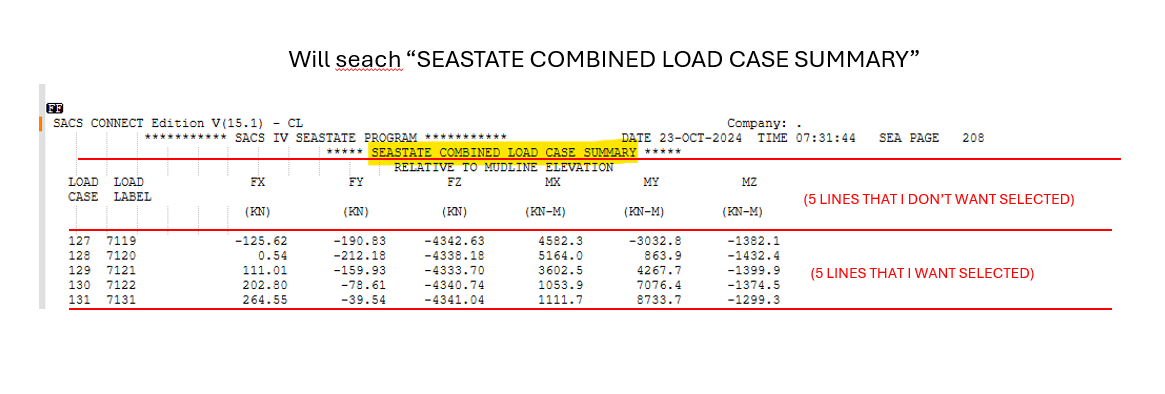
No i am not able to bookmark only the specific line that i want mark.Basically i want to find a specific text , ignore 4 lines after it and mark& select 5 line after the specific text & 4 lines.
-
-
Hello, @sam-rathod and All,
Ah, OK. Now, I understand all the story !
Just note that you should have put your text as raw text, using the
</>indication when replying and not pasting an image. Indeed, even with a OCR plugin, within my favorite graphic viewer, I was not able to convert the letters of your image into raw text :-(( This explains the delay of my reply !
So, with this kind of INPUT text :
 SACS CONNECT Edition V(15.1) - CL                                                        Company: .
             *********** SACS IX SEASTATE PROGRAM ***********               DATE 23-OCT-2024  TIME 07:31:44   SEA PAGE   208
                                     ***** SEASTATE COMBINED LOAD CASE SUMMARY *****
                                              RELATIVE TO MUDLINE ELEVATION
   LOAD  LOAD              FX           FY           FZ           MX           MY           MZ
   CASE  LABEL
                          (KN)         (KN)         (KN)       (KN-M)       (KN-M)       (KN-M)

   127  7119             -125.62      -190.83     -4342.63       4582.3      -3032.8      -1382.1
   128  7120                0.54      -212.18     -4388.18       5164.0        863.9      -1432.1
   129  7121              111.01      -159.93     -4333.70       3602.5       4267.7      -1399.5
   130  7122              202.80       -78.61     -4340.74       1053.9       7076.4      -1374.5
   131  7131              264.55       -39.54     -4341.04       1111.7       8733.7      -1299.3
Just use the search regex, below, in order to mark the expected lines :
SEARCH / MARK
(?-is)^.+SEASTATE COMBINED LOAD CASE SUMMARY.+\R(?:.+\R){5}\K(?:.+\R){5}
Notes :
-
Note that I use non-capturing groups
(?:.......), instead of capturings ones(.......), for each block of five lines. -
Now, after the complete line containing the string
SEASTATE COMBINED LOAD CASE SUMMARY, with this exact case -
And the five lines that follow,
-
The
\Ksyntax cancel any previous search, so far -
So, the next five lines are only taken in account by the regex engine and marked
Method :
-
Open the Mark dialog (
Ctrl + M) -
Uncheck all box options
-
SEARCH / MARK
(?-is)^.+SEASTATE COMBINED LOAD CASE SUMMARY.+\R(?:.+\R){5}\K(?:.+\R){5} -
Just check the
Bookmark line,Purge for each searchandWrap aroundbox options -
Select the
Regular expressionsearch mode -
Click on the
Mark Allbutton -
Now, you may either :
-
Copy all these bookmarked lines in an other new tab with the
Search > Bookmark > Copy Bookmarked Linesoption -
Click on the
Copy Marked Textbutton and paste the clipboard contents in an other tab
-
Best Regards
guy038
-
-
@guy038
Sorry for the inconvenience caused.Thanks a lot will try this. I m sure this will work.
Regards,
Aa



Hello! It looks like you're interested in this conversation, but you don't have an account yet.
Getting fed up of having to scroll through the same posts each visit? When you register for an account, you'll always come back to exactly where you were before, and choose to be notified of new replies (either via email, or push notification). You'll also be able to save bookmarks and upvote posts to show your appreciation to other community members.
With your input, this post could be even better 💗
Register Login